CX Genie x Flashlog: Keeping Every Customer Conversation Reliable
CX Genie x Flashlog
For a sales - driven business, every customer conversation can lead to a purchase.
Customers may reach out to ask about product pricing, check an order status, request an exchange, or get advice before making a decision. In these moments, the speed and reliability of the Customer Support team directly affect both the customer experience and the company’s revenue.
But what happens when the customer support platform itself experiences an incident?
A new message does not appear in the Inbox.
A conversation arrives several minutes late.
An agent types a reply but cannot send it.
The website chat widget fails to load.
An AI Agent stops responding or cannot hand the conversation over to a human agent.
A connection to Facebook, Telegram, or another sales channel is unexpectedly interrupted.
From the customer’s perspective, the situation is simple: the business is not responding.
For the business, however, that unanswered message could represent a lost lead, a missed sale, or a customer who will not return.
This is where CX Genie and Flashlog complement each other.
CX Genie keeps businesses connected to their customers. Flashlog helps keep those connections reliable.
CX Genie Helps Businesses Manage Customer Conversations
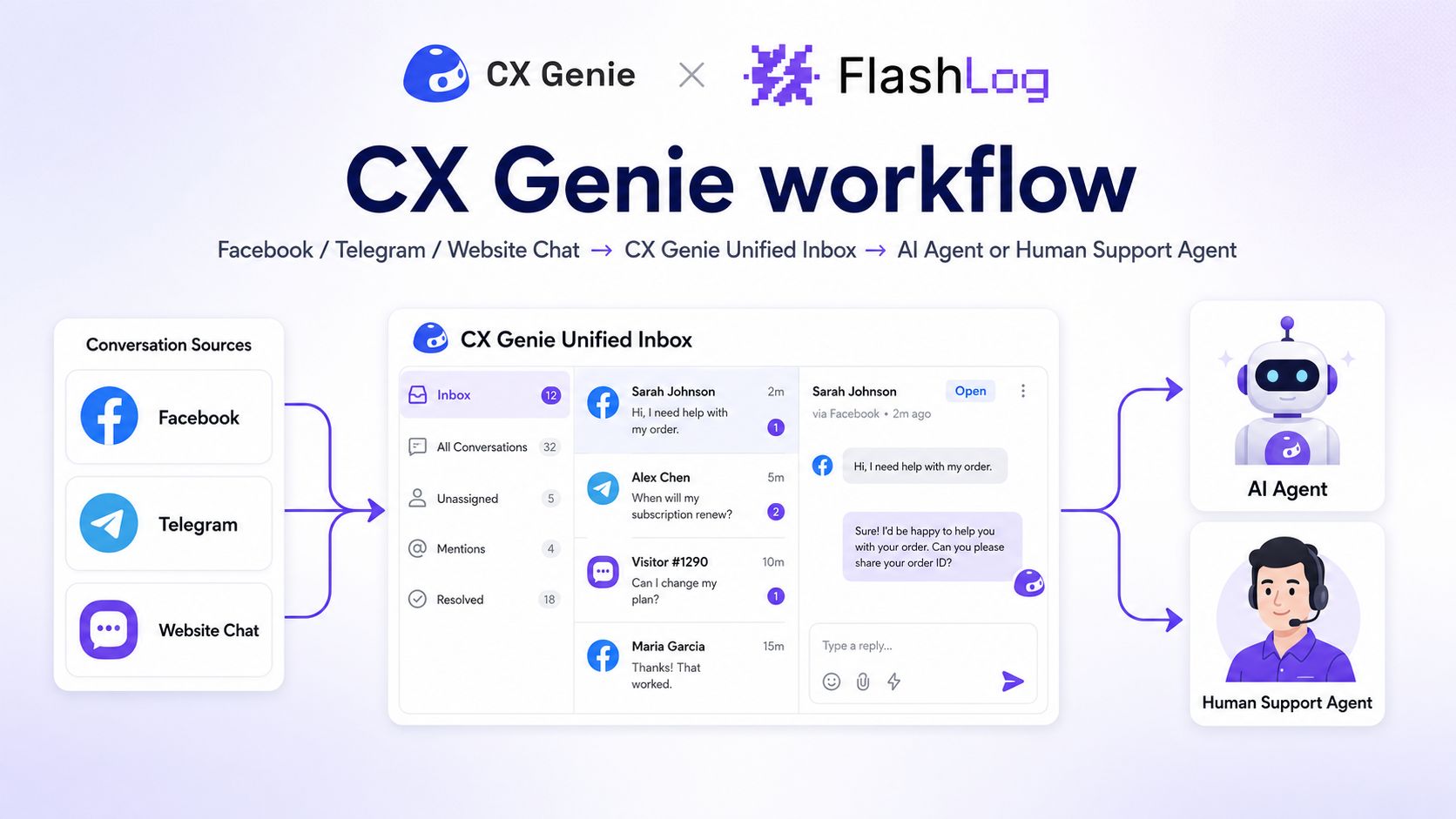
CX Genie enables businesses to centralize and manage customer interactions across multiple communication channels.
Instead of checking each platform separately, Customer Support teams can monitor conversations, use AI Agents to answer common questions, route customers to the appropriate employees, and manage support requests within a single system.
For a fashion retailer, CX Genie can support everyday scenarios such as:
Recommending suitable sizes and colors.
Checking order statuses.
Explaining return and exchange policies.
Collecting customer information.
Transferring conversations to sales representatives.
Managing messages from multiple channels in one Inbox.
However, for these workflows to operate effectively, the platform behind them must remain stable.
Even a small failure in the message delivery process can interrupt the entire customer experience.
Flashlog Helps CX Genie Detect Problems Behind Customer Conversations
Flashlog does not replace Customer Support teams, nor does it communicate directly with customers.
Its role is to help CX Genie’s technical and operational teams detect, monitor, and investigate incidents that may affect customer support activities.
When an incident occurs, Flashlog can provide the context teams need to understand:
What happened.
Where the issue started.
Which users or workspaces were affected.
What the user did before the failure occurred.
Whether the issue is isolated or affecting multiple customers.
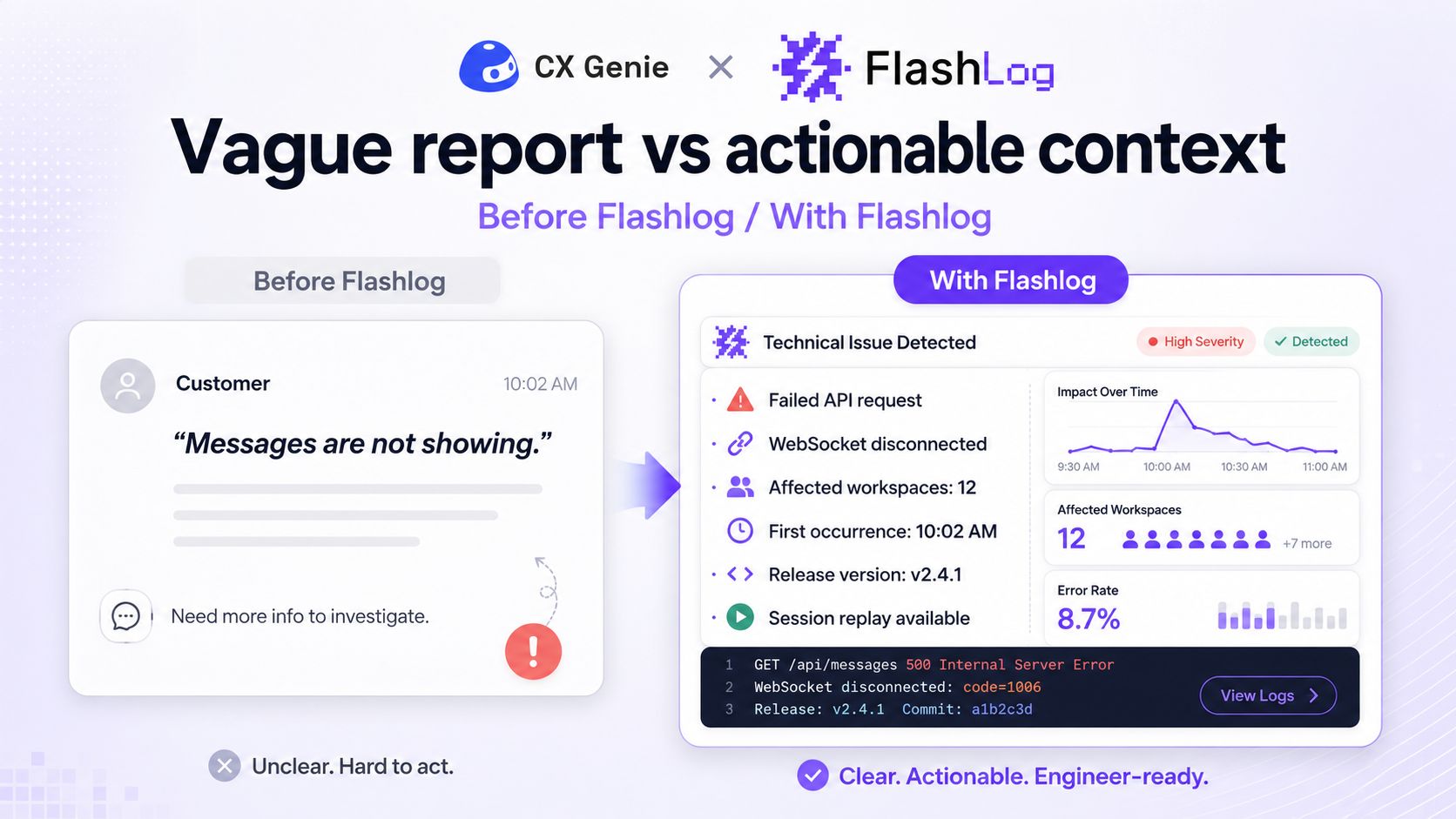
Instead of receiving a vague report such as:
“We are not receiving our customers’ messages.”
The CX Genie team can investigate more specific questions:
Did the request used to retrieve the conversation fail?
Was the Inbox receiving real-time updates?
Did the agent encounter a JavaScript error?
Did the message API time out?
Did the issue affect one workspace or multiple customers?
Did the incident begin after a recent release?
How many users encountered the same issue?
This shortens the time between the first customer report and the moment the team identifies the actual cause.
Use Case 1: Customer Messages Do Not Appear in the Inbox
Imagine a fashion retailer running a major promotional campaign.
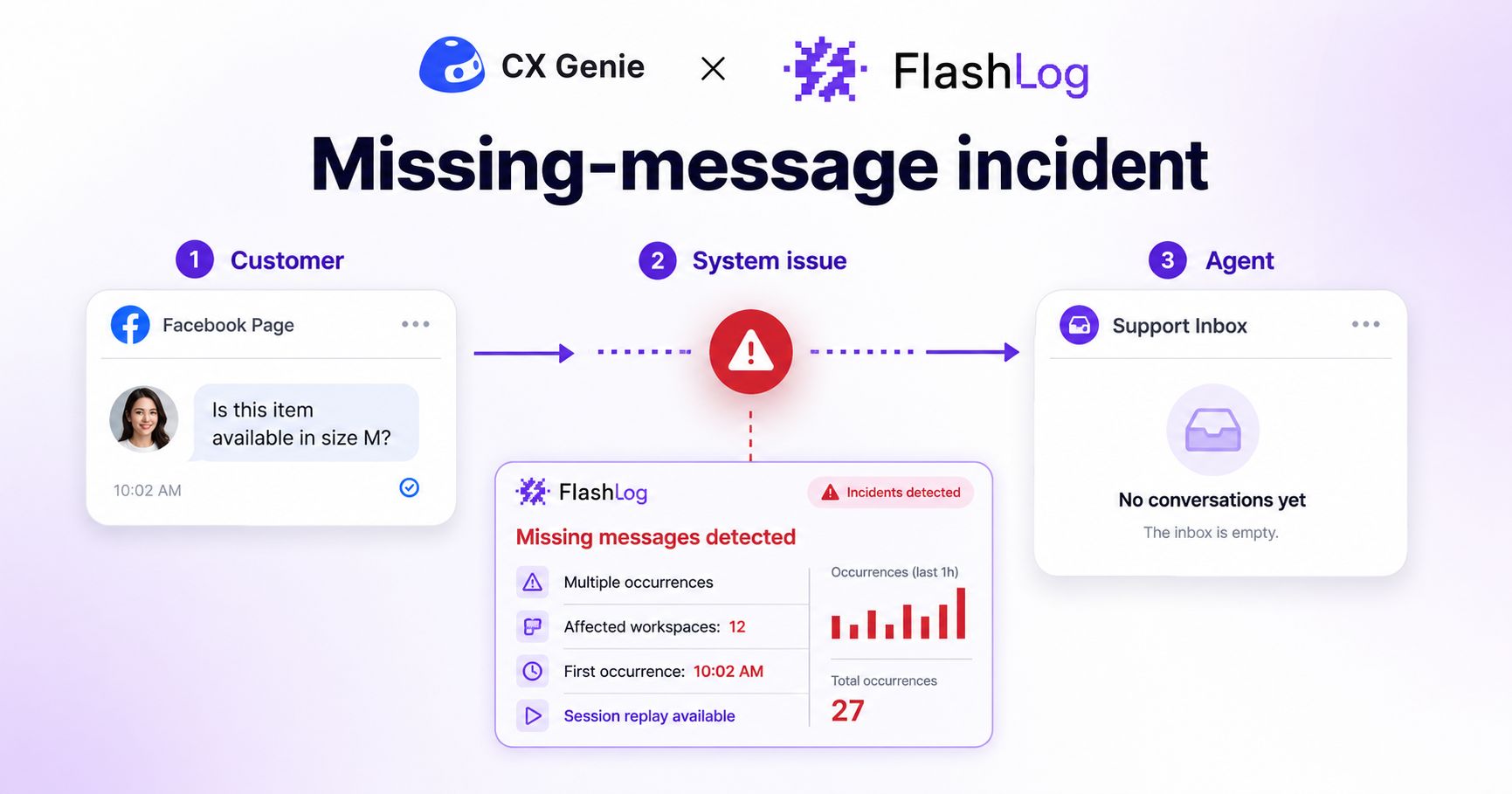
Within a few hours, hundreds of customers send messages asking about sizes, prices, and product availability. However, due to a real-time communication issue, some of those messages never appear in the agents’ Inbox.
Customers can see that their messages were sent.
The store, however, receives nothing.
Without proper monitoring, the problem may only be discovered after several customers complain—or after the company notices a decline in sales.
With Flashlog, the CX Genie team can investigate errors related to:
API requests.
WebSocket connections.
Conversation loading.
Real-time data updates.
Inbox interface behavior.
Similar errors can also be grouped into a single issue. This helps the team recognize that the problem is not an isolated case, but an incident affecting multiple workspaces.
Use Case 2: Messages Arrive Too Late
In online sales, even a few minutes of waiting can be enough for a customer to choose another store.
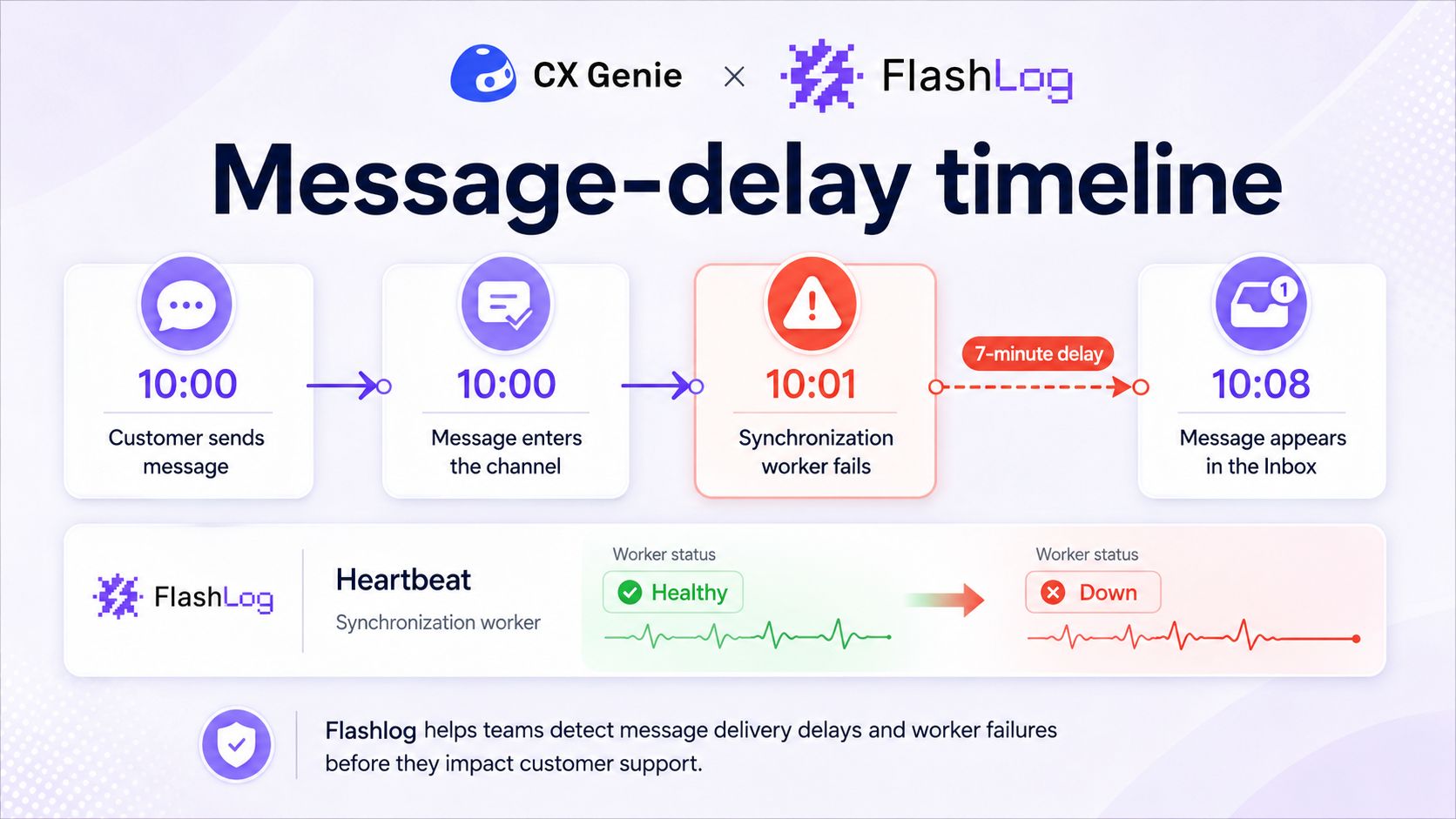
A message sent at 10:00 AM but delivered to an agent at 10:08 AM may mean that the sales opportunity has already disappeared.
The delay could originate from several parts of the system:
A slow message queue.
A message synchronization worker that has stopped running.
A slow API response.
An interrupted real-time connection.
A dashboard that does not update until the agent refreshes the page.
Flashlog can help the team determine whether the message entered the system late or whether it entered on time but appeared late on the agent’s screen.
Through Heartbeat Monitoring, CX Genie can also monitor critical workers and scheduled services. If a service fails to send a signal at the expected frequency, Flashlog can mark it as Down and notify the responsible team.
Use Case 3: An Agent Cannot Send a Reply
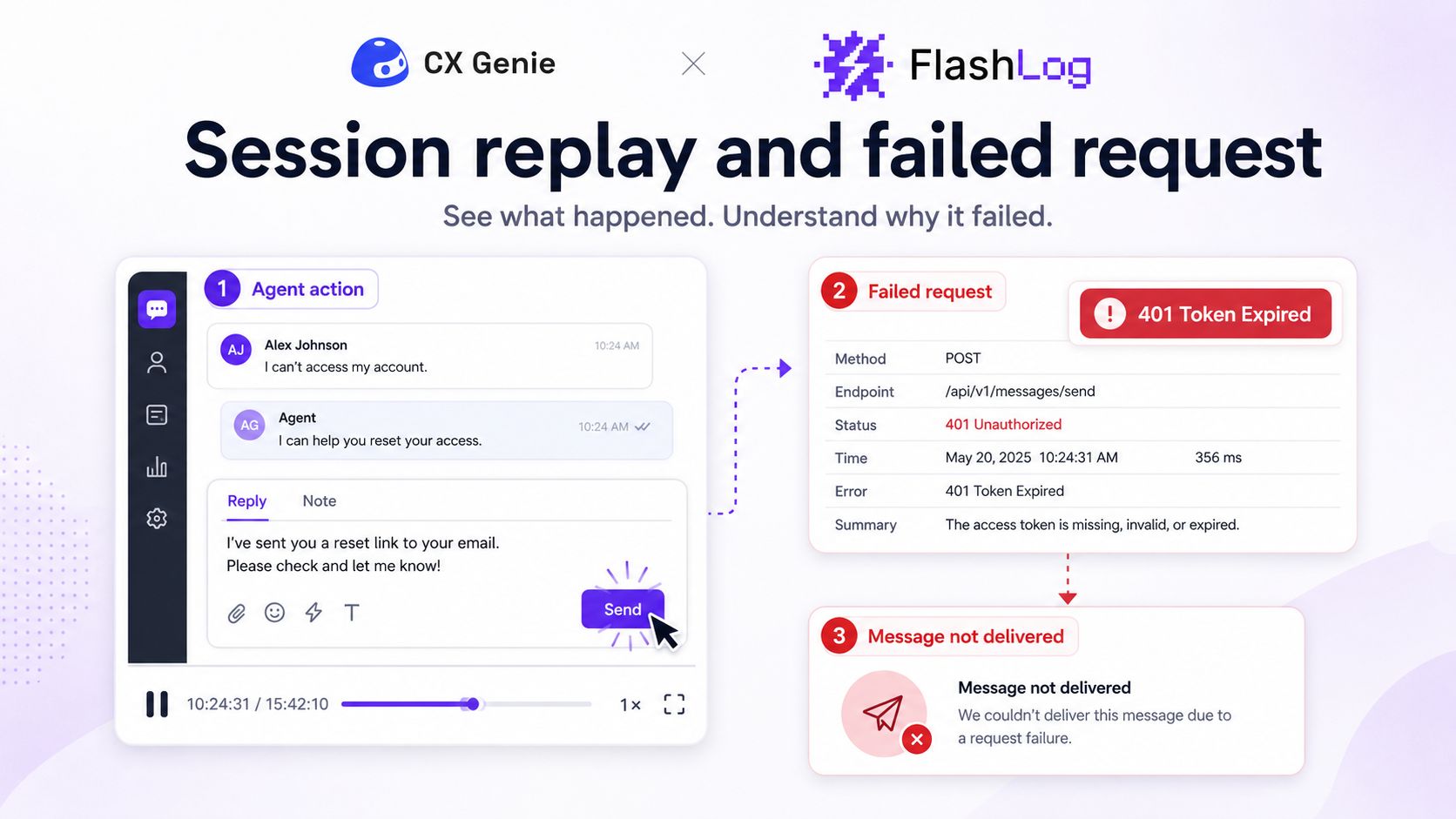
A Customer Support agent types a response, selects Send, and waits.
The message continues loading.
In another situation, the interface may show that the message was sent successfully, even though the customer never receives it.
The agent may try clicking the button again, refreshing the page, or switching to another tool. However, every additional action increases the response time and creates more friction in the customer experience.
Flashlog can capture details such as:
The actions the agent performed before the failure.
Whether the send-message request was created.
The error returned by the API.
Whether the channel connection token had expired.
Whether the failure only affected images or files, or all message types.
Whether the interface incorrectly displayed a successful status.
This technical context reduces the time engineers spend trying to reproduce an unpredictable issue.
Use Case 4: The Website Chat Widget Stops Working
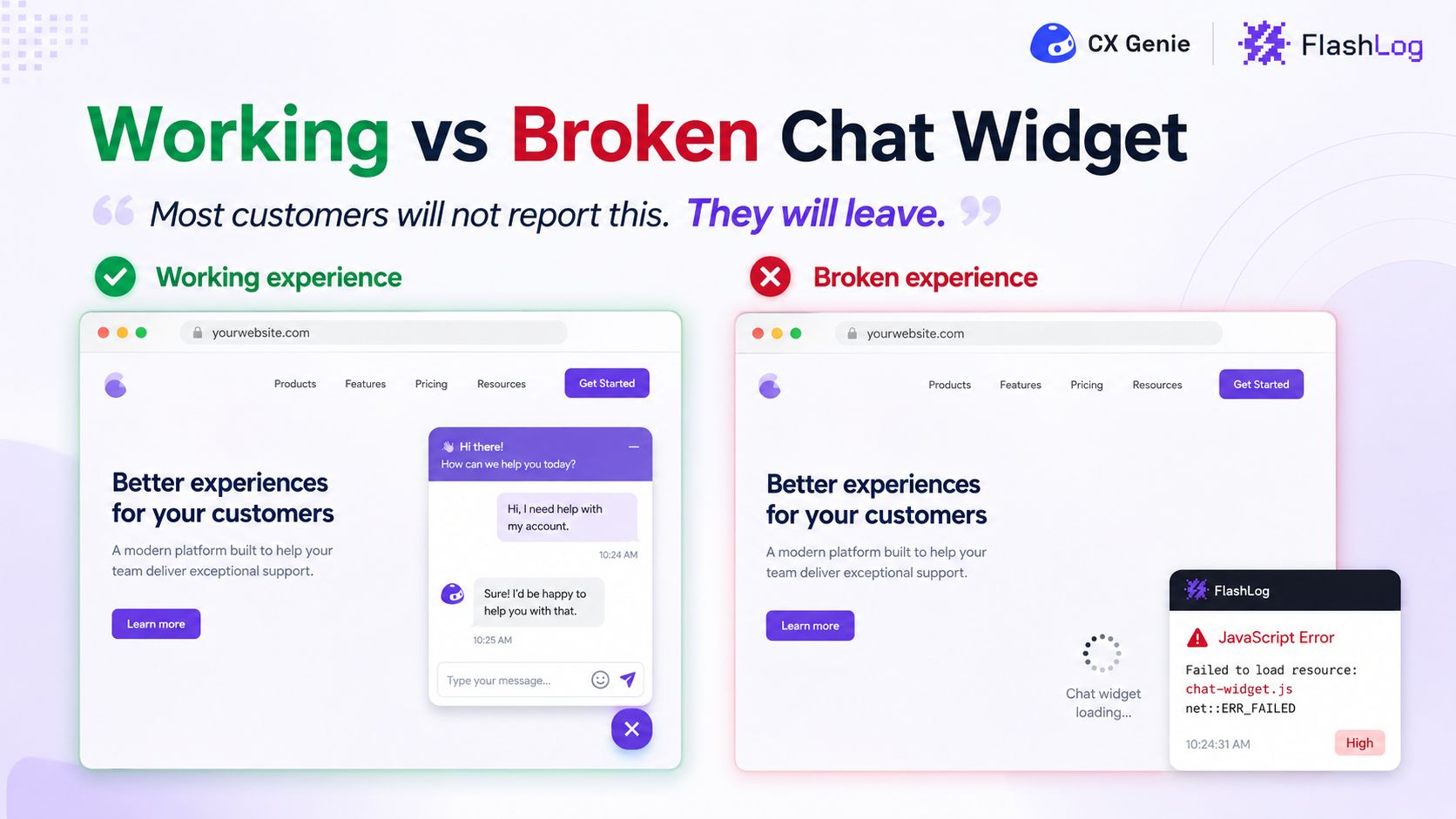
For many businesses, the chat widget is the first point of contact between a customer and the brand.
If the widget does not appear, takes too long to load, or fails to send messages, most customers will not send an email to report the problem.
They will simply leave the website.
This makes chat-widget failures particularly dangerous. The business may be losing potential customers without receiving any clear warning.
When Flashlog is implemented within the chat-widget experience, teams can detect problems such as:
The widget script failing to load.
The bot configuration not being returned.
A JavaScript error causing the widget to crash.
A failed send-message request.
A problem that only appears on certain browsers or devices.
A new widget version that breaks the mobile experience.
Instead of waiting for customers to report the issue, the team can identify and investigate it proactively.
Use Case 5: An AI Agent or Workflow Stops Running
AI Agents help businesses answer customers outside normal working hours, resolve common questions, and reduce the workload of Customer Support teams.
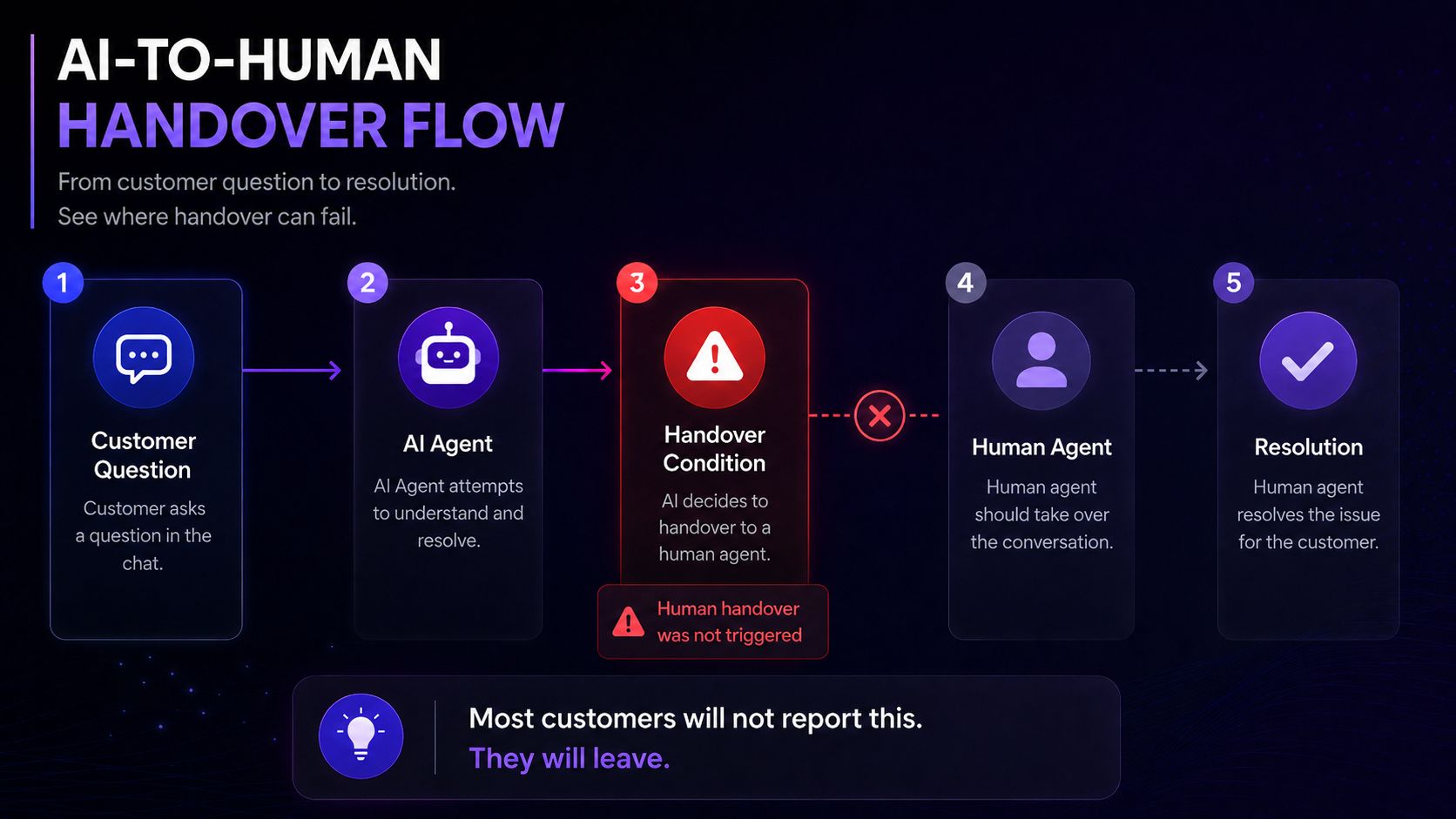
However, if an AI Agent stops responding, replies too slowly, or cannot transfer a conversation to a human agent, the customer may become trapped in an incomplete support flow.
Flashlog can help teams monitor technical failures involving:
Timed-out AI requests.
Workflows that stop before completion.
AI processing workers that are no longer running.
Human handover actions that are not triggered.
Conversations that remain assigned to the bot after being transferred.
Newly published workflows that introduce production errors.
Flashlog does not evaluate whether an AI response is helpful, accurate, or aligned with the brand’s tone.
Its role is to help ensure that the technical workflow behind the AI Agent continues to operate as designed.
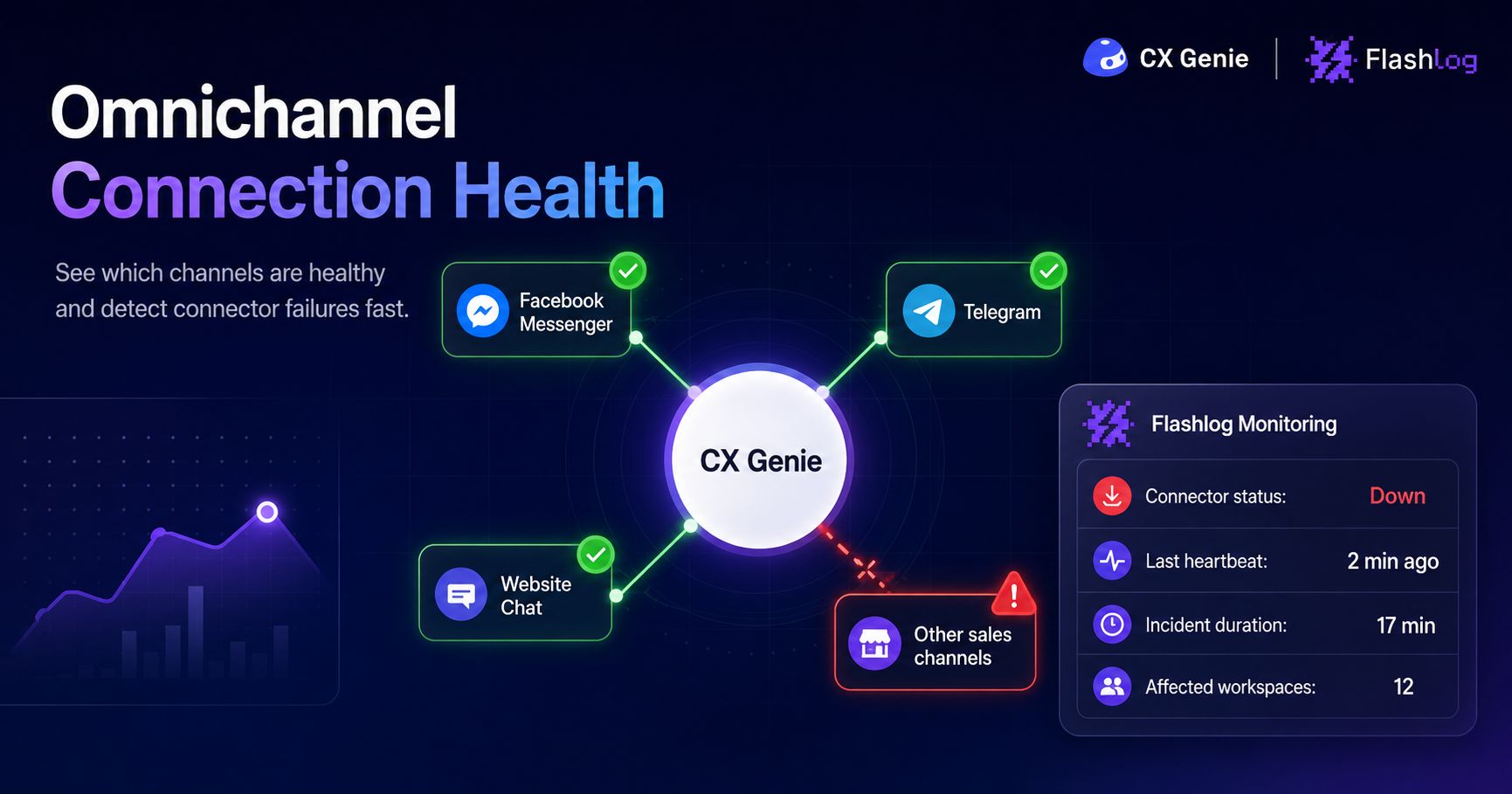
Use Case 6: A Sales Channel Becomes Disconnected
A business may receive customer inquiries through Facebook Messenger, Telegram, its website, and several other channels.
If one channel loses its connection, employees may continue using CX Genie without realizing that some messages are no longer being synchronized.
Common situations include:
An expired connection token.
A webhook that no longer receives data.
A channel displayed as Connected even though synchronization has stopped.
A message synchronization worker that is down.
An error when an administrator attempts to reconnect the channel.
Flashlog can monitor the health of connectors, services, and workers through Heartbeat Monitoring. It can also provide technical context when an administrator encounters an error on the channel configuration screen.
This allows the CX Genie team to identify the incident before multiple businesses begin reporting that their messages have disappeared.
Moving from Reactive Support to Proactive Incident Monitoring
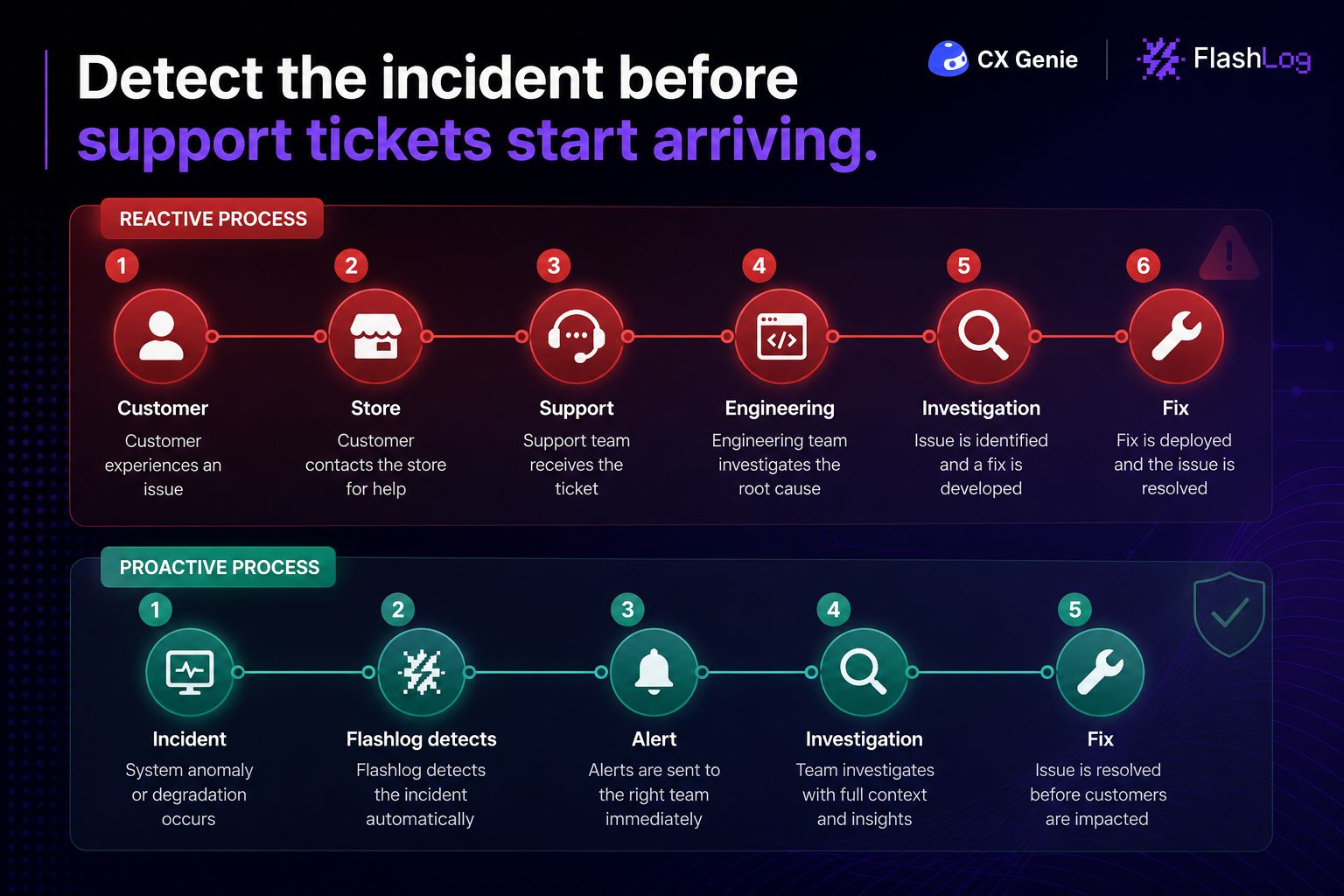
Without observability, incident management often begins with a long chain of communication:
A customer experiences a problem.
The customer reports it to the store.
The store contacts CX Genie.
The Support team asks for more information.
The technical team attempts to reproduce the issue.
After several rounds of communication, the team begins identifying the cause.
Throughout this process, the incident may continue affecting other businesses.
With Flashlog, CX Genie can adopt a more proactive workflow:
An incident occurs in production.
Flashlog captures the error, session context, or Heartbeat status.
Similar occurrences are grouped into one issue.
The CX Genie team receives an alert.
The team identifies the scope and likely cause.
The incident is resolved before it affects more customers.
The team continues monitoring the issue to ensure it does not return.
This is not only about fixing bugs faster.
It is also about protecting the experience of thousands of Customer Support agents and end customers who depend on the platform every day.
When an Incident Is More Than a Technical Error
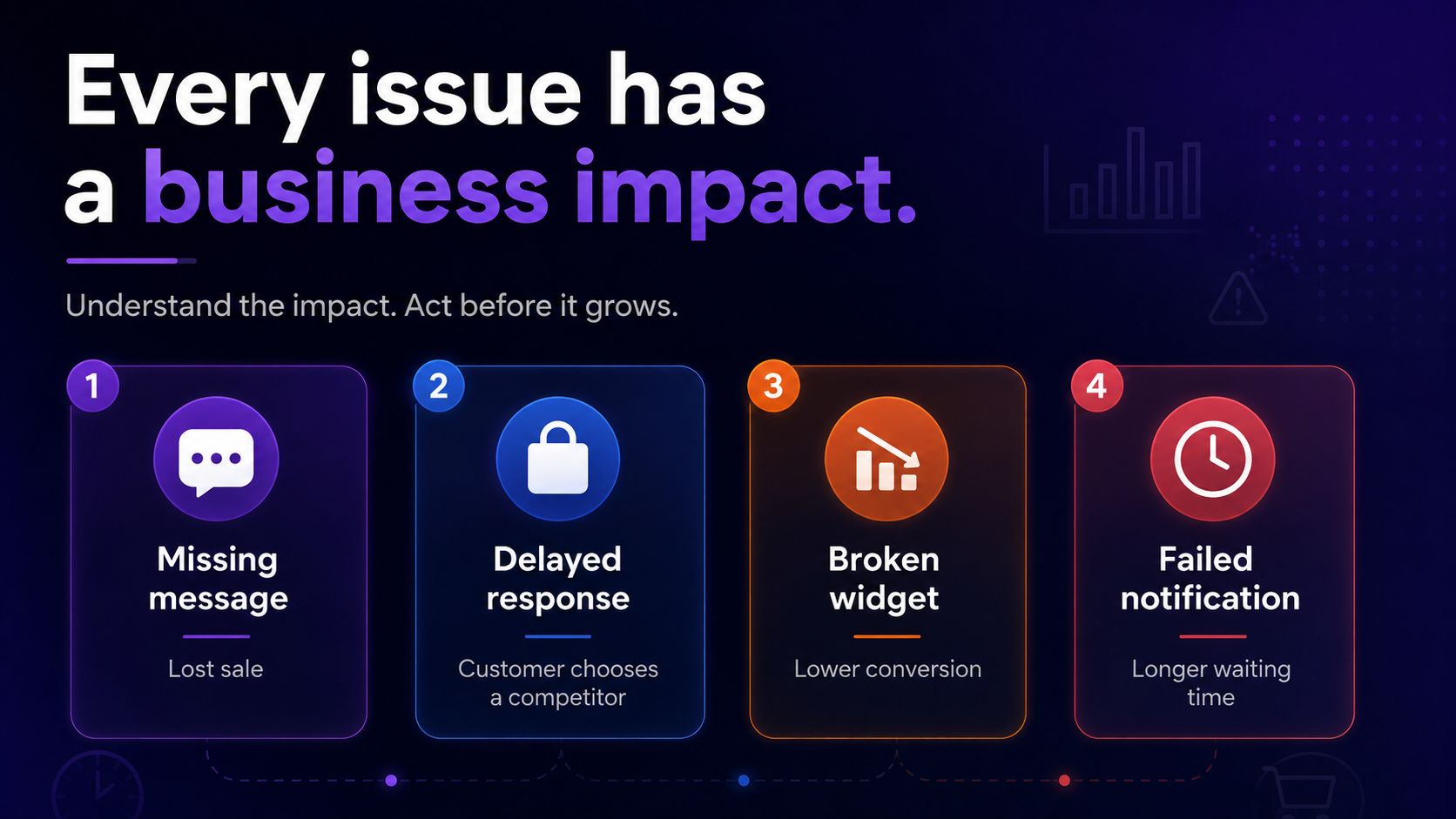
For a Customer Support platform, a system incident does not only affect the software.
A missing message can become a lost order.
A delayed reply can push a customer toward a competitor.
A broken chat widget can reduce conversion rates without the business realizing it.
A failed notification can leave a customer waiting for hours.
This is why the stability of a Customer Support platform is directly connected to customer experience, revenue, and brand reputation.
CX Genie x Flashlog: Protecting Every Important Customer Conversation
CX Genie enables businesses to connect with and support customers across multiple communication channels.
Flashlog helps the team behind CX Genie ensure that those connections remain stable and reliable.
From missing messages, delayed chats, failed replies, and broken notifications to incidents involving AI Agents, workflows, and channel connectors, Flashlog provides the technical context teams need to detect and resolve problems faster.
Because for a Customer Support platform, every minute of downtime is more than a technical metric.
It may represent hundreds of interrupted conversations.
And every missed conversation could be a lost customer or a lost sale.
CX Genie keeps businesses connected to their customers. Flashlog helps keep that connection reliable.