
Session Replay Technology Explained - How It Works, What It Captures, and What to Mask
Session replay technology helps teams understand what users experienced by reconstructing a session from events and DOM changes, not by filming a user’s screen, and that difference matters for privacy, performance, and compliance.
- Modern replay tools rebuild a “video-like” experience from event streams and DOM mutations, which changes what data is collected and how you secure it.
- A safe setup is mostly about data minimization and masking: decide what you never capture, what you redact, and what you allow only in controlled contexts.
- You can make a practical legality decision using a checklist for notice/consent, retention, access control, and vendor contracts instead of vague privacy debates.
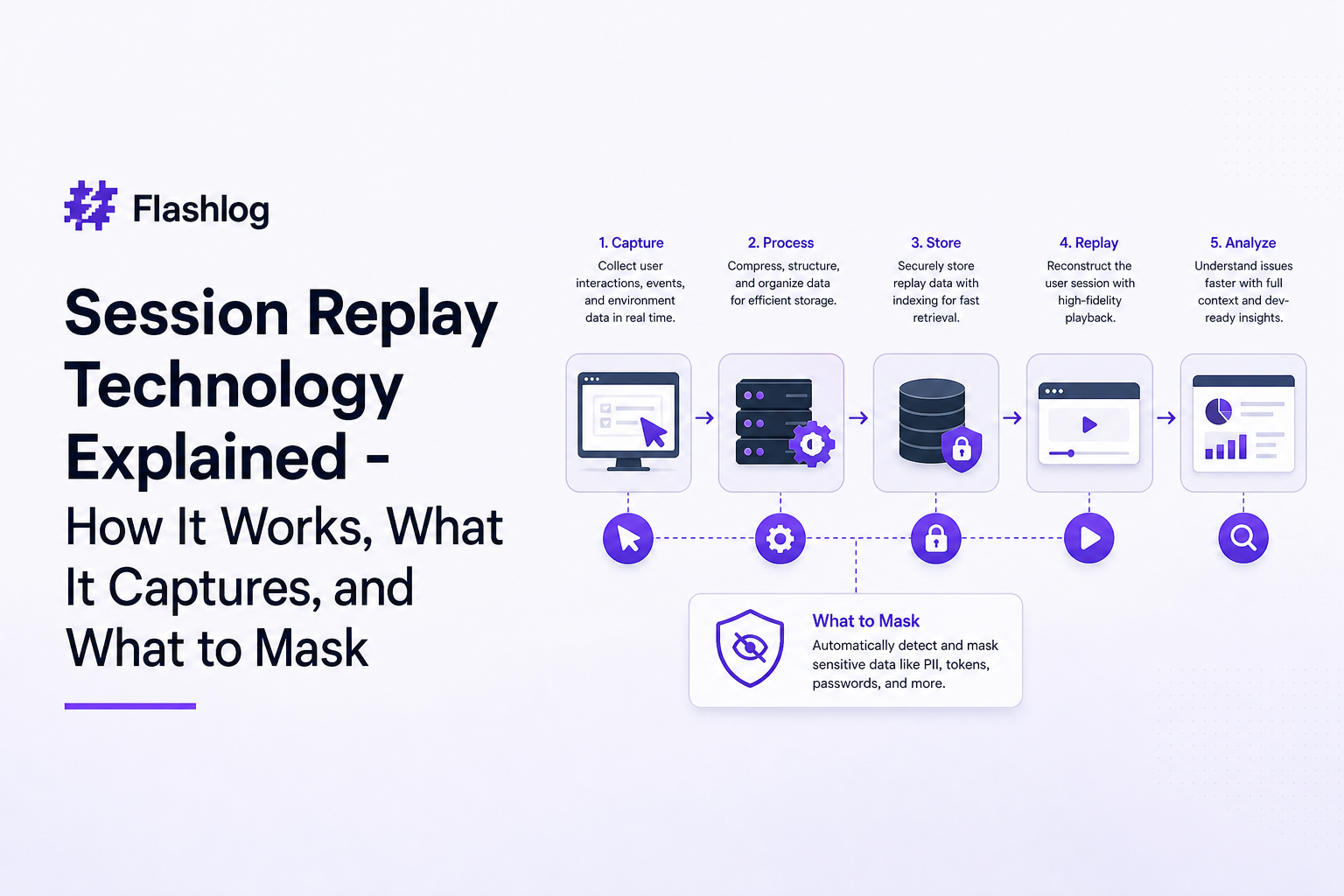
What Session Replay Technology Is and What It Is Not
Problem: teams guess at user behavior, then lose days to “can you reproduce it?”
If you’ve ever tried to debug an issue from a screenshot and a vague support note, you’ve felt the core pain: the user journey that led to the bug is missing. The result is slow triage, lots of back-and-forth, and fixes that ship late because engineers have to reconstruct steps from memory, analytics, and partial logs.
What it is: a reconstruction of UI state over time
Session replay technology instruments your web app to capture a stream of signals (for example: DOM mutations, user events, navigation changes, and timing) and then replays those signals to reconstruct what the page looked like and how it responded. That’s why a replay can look like a video even though it is typically not a literal screen recording.
What it is not: a raw screen recording of the user’s device
It’s important to set expectations correctly:
- Not a device capture: It generally does not record outside your web app (no desktop, other tabs, or other apps).
- Not automatically “everything typed”: Depending on configuration, keystrokes can be masked, omitted, or recorded only for non-sensitive fields.
- Not a replacement for logs: Replays show what happened in the UI; logs and traces explain why at the system level.
A simple expectations table you can use internally
| Question | Replay usually answers | Replay usually does not answer |
|---|---|---|
| What did the user click right before the error? | Yes, via click/tap events and UI state | Root cause in backend code |
| What did the UI show when the request failed? | Yes, reconstructed DOM and timing | Database query plan details |
| Did a specific browser or viewport trigger it? | Often, via environment metadata | Full device telemetry outside the browser |
How Session Replay Works Under the Hood in Modern Web Apps
Consequences of misunderstanding the “video-like” effect
Teams sometimes treat session replay technology like a screen recorder and assume it is either “obviously invasive” or “obviously safe.” In practice, the data model is different: what you capture is mostly structured events and DOM changes, which can be minimized, filtered, and redacted. That’s also why two tools can feel identical in the UI but behave very differently in what they collect.
The modern replay pipeline in 4 steps
- Instrument: a small script runs in the browser and subscribes to user events (click, input, scroll), navigation, and DOM changes.
- Serialize: events are converted into compact records (often batched) and linked to a session identifier.
- Transmit: batches are sent to a collector endpoint with retry logic and sampling controls.
- Reconstruct: a player re-applies the event stream to rebuild the UI state over time.
Why DOM mutations matter (and why SPAs need special handling)
In a server-rendered app, navigation can be a clean page load boundary. In a single-page app, the DOM can change massively without a full reload, and routing happens in JavaScript. That means a replay system must track:
- Virtual navigation: route changes and history events (so the replay timeline has meaningful “page” boundaries).
- DOM mutation bursts: large UI re-renders triggered by state changes.
- Timing: when user input happened relative to renders and network responses.
When we tested replay setups on SPAs with heavy client-side rendering, the biggest quality jump came from correctly labeling route changes and batching mutation bursts so the replay timeline stayed readable instead of “flickery.”
Performance and sampling criteria (a practical benchmark)
To keep overhead predictable, use explicit criteria rather than “turn it on everywhere”:
- Sampling: start with 1% to 5% of sessions for general UX visibility, and 100% for sessions that hit a known error signature.
- Payload budgets: set a target cap per session (for example, a few hundred KB compressed) and enforce truncation for long sessions.
- Trigger-based capture: capture full fidelity only after a failure condition (uncaught exception, failed request, rage click pattern).
What Data Gets Captured, What Should Be Masked, and How Masking Works
Framework: classify replay data into 4 buckets
A compliance-first setup starts with classification. We use four buckets because it forces field-level decisions instead of vague “PII yes/no” debates:
- UI interaction signals: clicks, taps, scroll depth, focus/blur, navigation.
- Content and structure: DOM nodes, text content, attributes, CSS-driven layout changes.
- Inputs: form fields, keystrokes, paste events, selections.
- Technical context: browser/OS, viewport, release version, network request metadata.
Concrete examples of what you typically capture
| Category | Example captured signal | Debug value | Default risk level |
|---|---|---|---|
| Clicks and taps | Selector and coordinates relative to viewport | Shows intent and last meaningful action | Low |
| Navigation | Route changes, URL path (ideally without query) | Reproduction path | Medium (queries can leak) |
| Inputs | Field focus and change events | Explains validation and form flow | High |
| Network context | Method, endpoint, status, timing | Connects UI to failing request | Medium to High (payloads) |
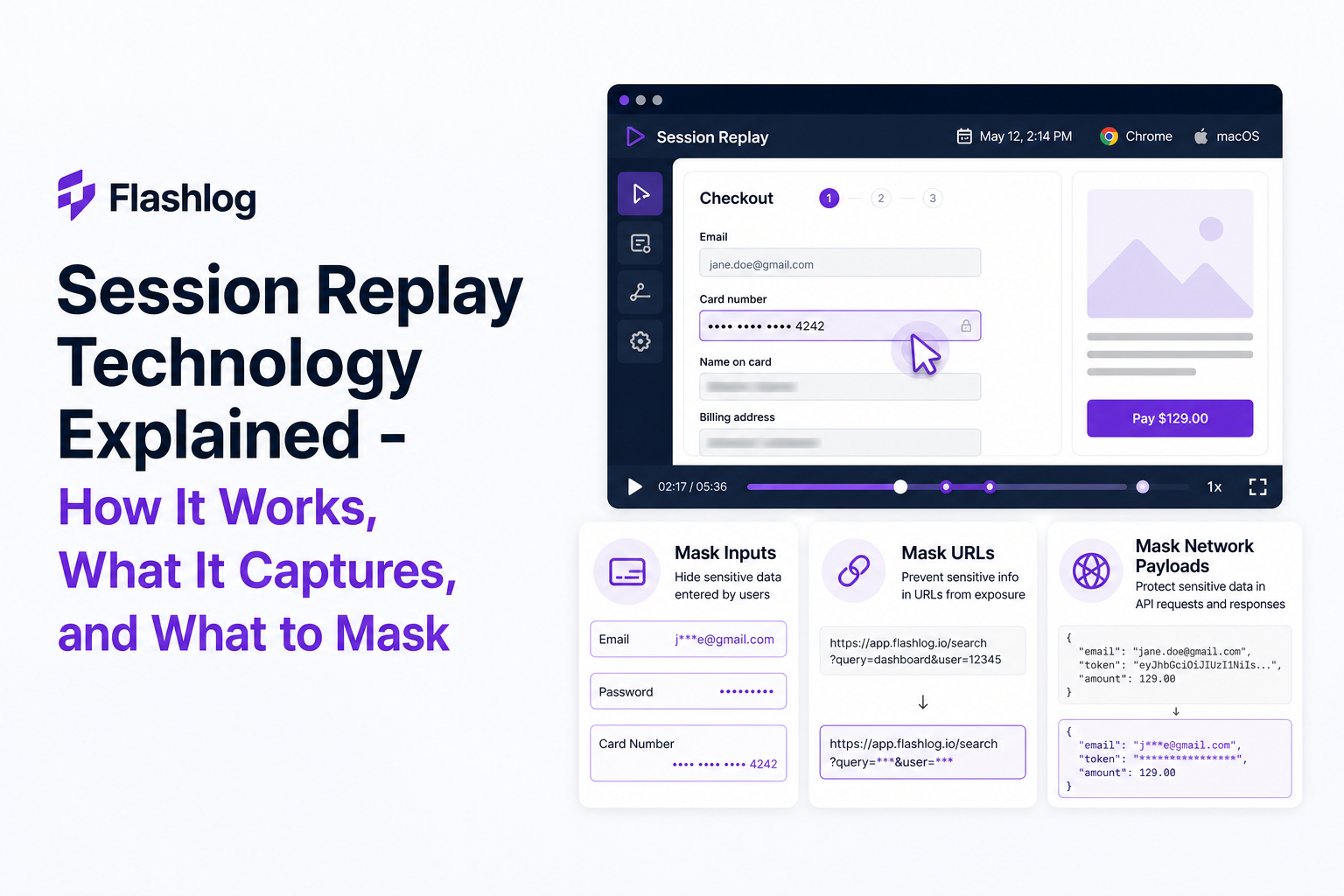
Masking and redaction: the three controls that matter
Most teams talk about “masking” as one feature, but in practice you need three distinct controls to make session replay technology safe:
- Omit: do not capture the data at all. Best for passwords, card numbers, tokens, medical fields, and any “special category” data.
- Mask at capture time: replace values in the browser before transmission (for example, convert input text to bullets or a fixed token like
[REDACTED]). - Redact at storage/view time: as a second layer, prevent accidental exposure in the player or exports.
A field-level masking checklist you can apply in 15 minutes
- Always omit:
password,card_number,cvv,token,ssn, auth headers, session cookies. - Mask by default: email, phone, full name, address, free-text “notes” fields, search boxes (users paste secrets).
- Allow conditionally: non-sensitive dropdown selections, checkbox choices, error messages that you control (not user-generated).
- Strip from URLs: query strings and fragments unless explicitly allowlisted.
What surprised our team was how often sensitive data leaked through URLs and error toasts rather than form fields, so we now start audits by searching for secrets in query parameters and client-side logs before we even touch input masking rules.
How masking works technically (so you can verify it)
Common approaches include:
- CSS selector-based masking: mark elements with attributes/classes (for example
data-private) so their text nodes and input values are never captured. - Input-type rules: automatically omit
type="password"and similar patterns. - Allowlisting: capture only specific fields you explicitly mark as safe, especially for regulated products.
A practical verification step: create a test page with fake secrets (for example “test-token-123”), run a replay, and then search your replay storage and network inspector for that exact string. If you can find it anywhere, your masking is not actually working end-to-end.
Is Session Replay Legal A Practical Compliance Decision Tree
Pain: “Is it legal?” becomes a blocker because it’s asked too late
Legality is rarely a single yes/no. Whether session replay technology is acceptable depends on what you collect, how you disclose it, and how you control access. The fastest way to get unstuck is to use a decision tree that maps to actions your team can implement this sprint.
Decision tree: five gates to pass before you scale rollout
- Purpose gate: Can you state a narrow purpose (for example, “debugging production errors and usability issues”) and exclude unrelated use?
- Notice and consent gate: Do you disclose replay collection in your privacy notice, and do you need opt-in consent in your jurisdictions and product category?
- Minimization gate: Are sensitive inputs omitted or masked by default, and are URLs/payloads restricted?
- Retention gate: Do you have a defined retention window (for example 7 to 30 days for debugging) and deletion process?
- Access control gate: Is replay access limited by role, logged, and reviewed (RBAC plus audit trail)?
A compliance-first rollout checklist (copy/paste)
- Data map: document what events, DOM content, inputs, and network metadata are captured.
- Masking spec: list fields and selectors to omit/mask; include URL query stripping rules.
- Retention: set a default retention period and justify it (debugging needs are usually short-lived).
- RBAC: restrict replay access to engineering and a small set of support roles; require SSO if possible.
- Vendor contracts: ensure a DPA is in place and clarify processor/subprocessor responsibilities.
- Security review: verify encryption in transit and at rest, and confirm how exports are controlled.
Where teams commonly over-collect (and how to fix it)
In our experience working with B2B SaaS teams, the most common compliance failure is capturing too much by default: full text nodes, full URLs including queries, and request payloads that contain user-entered data. The fix is straightforward: start with allowlisting for inputs, strip queries globally, and only attach request metadata needed for debugging (endpoint, status, timing) unless a specific endpoint is approved for deeper capture.
For standards references, align your internal checklist with widely used guidance such as the GDPR overview and the California CCPA page, then translate those principles into your concrete capture and masking rules.
| Risk area | What to check | Safer default |
|---|---|---|
| Inputs | Are keystrokes stored for any text field? | Mask all inputs unless allowlisted |
| URLs | Do replays store query strings or fragments? | Strip queries globally; allowlist only if needed |
| Network | Are request/response bodies captured? | Capture metadata only; approve payload capture per endpoint |
| Access | Who can view replays? Is it audited? | RBAC + audit logs + least privilege |
| Retention | How long is replay data kept? | 7 to 30 days for debugging use cases |
FAQ about session replay technology
If you want the debugging benefits of session replay technology but prefer an evidence package that’s built for engineers, Flash Log focuses on capturing reproduction context around real issues, including the user journey, failing request details, environment, and privacy-safe masked replay context so teams can move from report to fix with less back-and-forth.
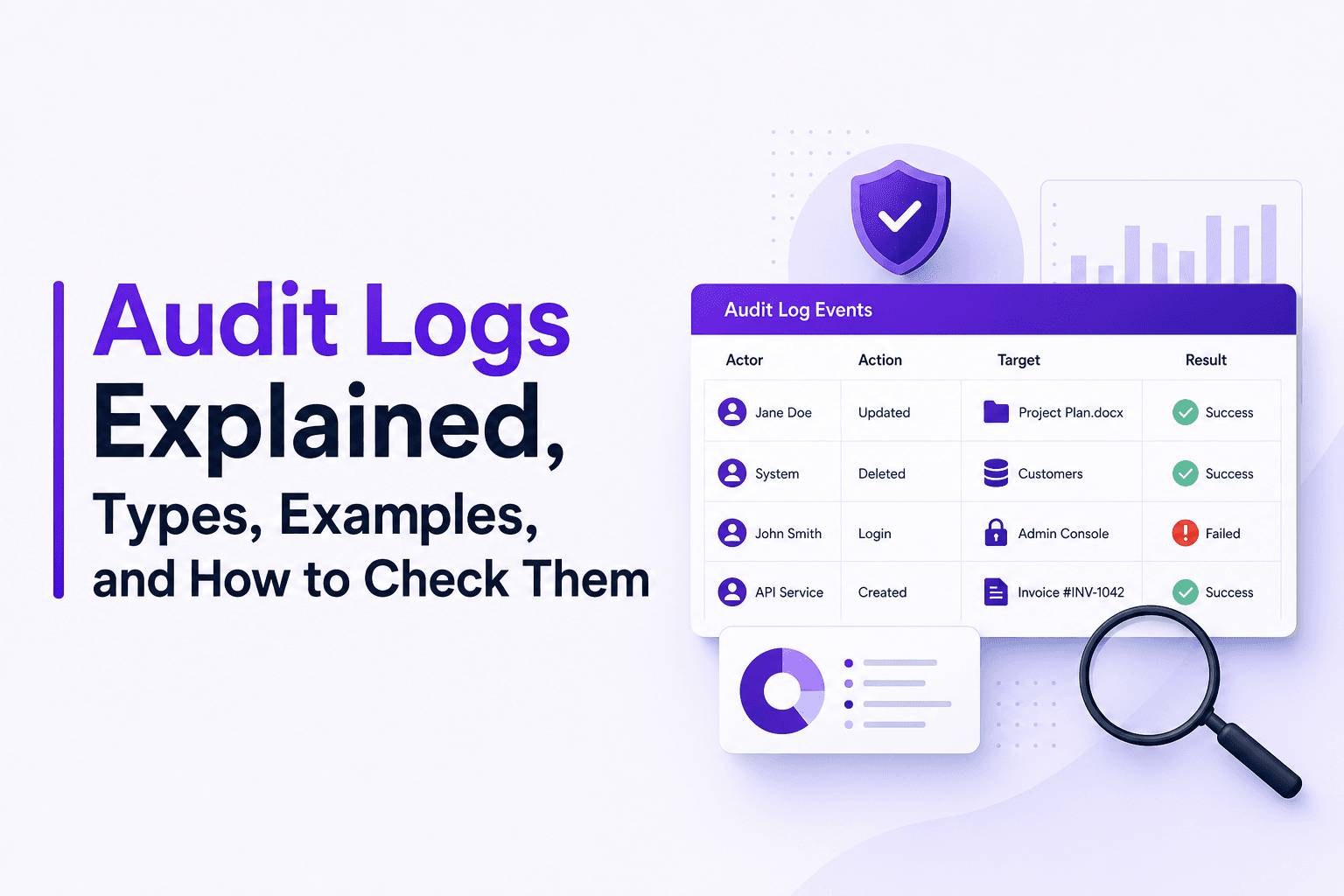
Audit Logs Explained, Types, Examples, and How to Check Them
Learn what audit logs are, the two key types, minimum fields, copyable examples, and how to check audit logs in Microsoft 365, Azure, Power BI, and Linux.

Web Session Replay, A Practical Tutorial and Debugging Workflow for Engineering Teams
Learn a practical web session replay workflow to capture context, reproduce bugs, and fix production issues faster with privacy-safe governance.
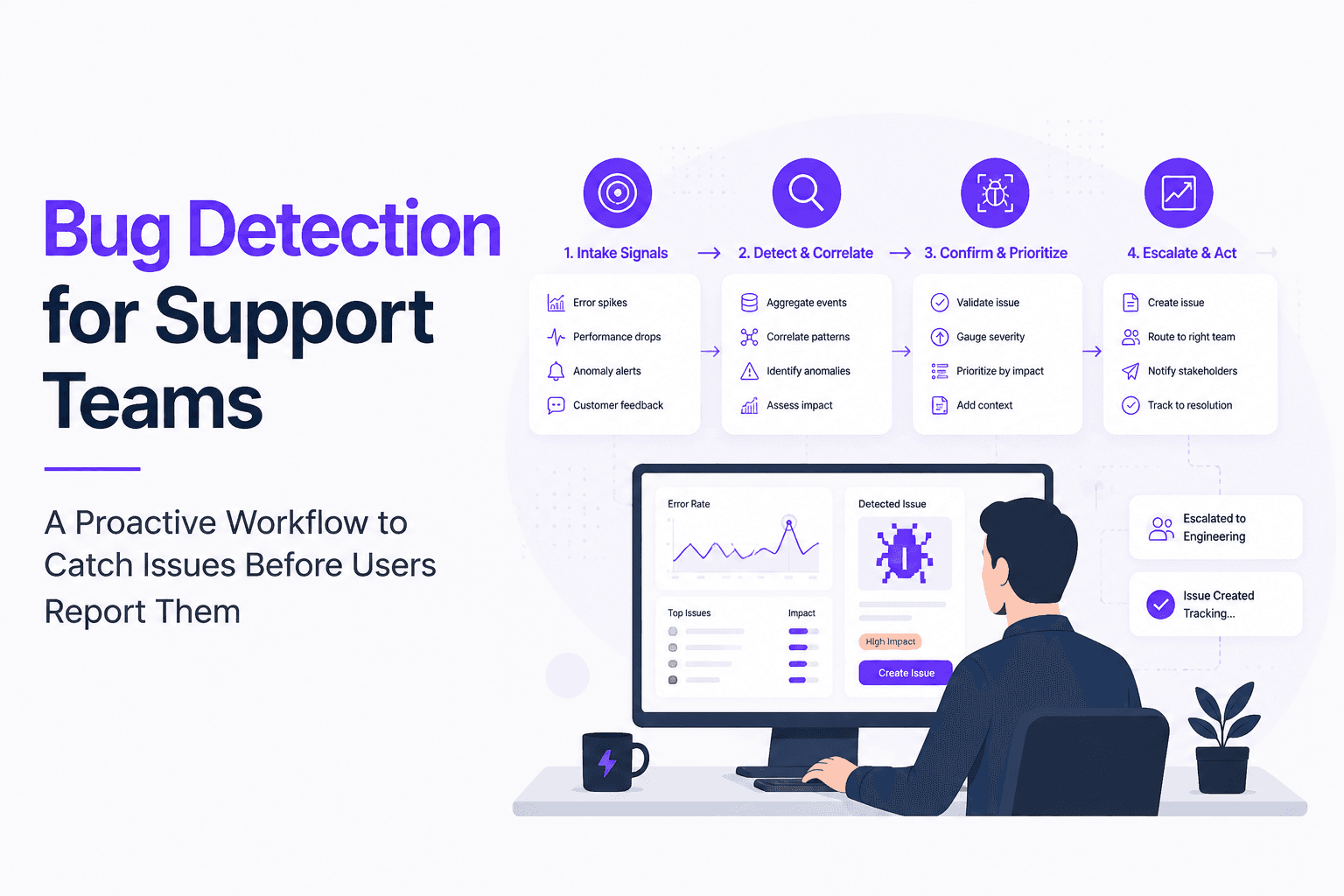
Bug Detection for Support Teams, A Proactive Workflow to Catch Issues Before Users Report Them
Build proactive bug detection for Support with clear signals, triage rules, evidence standards, and a weekly cadence that engineering trusts.