
Software Bug Tracking System for Support Teams, A Practical Workflow for Catching Bugs Before Users Report Them
A software bug tracking system that actually helps support teams is one that captures, enriches, routes, and verifies defects with clear ownership so engineering gets actionable issues before customers pile on duplicates.
- Design your lifecycle around support ownership: intake and reproduction quality gates, explicit handoffs, and verification criteria.
- Standardize one ticket schema (fields plus status transitions) so triage becomes rule-based and scalable, not tribal knowledge.
- Proactive capture plus threshold-based alerting reduces “customer found it first” bugs and keeps engineers focused on real issue pressure.
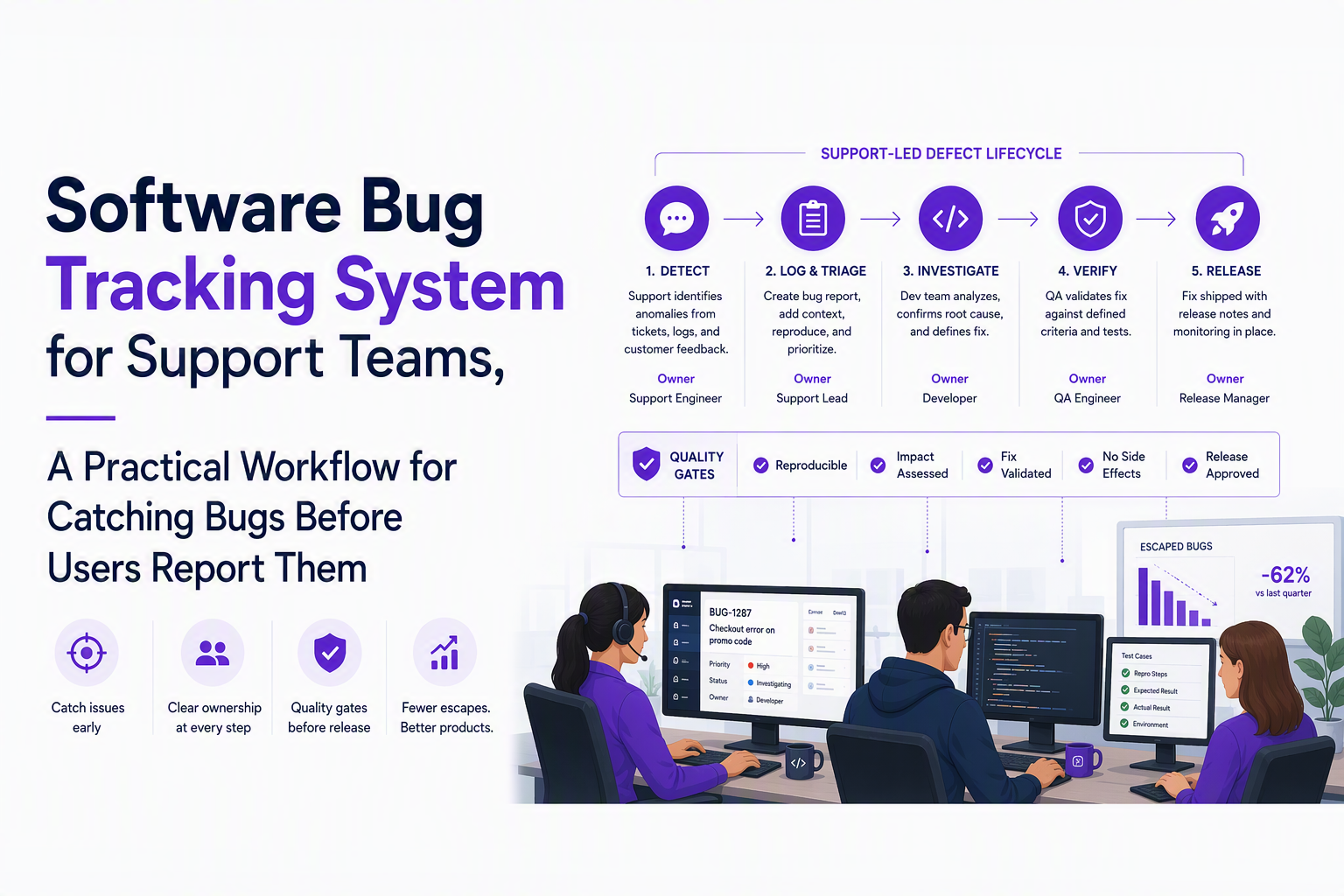
Walk Through the Defect Lifecycle Support Teams Should Own
A support-led defect lifecycle works when each stage has a single owner, a clear “definition of done,” and a handoff artifact that engineering can act on without another meeting.
Lifecycle map with support ownership and explicit gates
Most teams already know the generic flow (report, reproduce, fix), but support teams need a version that makes handoffs measurable. Below is a practical lifecycle we use to keep a software bug tracking system from turning into a dumping ground.
- 1) Intake (Support owns): Convert signal into a candidate bug. Gate: enough context to attempt reproduction within 10 minutes.
- 2) Reproduction (Support owns): Prove the issue or label it “needs-info” with a specific ask. Gate: “reproducible” or “cannot reproduce with current data.”
- 3) Triage (Shared, Support drives): Classify severity, user impact, and component. Gate: priority assigned and next owner decided.
- 4) Assignment (Engineering owns): Accept the issue with a committed next action (investigate, fix, or close as expected). Gate: assignee and target milestone (even if it is “next triage”).
- 5) Fix (Engineering owns): Implement and link PR/build. Gate: change reference and test notes.
- 6) Verification (Support owns): Validate in the right environment with a defined checklist. Gate: verified fixed or reopen with new evidence.
- 7) Close (Support owns): Confirm comms (if applicable), close with reason code, and add learnings for prevention. Gate: closure reason + customer-facing note if needed.
Definitions of done that stop ping-pong
Support teams often become bottlenecks because “triage” means different things to different people. The fix is to formalize the acceptance criteria for each stage.
- Intake done: user impact stated, environment captured, and at least one artifact attached (screenshot, log snippet, session link, or API request/response).
- Reproduction done: steps attempted with the same version/build; result recorded; if blocked, a single “missing info” list is posted once, not piecemeal.
- Triage done: severity and priority set using a rubric (below), duplicate check completed, and owner/queue assigned.
- Verification done: tested on the stated fix version, plus one negative test (confirm it does not regress a related flow).
A support-grade severity and priority rubric
A software bug tracking system stays usable when priority is determined by impact and urgency, not by who is loudest. Keep it simple enough that support can apply it consistently.
- Severity (impact): S1 data loss/security risk; S2 core workflow broken; S3 degraded/incorrect; S4 cosmetic.
- Urgency (time): U1 active incident; U2 escalating trend; U3 can wait for planned sprint.
- Priority (engineering lane): map (S1/U1) to P1, (S2/U2) to P2, etc. Document the mapping in your tracker.
In our experience working with high-volume support queues, the single biggest improvement is treating reproduction as a first-class deliverable: when the “repro gate” is enforced, engineering clarifications drop dramatically because the ticket already contains the evidence they would ask for.
Use a Real Bug Ticket Example With Fields and Statuses
A workable bug ticket template makes defects searchable, routable, and verifiable without relying on the original reporter being available.
One concrete ticket schema support can fill in under pressure
Below is an example you can copy into your software bug tracking system as required fields and structured sections. The goal is not maximum detail, it is consistent detail.
- Title: “[Checkout] Payment method list fails to load on Safari 17.4”
- Customer impact: “Users cannot select a payment method; checkout blocked.”
- Severity: S2 (core workflow broken)
- Urgency: U2 (trend increasing since last deploy)
- Priority: P2
- Environment:
- App version/build: 2026.09.07-1842
- Browser/OS: Safari 17.4, macOS 14.5
- Account type: Standard
- Region: EU
- Feature flags: payments_v3 = on
- Expected vs actual:
- Expected: Payment methods render within 2 seconds.
- Actual: Spinner persists; console shows 403 on /api/payments/methods.
- reproduction steps:
- Log in as a Standard user with payments_v3 enabled.
- Add any item to cart.
- Go to Checkout and click “Payment method”.
- Observe spinner does not resolve.
- Evidence attached:
- HAR file showing 403 on /api/payments/methods
- Screenshot of UI state
- Log snippet: request_id=abc123, error=Forbidden
- Suspected component: Payments API
- Duplicates: linked issues #1821, #1827 (same endpoint)
- Workaround: “Use Chrome” (temporary support guidance)
- Owner: Engineering queue “Payments On-call”
Status transitions that match how support and engineering really work
A common failure mode is having too many statuses that nobody uses consistently. The below set is small but expressive enough to support proactive defect handling.
- New (Support): captured, not yet reproduced.
- Needs info (Support): blocked; includes a single checklist of what is missing.
- Reproduced (Support): repro confirmed, impact described, evidence attached.
- Triaged (Support + Eng): priority set, routed to an owning queue.
- In progress (Eng): actively being worked with linked PR/build.
- Fix ready for verify (Eng): deployed to a verifiable environment.
- Verified (Support): fix confirmed using ticket checklist.
- Closed (Support): reason code applied (Fixed, Duplicate, Expected behavior, Cannot reproduce).
Required fields vs optional fields
To keep compliance and audit needs satisfied without slowing intake, separate fields that must exist for routing from fields that are nice-to-have.
- Required for routing: priority, component/queue, environment, impact, evidence type, status.
- Required for verification: fix version/build, verification checklist, test environment.
- Optional: suspected root cause, workaround, customer list, internal notes.
Show How AI Capture Tools Like Flash Log Surface Bugs Before Reports Arrive
Proactive bug detection works when your software bug tracking system can ingest signals from production behavior and turn them into grouped, triaged issues instead of raw error spam.
Three proactive signal sources support teams can operationalize
- Logs and error events: useful for frequency and time correlation, but noisy without grouping and filtering.
- Session evidence: replays, breadcrumbs, network traces, and client context reduce time-to-reproduce.
- Support conversations: patterns in chat/email tags can reveal emerging bugs before a formal ticket exists.
What “surface before reports” needs to mean in practice
Support teams do not need more alerts; they need earlier, cleaner issue candidates with context already attached. In practice, proactive capture should do four things before it creates pressure on humans:
- Classify: separate likely defects from expected business errors (for example, user-caused validation failures).
- Group: roll repeated failures into a single issue so the team sees accumulation, not duplicates.
- Enrich: attach environment and runtime context so reproduction starts with evidence.
- Route: send the right signal to the right place when threshold pressure is real.
One body mention: where Flash Log fits
Flash Log is one example of an AI-driven capture approach: it can automatically capture and classify bugs, including bugs that happen even when users never file a report, so support can start from an issue record rather than waiting for a customer to describe the problem.
What surprised our team was how much time was wasted on “report shaping” rather than investigation: once the tracker starts with grouped issues and attached context, support stops rewriting the same narrative across multiple tickets and can focus on verification and comms.
Build Triage Rules That Route Defects Without Support Bottlenecks
Routing rules remove bottlenecks when they convert ticket fields and issue pressure into predictable ownership and escalation paths.
A routing framework support can administer
If you want triage to scale, define rules that map from (priority + component + confidence) to (owner + SLA + channel). Use these four rule layers in order.
- Noise gate: exclude known junk early (ignore patterns, expected error classes, test/staging traffic).
- Grouping: collapse repeats into an issue so routing happens once per problem, not once per event.
- Priority lane thresholds: alert based on accumulated issue count, not every failure occurrence.
- Channel and escalation: route P1 to on-call chat; P2 to team channel; email as backup for auditability.
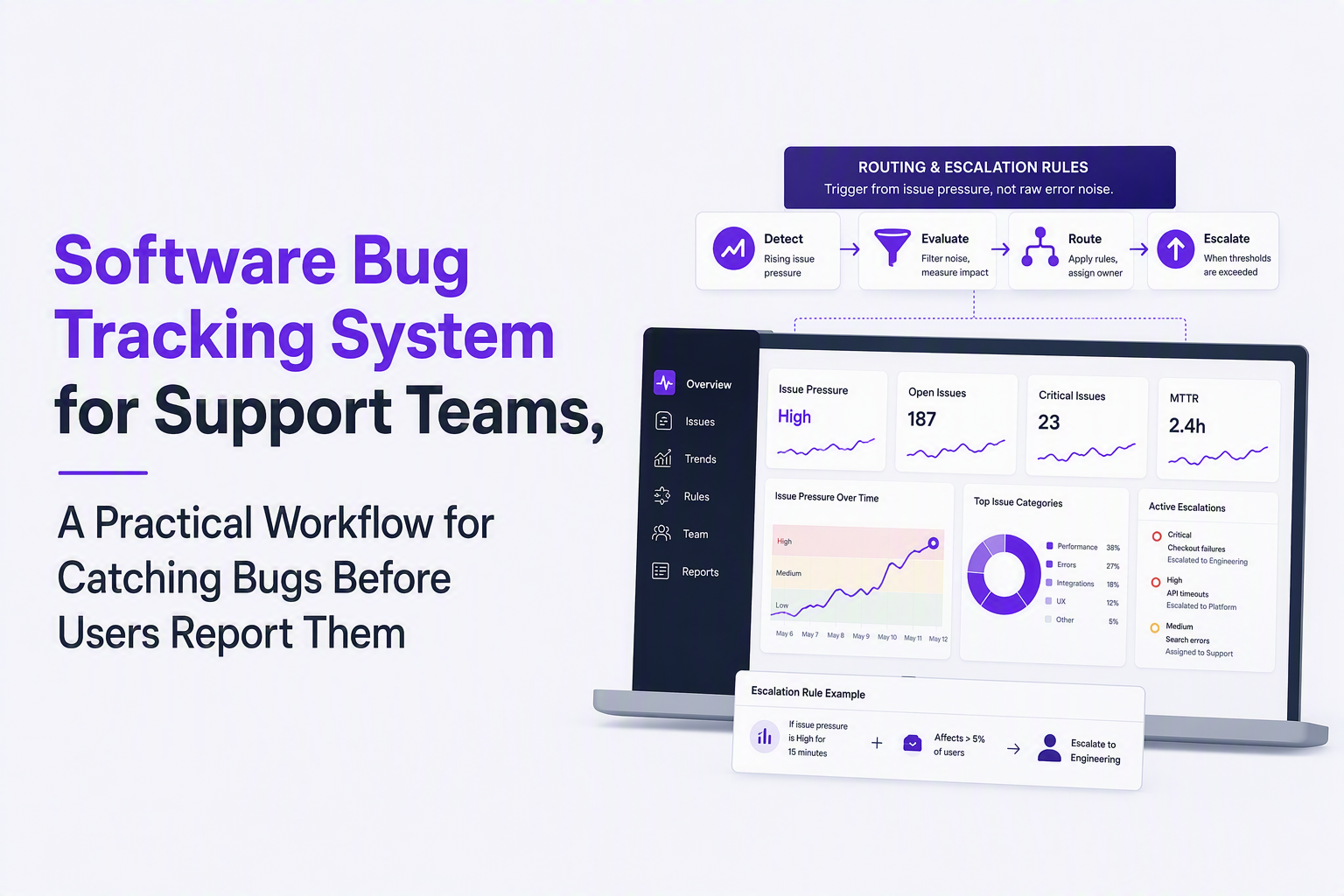
Concrete escalation policy (copy and adapt)
- P1: immediate page or on-call chat; response owner = incident lead; support posts customer-impact summary within 30 minutes.
- P2: engineering queue + team channel; support gathers affected accounts and workaround; review in next triage block.
- P3/P4: backlog with aging policy; auto-close candidates after a set period only if no repeats and no customer impact.
Approval rights for status changes
Status control is how you prevent “resolved but not really” closures. A simple model that works:
- Only support can mark Verified and Closed (ensures customer-impact lens and verification).
- Only engineering can mark Fix ready for verify (ensures deploy artifacts exist).
- Either can move to Needs info, but the ticket must contain a single consolidated request list.
Alerting that reflects issue pressure, not panic
If your tooling supports it, configure alerts to fire from priority issue counts rather than every error event. For example, a rule like “P1 issues >= 5” routed to Slack or Telegram interrupts the team only when the accumulation becomes operationally meaningful, and a templated message can include the live priority and issue count so the alert is actionable on arrival.
When we tested threshold-based alerting against raw error notifications, the operational pattern changed: engineers stopped muting channels because alerts arrived as grouped signals they could triage, not as a constant stream of duplicates.
Track Metrics That Prove the Workflow Is Reducing Backlog and Reopenings
Support-led bug operations improve when your software bug tracking system reports cycle time, aging, and reopen drivers in a way you can act on weekly.
A metrics set that ties directly to support pain
- Time to first reproducible ticket: time from first signal to “Reproduced” status.
- Time to first engineering touch: time from “Triaged” to “In progress” or “Fix ready for verify.”
- Verification lead time: time from “Fix ready for verify” to “Verified.”
- Reopen rate: % of issues moved from Closed back to Reproduced/Triaged.
- Aging by priority: count of P1/P2 issues older than your policy threshold.
- Duplicate ratio: duplicates per unique issue, by component (helps you spot where proactive capture or docs are weak).
How to turn metrics into weekly operating decisions
Metrics only matter if they change the plan. A simple weekly review agenda support can run:
- Top repeat issues: review the 3 issues with the most duplicates and confirm grouping rules and tagging are correct.
- Oldest P1/P2: decide: escalate, de-scope with explicit rationale, or split into smaller fixes.
- Reopen postmortems: for each reopened issue, label the cause (missing environment, unclear steps, partial fix, regression) and update the template accordingly.
- Intake quality audit: sample 10 recent tickets and check required fields completion; adjust form defaults and macros.
Visibility for support leadership
Support teams need to show impact in customer terms, not engineering terms. Add two lightweight rollups to your dashboard: (1) number of support conversations linked to open issues and (2) number of accounts affected by open P1/P2. These can be manual at first; consistency matters more than automation.
Choose a Software Bug Tracking System by Team Size, Compliance Needs, and Admin Overhead
The best software bug tracking system for support teams is the one that matches your org constraints while still enforcing ticket structure and verification gates.
Scenario-based selection criteria (support-first)
- Small team, GitHub-native engineering: prioritize low admin overhead, tight PR linking, and a support-friendly intake form layer on top of engineering workflows.
- Mid-size SaaS with multiple product areas: prioritize routing rules, component ownership, dashboards for aging and duplicates, and permissioning for verification and closure.
- Enterprise or regulated org: prioritize audit trails, role-based access control, data retention, and exportability; ensure the workflow supports approvals and evidence retention.
- Self-hosted or strict data control: prioritize operational reliability (backups, upgrades), SSO options, and the real cost of administering forms, workflows, and integrations.
A selection checklist you can use in demos
- Intake structure: Can support enforce required fields without custom engineering work?
- Routing: Can you auto-assign by component and priority and keep an explicit owning queue?
- Evidence handling: Can tickets store logs, HAR files, screenshots, and links reliably?
- Status governance: Can support own verification and closure permissions cleanly?
- Reporting: Can you report aging by priority and reopen causes without exporting to spreadsheets?
- Integrations: Can you connect chat channels and email reliably, and test delivery before relying on it?
Where teams get surprised by admin overhead
Teams often underestimate the time cost of maintaining custom fields, workflow transitions, and permission models. After running multiple tracker migrations, the pattern was clear: a simpler, enforced ticket schema beats a “fully customizable” tracker that nobody keeps consistent.
Use Popularity and Open Source Signals to Break Ties, Not Make the Decision
Popularity signals help only after you confirm your workflow requirements, because a widely used tracker can still be the wrong fit for support-led operations.
What popularity signals can genuinely tell you
- Ecosystem depth: more integrations, templates, and community troubleshooting.
- Hiring and onboarding ease: new teammates recognize the UI and concepts.
- Longevity risk: active maintenance reduces the chance you get stuck on an abandoned tool.
What popularity signals do not tell you
- Support usability: whether intake forms and evidence handling are fast under pressure.
- Verification governance: whether status permissions align with your need for support-owned closure.
- Total cost: self-hosted “free” can become expensive once you count upgrades, backups, and workflow admin.
A tie-breaker rubric you can score in 15 minutes
Use this when two options both meet your functional checklist. Score each 1 to 5.
- Workflow fit: supports your lifecycle gates without heavy customization.
- Operational cost: effort to administer fields, permissions, and routing rules.
- Evidence quality: how well it supports reproducibility artifacts and linking.
- Signal quality: ability to reduce noise (grouping, ignore rules, threshold alerting).
- Adoption: likelihood that both support and engineering will actually use it daily.
For deeper selection help, compare categories and tradeoffs in our guide to bug tracking tools, and if you are specifically building a support workflow, this end-to-end playbook on bug tracking pairs well with the lifecycle above.
| Workflow requirement | What to look for in the system | How to test in a demo |
|---|---|---|
| Reproduction quality gate | Required fields, templates, and a “Needs info” loop | Create a ticket with missing environment and confirm it cannot be routed as P1/P2 |
| Support-owned verification | Permissions for status transitions and closure reason codes | Verify whether engineering can close issues without support sign-off |
| Routing without bottlenecks | Component ownership, auto-assignment, and escalation rules | Change priority and confirm owner/queue updates predictably |
| Noise control | Grouping, ignore rules, and alerting based on issue pressure | Simulate repeated errors and confirm you get one issue, not 50 tickets |
| Support impact visibility | Dashboards for aging, duplicates, and reopen causes | Filter by priority and show “oldest open” and “reopened last 30 days” |
FAQ for support teams implementing a bug tracking workflow
If your biggest gap is that bugs are being discovered by customers before your team sees them, evaluate Flash Log alongside your current software bug tracking system to see whether automatic AI capture and classification can give support earlier, cleaner issues to route and verify.

Anomaly Detection With Machine Learning, A Practical Playbook For Reducing Alert Noise
Anomaly detection with machine learning without alert noise: choose setup, build features, calibrate thresholds, evaluate incidents, ship safely.
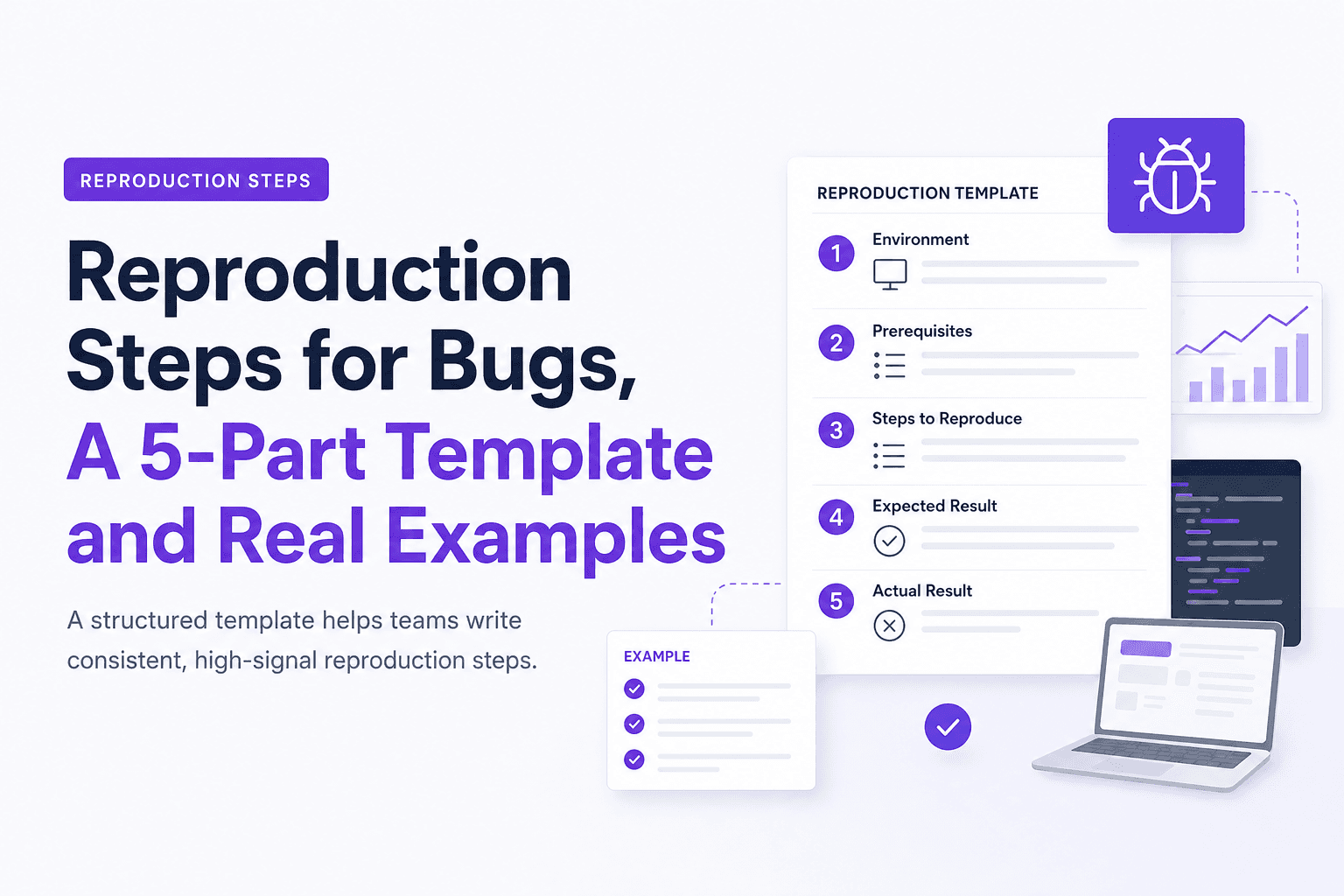
Reproduction Steps for Bugs, A 5-Part Template and Real Examples
Learn reproduction steps that engineers can actually follow: a 5-part template, diagram, and real web, mobile, and API examples.

Adaptive Sampling for Observability, A Practical Framework to Cut Noise Without Missing Incidents
Adaptive sampling framework for observability: pick signals, set rates with SLO risk math, validate quality, and cut telemetry noise without hiding incidents.