
Best Session Replay Tools, A Practical Shortlist and Decision Tree for 2026
Best session replay tools fall into a few clear categories, and the fastest way to shortlist them is to choose by primary goal (debugging, product analytics, support, CRO) and constraints (privacy, self-hosting, mobile coverage, and cost predictability).
- Pick your category first: engineering-grade replay (debugging) vs product analytics replay vs CRO and heatmaps vs privacy-first/self-hosted.
- For debugging, prioritize replay fidelity plus a linked network and error trail, strict masking, and reliable integrations into your tracker.
- Cost blowups usually come from high-traffic sampling mistakes and long retention; set quotas per environment and define retention by team use case.
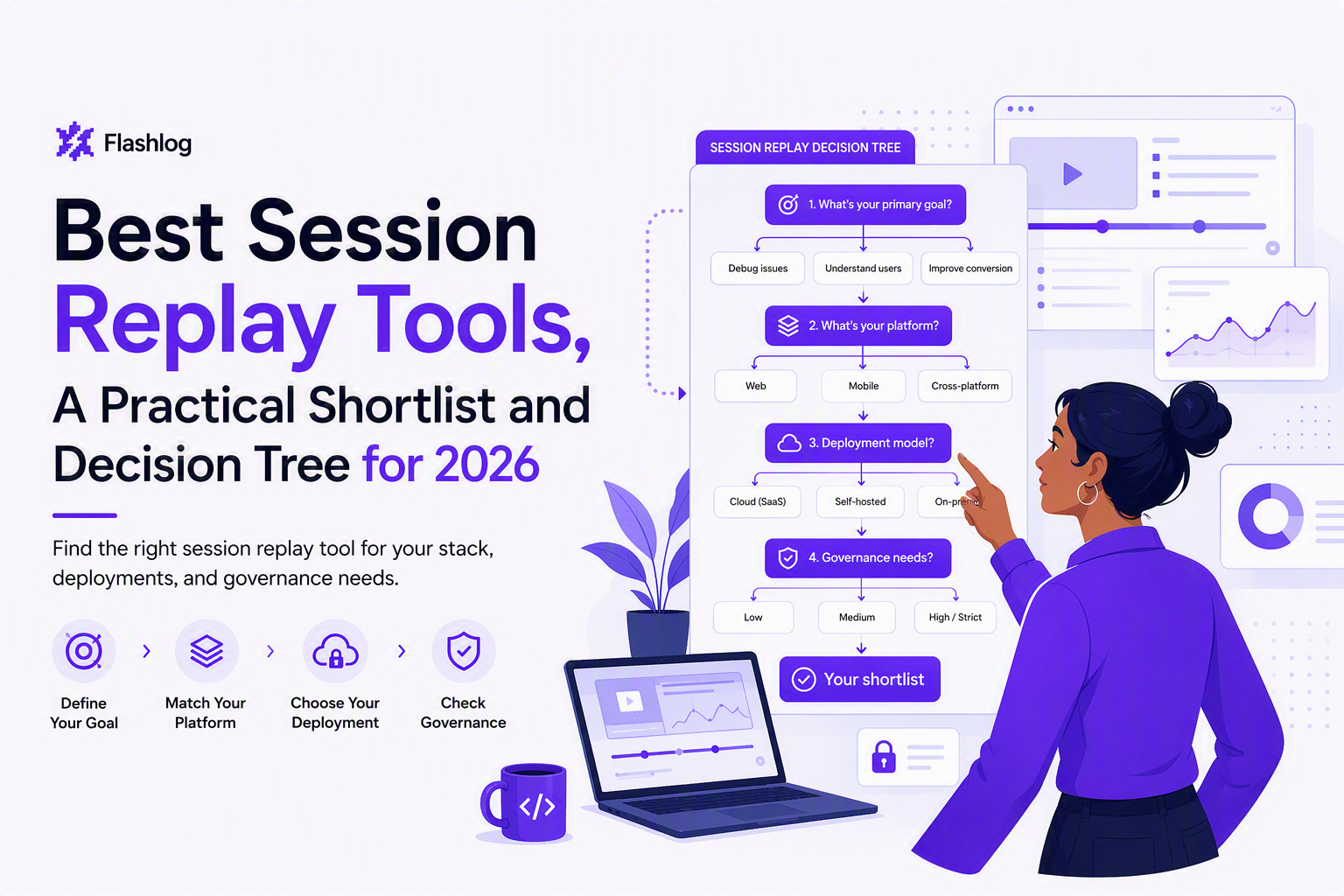
A fast decision tree to choose the right session replay category
Best session replay tools become easier to evaluate when you route the decision through four gates: goal, platform coverage, deployment model, and governance.
Gate 1: What are you optimizing for?
- Debugging and bug reproduction: choose replay that captures high-fidelity DOM changes and pairs them with errors and network context so an engineer can reproduce quickly.
- Product analytics and behavior analysis: choose replay that’s tightly coupled to events, funnels, and cohorts (replay is a drill-down from analytics).
- Support and customer evidence: choose fast search, account/user lookup, and “shareable” replays with strong redaction controls.
- CRO and UX research: choose heatmaps + form analytics + experiments; replay is supporting evidence, not the center.
Gate 2: Web only, or web plus mobile?
- Web only: most vendors are strongest here, especially for DOM-based replay.
- Mobile apps: verify native SDK maturity and whether replay is “screen capture style” vs event-driven, and validate privacy controls for text inputs.
Gate 3: Cloud vs self-hosted
- Cloud: fastest time-to-value and best managed UX, but you must accept vendor processing and their retention model.
- Self-hosted: stronger data control and sometimes cost control at scale, but you own upgrades, storage growth, and incident response.
Gate 4: Governance and privacy constraints
- Regulated or high-sensitivity: require strict default masking, allowlists for capture, and auditability. Map your requirements to guidance like OWASP sensitive data handling.
- Internal-only tools: you can loosen controls, but still define what never gets captured (passwords, tokens, payment fields).
What actually matters in the best session replay tools for debugging and UX
Best session replay tools are differentiated less by “can it replay” and more by fidelity, evidence linkage, privacy, and cost behavior under real traffic.
Selection checklist you can apply in 30 minutes
- Replay fidelity: validate that clicks, scrolls, inputs, and dynamic UI states render correctly in the replay, especially for SPAs and heavy client-side rendering.
- Technical evidence near the replay: confirm you can see console errors and failing requests with status and timing (even if your team keeps deeper logs elsewhere).
- Searchability: you should be able to find sessions by user/account ID, page, error signature, and time window.
- Privacy and masking defaults: look for strong default masking and the ability to allowlist capture on specific fields, plus redaction for any stored metadata.
- Performance overhead: test on your heaviest pages; overhead shows up as additional JS payload and runtime work. In our experience, the “slowdown” complaints usually come from over-capturing (full DOM + long sessions) rather than a single vendor choice.
- Integrations and workflow: confirm the path into Jira/Linear/GitHub Issues and whether replay links remain accessible and permissioned.
- Governance knobs: retention settings, role-based access, environment separation (prod vs staging), and data residency options if needed.
A quick fit test for your stack
- Modern SPA framework: validate DOM mutation capture and route changes.
- Auth-heavy app: verify masking is correct on login, SSO, and token flows.
- Checkout or payments: confirm strict suppression of payment fields plus a way to capture enough context for debugging without storing sensitive values.
If you’re building an internal evaluation doc, link your replay requirements to the broader session replay software checklist so the team agrees on privacy and ownership before a trial starts.
Best session replay tools in 2026, ranked by use case
Best session replay tools are easiest to shortlist when each option is “best for” a specific job, because the tradeoffs differ across engineering, product analytics, support, and self-hosted needs.
Engineering-focused debugging and reproduction
- Sentry Session Replay: best when your primary workflow is error-first triage and you want replay directly beside exceptions. Pros: strong linkage to errors and performance signals. Cons: replay depth is optimized for debugging, not full analytics. Pricing: bundled/plan-based depending on Sentry tier.
- Datadog Session Replay: best for teams already on Datadog RUM and wanting replay in the same observability plane. Pros: unified with RUM/APM context. Cons: cost predictability depends on session volumes and retention. Pricing: usage-based with plan constraints.
- FullStory: best for high-fidelity web replay plus robust search and UX analysis. Pros: strong playback and investigative tools. Cons: cost and governance must be planned early for high-traffic apps. Pricing: enterprise-style, varies by volume and features.
- LogRocket: best for teams wanting replay plus console/network visibility geared toward engineers. Pros: debugging-friendly UX. Cons: needs careful masking configuration for sensitive flows. Pricing: plan-based with usage considerations.
Product analytics plus replay
- PostHog (with session replay): best for product teams that want events, funnels, feature flags, and replay in one stack, with a strong self-host option. Pros: tight analytics-replay loop. Cons: operational ownership if self-hosted. Pricing: open-source and cloud tiers; usage-based for many workloads.
- Mixpanel (via integrations) and similar analytics stacks: best when replay is secondary and analytics is primary. Pros: analytics maturity. Cons: replay may require a partner tool, adding complexity. Pricing: varies by analytics vendor and add-ons.
Support and customer evidence workflows
- Hotjar: best for lightweight replay plus heatmaps and feedback widgets that support support and UX research. Pros: simple setup and UX insights. Cons: not designed as an engineering-grade repro system. Pricing: tiered plans.
- Microsoft Clarity: best for a budget-friendly entry point for replay and heatmaps on web. Pros: accessible for broad rollout. Cons: governance and advanced workflow integrations are more limited than enterprise tools. Pricing: published as free for many use cases, but still validate fit and terms.
Self-hosted or privacy-first deployments
- OpenReplay: best when you want an open-source-first approach and more control over data storage. Pros: deployment control. Cons: you own maintenance, scaling, and upgrades. Pricing: open-source plus potential paid offerings depending on edition.
- rrweb-based custom capture: best when you need a bespoke replay pipeline and can invest engineering time. Pros: maximum flexibility. Cons: you must build storage, playback, masking, and governance. Pricing: engineering time plus infrastructure.
What surprised our team was how often “best” came down to the tool’s search model: teams ship faster when sessions can be found via error signature and user ID in seconds, not after manual digging.
Operational reality check, sampling, retention, and cost predictability
Cost predictability is the practical separator between best session replay tools and “tools you churn,” because replay volume grows with traffic, not with team size.
How quota exhaustion happens in practice
- Default capture in production: teams enable broad capture, then discover that long sessions and high-traffic marketing pages eat the budget.
- No environment boundaries: staging and dev traffic can pollute production quotas if not separated.
- Retention creep: replay stored for weeks or months without a clear reason increases storage and billing pressure.
Sampling strategies that stay useful for debugging
- Error-triggered capture: keep baseline sampling low, but increase capture when exceptions or HTTP 4xx/5xx spikes occur.
- High-value flow capture: prioritize checkout, onboarding, and auth flows; downsample low-signal pages (blog, docs).
- Per-segment rules: capture more for newly released features or specific browsers/devices when investigating environment-specific failures.
After running a few sampling audits, the pattern was clear: teams get better ROI when they treat replay like logging, with explicit budgets per flow and a written retention policy, not as a blanket “record everything” switch.
Self-hosted total cost of ownership to model
- Storage growth: replay data is large and bursty; you need a retention plan and lifecycle policies.
- Upgrade cadence: replay pipelines break on edge cases; staying current reduces debugging your debugger.
- Access controls and audits: governance work doesn’t disappear in self-hosted; it moves to your team.
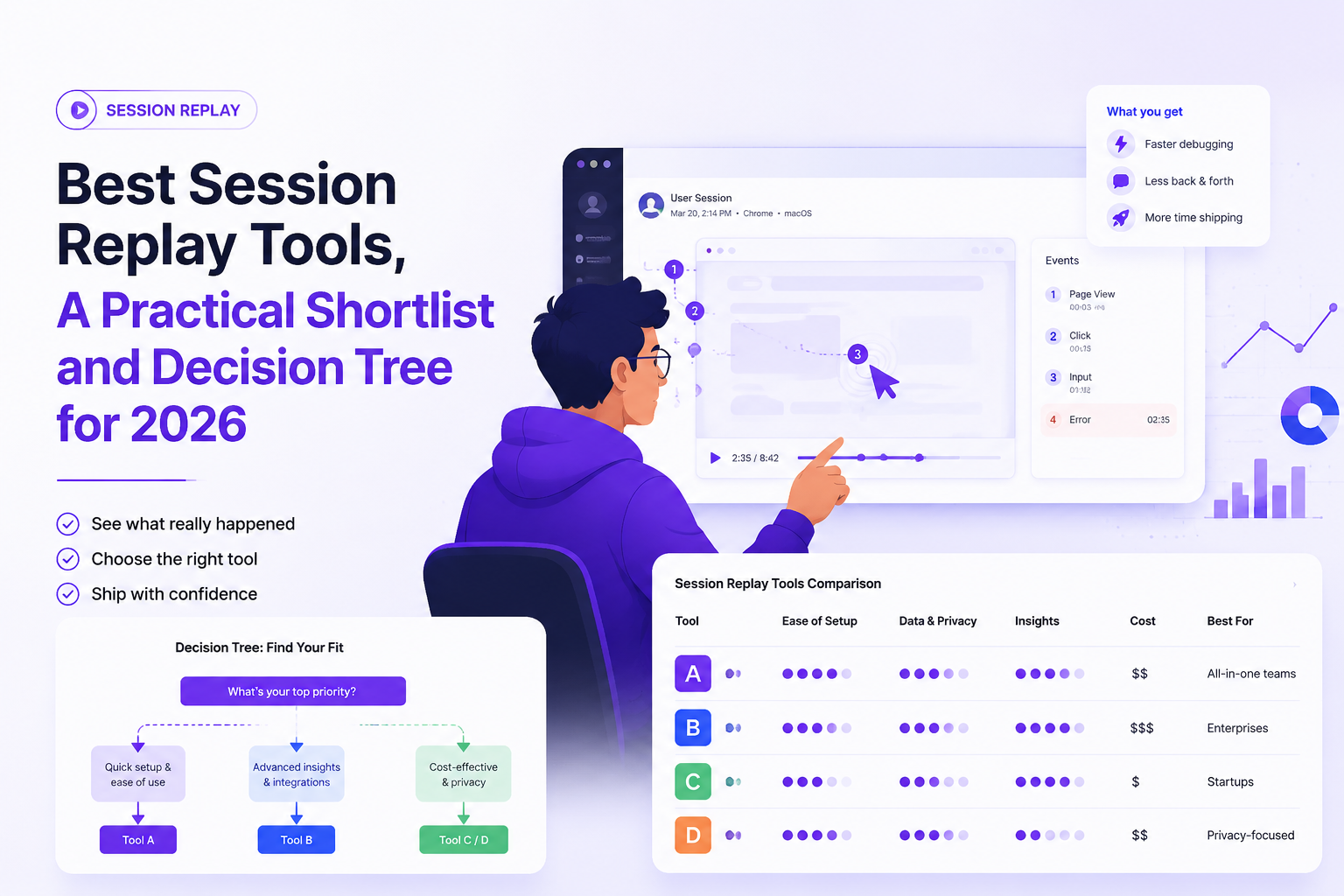
| Category | Best for | Typical strengths | Common tradeoff |
|---|---|---|---|
| Engineering-grade replay | Bug reproduction, triage | Error and request context, workflow integrations | Less built-in product analytics depth |
| Analytics-led replay | Funnels, cohorts, feature adoption | Events + replay drill-down, segmentation | Replay may be less “forensic” for debugging |
| CRO and UX suite | Heatmaps, form analysis, research | Qual + quant UX tooling | Not optimized for engineering evidence |
| Privacy-first/self-hosted | Data control, residency constraints | Ownership of storage and access | Operational burden and maintenance |
Community picks from Reddit and GitHub, what practitioners complain about
Practitioner feedback on best session replay tools clusters around setup friction, data control, and long-term maintainability more than playback quality.
Recurring complaints to watch for in reviews
- “Setup was easy until privacy”: teams underestimate how much time masking rules take, especially for complex forms and embedded widgets.
- “We can’t find the session we need”: replay without good indexing by user ID, errors, and key events becomes a time sink.
- “Vendor lock-in via proprietary replay format”: exporting replays or migrating can be difficult; ask what “export” actually means (raw events vs video vs link-only).
- “Open-source went stale”: for OSS options, check release cadence, issue triage speed, and whether core replay libraries are actively maintained.
A practical way to validate claims during a trial
- Run a web session replay trial on one critical flow and one messy flow (lots of dynamic UI), then compare how quickly an engineer can go from “user hit a problem” to “I can reproduce it.”
- Test your support workflow: can support attach a replay link to a ticket with correct permissions and masking?
- Document your “day-2” tasks: sampling rules, retention, and access reviews, then decide if you can sustain them.
If you want a more explicit step-by-step for investigations, align the trial to a written session replay workflow so the tool is judged on the real handoffs, not on a polished demo project.
FAQ
If your replay stack helps you see what happened but you still lose time turning sessions into actionable, reproducible issues, Flash Log can be added on top to automatically capture bugs (even when users never report them) and classify them so engineering can triage faster. Try it on one critical flow this week, define what “repro-ready” means for your team, and compare the before-and-after handoff quality.

Escalation Policy Template And Matrix For On-Call Teams
Use a practical escalation policy template and SEV matrix with timelines, roles, and targets to reduce missed pages and time-to-ack.

Anomaly Detection With Machine Learning, A Practical Playbook For Reducing Alert Noise
Anomaly detection with machine learning without alert noise: choose setup, build features, calibrate thresholds, evaluate incidents, ship safely.
Log Filtering That Actually Reduces Noise, A Practical Framework and Cheat Sheet
A practitioner framework for log filtering that reduces noise without losing forensic signal, plus a cross-tool cheat sheet and validation checklist.