
Unhandled Exceptions Explained, How They Happen and How to Fix Them
Unhandled exceptions are runtime errors that propagate to the top of a program without being caught, often crashing the process or breaking a user flow, and they are one of the fastest ways to turn a small bug into a production incident.
- “Unhandled” is about propagation, not severity: an exception becomes unhandled when no code catches it before it reaches the runtime boundary.
- Stop chasing the wrong signal by separating handled, first-chance, user-unhandled, and truly unhandled exceptions.
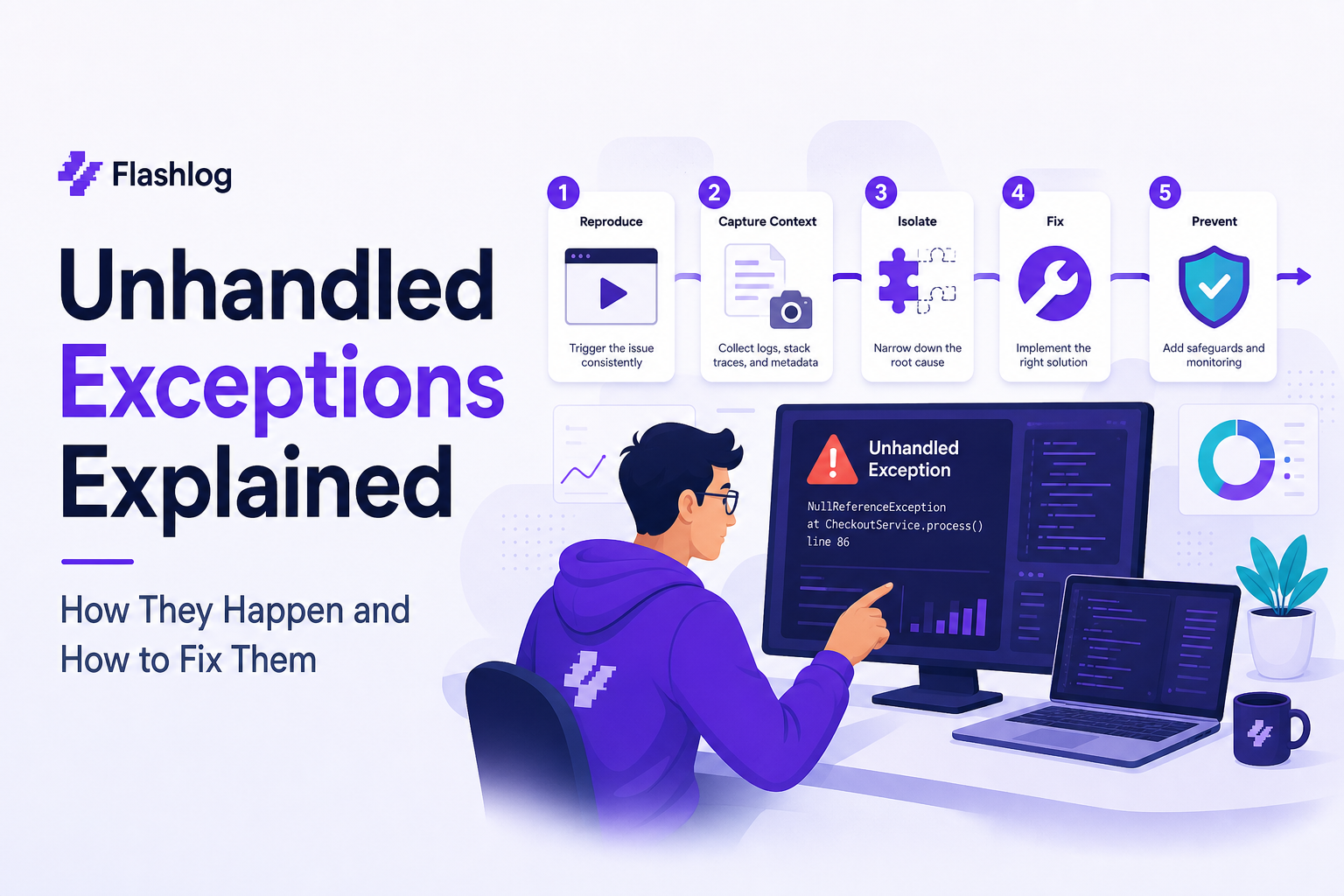
- A repeatable troubleshooting flow is: reproduce, capture the full stack trace plus context, isolate environment and inputs, validate dependencies, then confirm the fix with a regression guard.
Unhandled Exceptions 101, What They Are and Why They Crash Apps
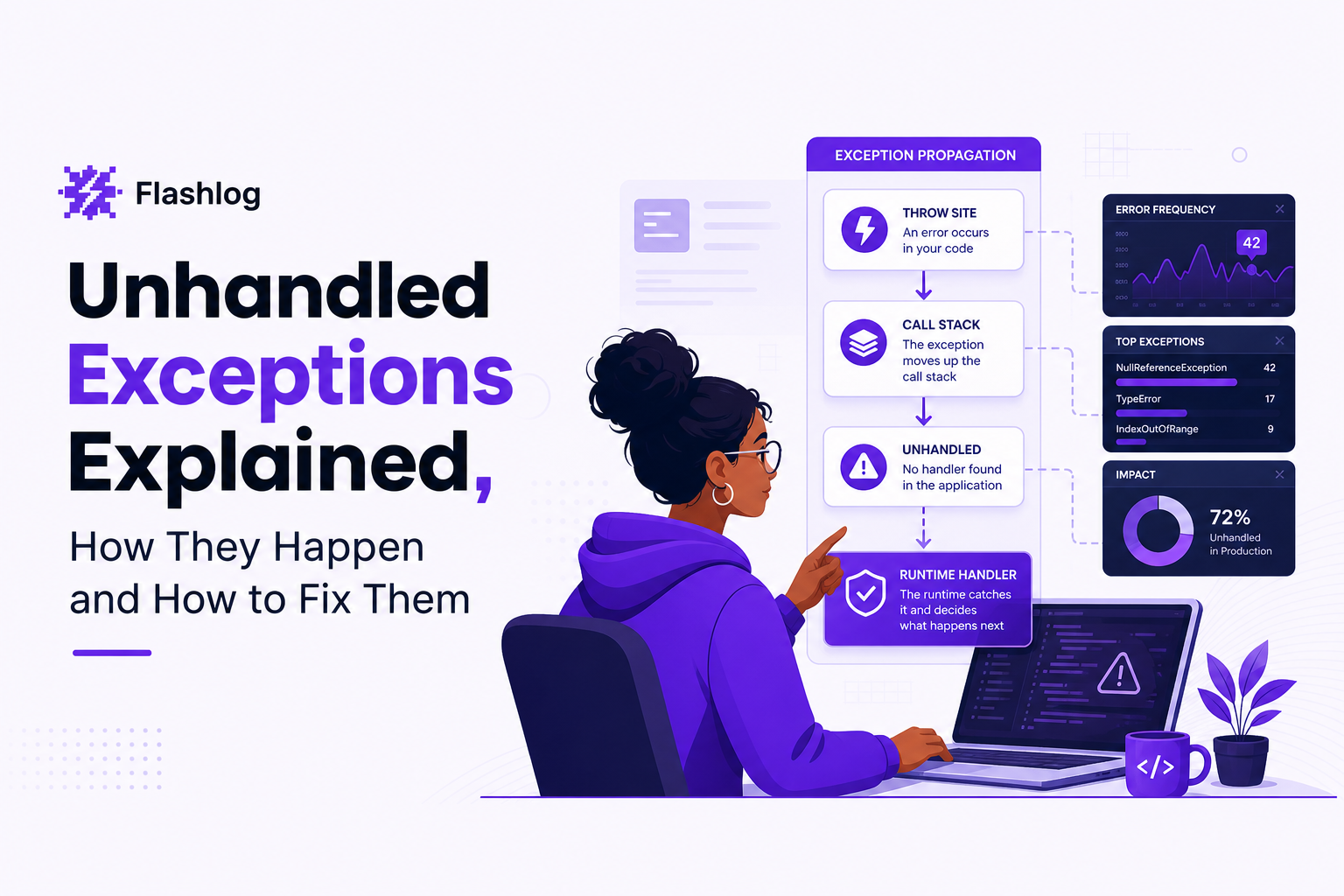
Unhandled exceptions happen when an error is thrown and no catch boundary handles it before control reaches the runtime’s last-resort handler.
Exceptions vs unhandled exceptions in plain terms
- Exception: an error object plus a call stack that interrupts normal control flow.
- Handled exception: code catches it (try/catch, catch block, middleware) and either recovers or converts it to a safe result (like an HTTP 4xx/5xx response).
- Unhandled exception: nothing catches it in the current execution context, so the runtime treats it as fatal (common in server processes) or breaks the user experience (common in browsers).
How propagation works (why “top of stack” matters)
- A function throws (or a promise rejects).
- The runtime unwinds the call stack, looking for the nearest handler.
- If it finds one, the exception is handled and execution continues from that handler.
- If it finds none, the runtime triggers a global handler. Depending on the platform, the process may terminate, the request may fail, or the UI may stop responding.
What the real-world impact looks like
- Backend: request drops, worker restarts, partial writes, or stuck queues if retries are misconfigured.
- Frontend: blank screens, broken navigation, or silently failing actions (for example, checkout button does nothing after a JS error).
- Mobile/desktop: app termination if the platform treats the exception as fatal.
In practice, the cost is not just “a crash”; it is the time lost reconstructing what the user did, what request failed, and what environment triggered the failure.
Stop Confusing These Signals, First-Chance vs Handled vs User-Unhandled vs Unhandled
Debuggers and runtimes surface different “exception events,” so the same bug can look like a crash in production but only a breakpoint in development.
Four terms that teams mix up
- First-chance exception: the runtime notifies the debugger when an exception is thrown, before any catch blocks run. Many exceptions are thrown and then handled normally.
- Handled exception: an exception that is caught by application code or framework middleware and converted into a controlled outcome.
- User-unhandled exception (common in Visual Studio): the exception is handled by framework code, but not by your code, so the debugger breaks to show you where it originated.
- Unhandled exception: no handler exists in the execution context; the runtime’s last-resort handler runs (often terminating the process).
A quick interpretation checklist (so you do not chase noise)
- Did the process terminate? If yes, treat it as truly unhandled (or fatal) until proven otherwise.
- Did the request fail but the process stayed up? Likely handled at a boundary (framework), but still an actionable bug.
- Did the debugger break but the app continues after you hit “Continue”? Often first-chance or user-unhandled, not necessarily a production crash.
- Is the same exception name repeating with different stacks? That is frequently a symptom of one root cause plus many call sites.
What surprised our team was how often “user-unhandled” in dev led people to add random try/catch blocks, when the real fix was to validate inputs earlier and let a single boundary handler produce a safe error response.
A Step-by-Step Troubleshooting Flow to Fix Unhandled Exceptions
A reliable way to fix unhandled exceptions is a short decision flow that forces you to capture a reproducible stack trace plus the minimum production context before changing code.
Step 1: Reproduce with a smallest-possible scenario
- Reproduce on the same release version and configuration if possible.
- Reduce to the smallest input that still fails (one request payload, one URL, one UI action).
- If it is intermittent, capture frequency signals: “1 in 20 checkouts” is more useful than “sometimes.”
Step 2: Capture a complete stack trace (and verify it matches the crash)
- Get the stack trace from the failing moment, not from a later retry.
- Confirm the top frame is where it was thrown, and the bottom frames show the boundary where it escaped (request handler, event loop, UI callback).
- Record whether it is synchronous (thrown) or async (promise rejection, callback error).
Step 3: Isolate environment, configuration, and permissions
- Environment: OS, browser/runtime version, device type, container image tag.
- Config: feature flags, API base URL, timeouts, region, build mode.
- Permissions: missing filesystem rights, expired tokens, CORS, blocked third-party cookies.
After running several “works on my machine” audits, the pattern was clear: mismatched config between staging and production caused more unhandled exceptions than code regressions, especially around timeouts and missing env vars.
Step 4: Validate dependencies and boundaries
- Check upstream responses (schema changes, new 500s, auth failures).
- Confirm database migrations and backward compatibility.
- Verify that a boundary handler exists where it should: web middleware, job runner wrapper, UI error boundary.
Step 5: Fix, then add a regression guard
- Add a unit test for the smallest failing input.
- Add an integration test at the boundary (HTTP handler, queue consumer, UI action).
- Add a “should never happen” alert only after you confirm the exception is truly unexpected, otherwise you create noisy paging.
JavaScript Unhandled Exceptions in Browser and Node, Global Handlers You Can Copy
JavaScript needs explicit global handlers because unhandled exceptions in event callbacks and unhandled promise rejections can fail silently or terminate a Node process depending on settings.
Browser: capture errors and promise rejections
Use both window.onerror and window.onunhandledrejection because many modern failures are promise-based.
// Browser global error handler
window.addEventListener('error', (event) => {
  // event.error may be undefined for some cross-origin script errors
  const err = event.error;
  const payload = {
    message: event.message,
    filename: event.filename,
    lineno: event.lineno,
    colno: event.colno,
    stack: err && err.stack ? String(err.stack) : null,
    type: 'window.error'
  };
  // Send to your logging endpoint (avoid blocking the UI)
  navigator.sendBeacon?.('/client-error', JSON.stringify(payload));
});

// Browser unhandled promise rejection handler
window.addEventListener('unhandledrejection', (event) => {
  const reason = event.reason;
  const payload = {
    message: reason && reason.message ? reason.message : String(reason),
    stack: reason && reason.stack ? String(reason.stack) : null,
    type: 'unhandledrejection'
  };
  navigator.sendBeacon?.('/client-error', JSON.stringify(payload));
});
Node.js: log, then shut down safely for uncaught exceptions
In Node, an uncaughtException can leave the process in an unknown state, so the safest default is to log, stop accepting new work, and exit after flushing.
// Node.js global handlers
process.on('uncaughtException', (err) => {
  console.error('uncaughtException', err);
  // stop accepting new connections, flush logs, then exit
  // server.close(() => process.exit(1));
  process.exit(1);
});

process.on('unhandledRejection', (reason) => {
  console.error('unhandledRejection', reason);
  // Decide policy: treat as fatal, or escalate to metrics + alerting
});
Safety rules for global handlers (to avoid making things worse)
- Do not swallow everything. Use global handlers to capture context, not to pretend the app is healthy.
- Do not log secrets. Mask tokens, passwords, and payment fields before sending client error payloads.
- Correlate with requests. Attach a request ID or session ID so you can connect frontend errors to backend failures using log correlation.
Common Unhandled Exception Types Across Languages, A Quick Mapping Table
Most unhandled exceptions reduce to a small set of root causes, so mapping “what happened” to “what exception name you see” speeds triage across stacks.
Root cause mapping table
| Root cause | .NET | Java | Python | JavaScript |
|---|---|---|---|---|
| Null / missing value | NullReferenceException | NullPointerException | TypeError (None) | TypeError (cannot read property of undefined/null) |
| Index out of range | IndexOutOfRangeException | IndexOutOfBoundsException | IndexError | RangeError (or undefined access) |
| Type mismatch / cast | InvalidCastException | ClassCastException | TypeError | TypeError |
| I/O or missing file | IOException / FileNotFoundException | IOException / FileNotFoundException | OSError / FileNotFoundError | ENOENT (Node), NetworkError (browser) |
| Timeout / network failure | TaskCanceledException / TimeoutException | SocketTimeoutException | TimeoutError / requests exceptions | AbortError, fetch TypeError, ETIMEDOUT (Node) |
| Permission / auth | UnauthorizedAccessException | SecurityException | PermissionError | 403/401 surfaced as app error, EACCES (Node) |
How to use the table during triage
- Classify the exception into a root cause row (null, index, I/O, type, timeout, permission).
- Check whether the failure is data-driven (one user/input) or environment-driven (one browser/region/release).
- Decide the next artifact to collect: request payload, feature-flag state, upstream response, or environment details.
Prevent Recurrence, What Context to Collect in Production for Faster Debugging
Production debugging gets dramatically faster when every crash report includes a minimal “reproduction packet” rather than only an error message.
The minimum context checklist (collect this first)
- Release identifier: version, commit SHA, build number, feature-flag snapshot.
- User journey breadcrumbs: last 10 to 30 meaningful actions (navigation, clicks, submits).
- Failing request context: method, URL, status, duration, and a redacted payload schema.
- Environment: browser/runtime, OS, device, viewport, locale/timezone, network type.
- Correlation IDs: request ID, session ID, trace ID so logs and metrics join cleanly.
Alerting patterns that reduce noise
- Alert on new exception fingerprints (new stack signature) rather than raw counts.
- Page only when user impact is clear: error rate threshold, failed checkouts, or elevated 5xx.
- Route the rest into structured issue triage so engineers review with context, not panic.
Where teams usually lose the most time
In our experience working with product engineering teams, the slowest part is not the fix; it is reconstructing steps to reproduce after the fact, especially when users do not report the problem or cannot remember what they clicked.
If you are frequently forced to debug in production, consider automating the capture of journey, failing request, and environment context so unhandled exceptions arrive with the evidence you would otherwise ask support to collect.
FAQ
If you want a low-friction way to capture and classify unhandled exceptions in production, Flash Log can automatically capture bugs even when users do not report them, then attach the user journey, failing request, environment, and privacy-masked replay context so engineers can reproduce faster starting with a small service or feature area.

Outlier Identification That Works, The 1.5 IQR Rule, Method Selection, and Excel Steps
Practical outlier identification workflow using 1.5×IQR, plus method selection (Z, MAD, Grubbs/ESD) and Excel formulas to label outliers.

Bug Tracking Software for Support Teams - A Proactive Intake and Triage Framework
Bug tracking software for support teams: a proactive intake and triage workflow, severity standards, and tool scorecard to prevent backlogs.

Debug In Production Without Panic, A Safety-First Workflow for Live Issues
Learn how to debug in production safely with a containment-first workflow, guardrails, and checklists to fix live issues fast.