
Bug Tracking Software for Support Teams - A Proactive Intake and Triage Framework
Bug tracking software works best for support teams when it is paired with a proactive intake and triage workflow that turns scattered customer signals into engineer-ready issues before users formally report them.
- Run a single intake-to-triage workflow with clear owners and time SLAs so bugs do not stall in “needs info”.
- Standardize fields, severity vs priority rules, and lifecycle states so every ticket becomes actionable without back-and-forth.
- Choose bug tracking software using a support scorecard: setup friction, integrations, automation, reporting, and noise-controlled notifications.
Quick answers to common bug tracking tool questions
Bug tracking software is usually “good enough” when it supports consistent fields, a triage queue, and integrations your support team already uses, even if it is not marketed as a dedicated bug tool.
Jira for support-led bug tracking
- Use it? Yes.
- Best for: Cross-team workflows where engineering wants custom fields, statuses, and reporting.
- Limits to plan around: Setup can get heavy, and support often needs a lighter front door (forms, email parsing, or a separate intake) to avoid inconsistent tickets.
GitHub Issues for support-led bug tracking
- Use it? Yes, if engineering lives in GitHub.
- Best for: Repo-native teams that want bugs close to code and PRs.
- Limits to plan around: Non-technical reporters struggle without templates, forms, and strict labeling. If you go this route, decide early on a bug tracker github workflow so intake does not become a dumping ground.
Bugzilla for support-led bug tracking
- Use it? Yes, but selectively.
- Best for: Teams that want a mature, structured bug database and can invest in process discipline.
- Limits to plan around: UX and onboarding can be harder for support and non-engineering stakeholders; you may need a separate support intake form to populate it.
MantisBT for support-led bug tracking
- Use it? Yes, for smaller teams that want self-hosted simplicity.
- Best for: Lightweight, straightforward tracking with fewer moving parts.
- Limits to plan around: Reporting and automation depth may be limited compared to broader suites; plan a manual triage cadence.
The support-led bug intake workflow that prevents backlogs
A backlog stays manageable when every incoming bug signal is forced through the same four-step intake-to-triage path with explicit ownership and “next action” rules.
Step 1: Define your intake sources and normalize them into one queue
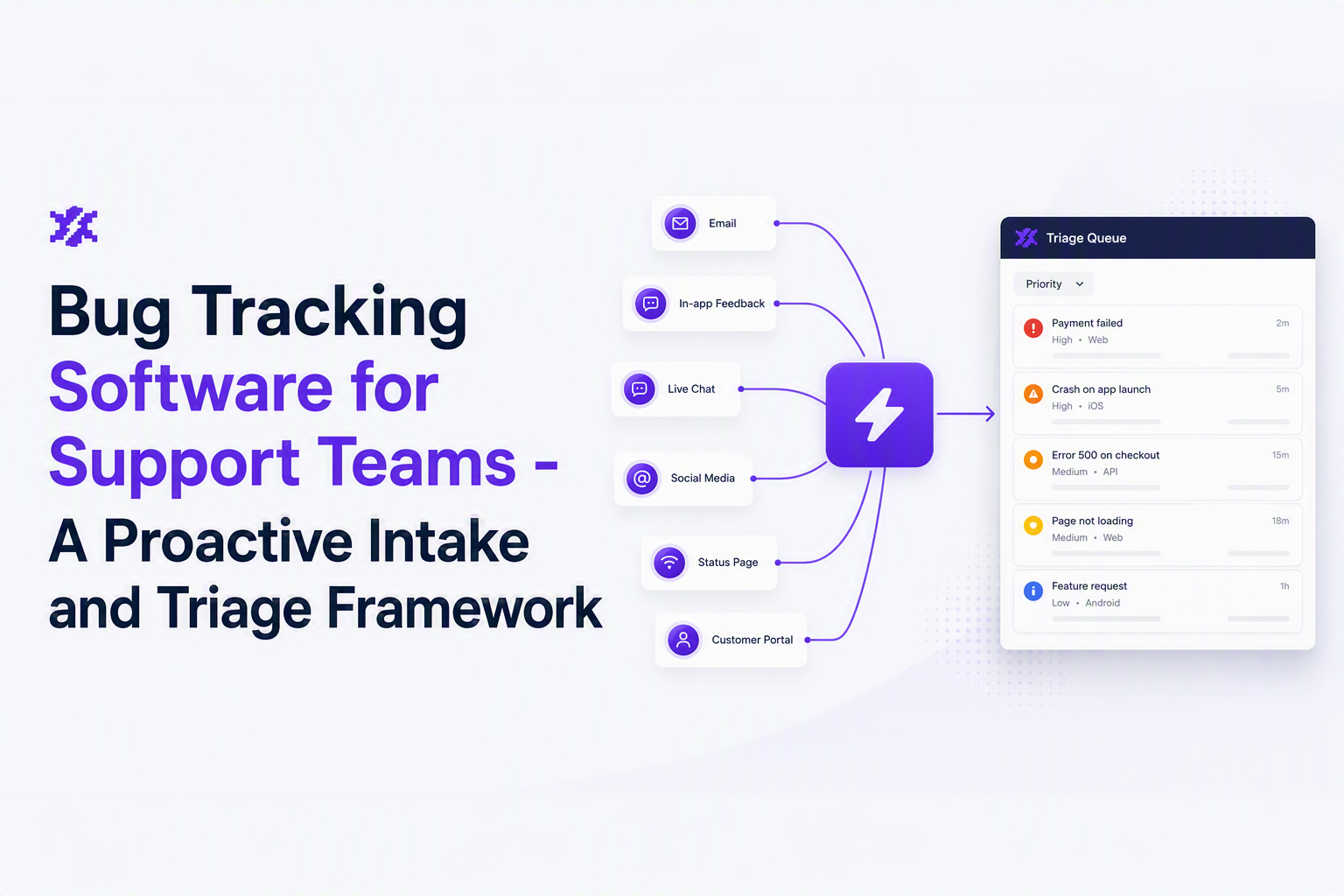
Support teams typically juggle multiple inputs, and the failure mode is “each channel becomes its own tracker.” Normalize everything into one intake queue (not the engineering backlog) so triage is the gate:
- Human-reported: chat, email, calls, in-app feedback, social.
- System-reported: logs, crashes, monitoring alerts, synthetic checks.
- Account-reported: CSM notes, renewals risk, escalations.
In our experience working with support ops teams, the fastest way to cut chaos is to forbid “direct creation” into the engineering board unless a ticket already passes a minimum field checklist (see the next sections).
Step 2: Apply a 15-minute triage SLA with a simple disposition
Set a short SLA for first triage touch, then require one of four dispositions so tickets never idle:
- Confirmed bug: Create or link to a tracked issue.
- Needs info: Ask a single, concrete question and set a deadline.
- Duplicate: Link to existing issue and add impact context.
- Not a bug: Route to product question, billing, or known limitation.
A practical implementation detail: make “Needs info” auto-expire after 3 business days into “Closed: no reproduction,” but allow reopening if new reproduction data arrives. That one rule prevents slow backlogs.
Step 3: Route ownership using a two-lane model
- Support owns: intake quality, customer impact, environment details, and reproduction attempts.
- Engineering owns: technical diagnosis, fixes, and release notes back to support.
Handoff point: engineering should only receive tickets that are either reproducible or clearly tagged as “production-only, needs investigation” with logs and context attached. If you need a faster standard, use a lightweight issue triage checklist for what qualifies as “investigable.”
Step 4: Prevent alert spam by alerting on pressure, not events
Support-led operations break when every exception becomes a ping. Instead, configure notifications to fire when “issue pressure” becomes meaningful, for example “P1 open issues >= 5,” rather than on every incoming error event. That creates a triageable moment instead of constant interruption, and it aligns with how support experiences risk: a pattern that affects customers, not a single stack trace.
Bug report quality in software testing, fields, severity standards, and lifecycle
Bug tracking software only improves cycle time when every bug record contains a consistent set of fields, a severity vs priority decision, and a lifecycle that matches how work actually moves.
A reusable bug report template support can fill in
Copy this template into your tracker, form, or intake tool and require it for “Confirmed bug” creation:
- Title: [Action] + [Result] + [Where]. Example: “Checkout fails with 500 on coupon apply in web app”.
- Customer impact: # of customers affected (if known), plan tier, revenue risk tag (Low/Med/High).
- Environment: app version, device, OS/browser, region, account ID (if allowed).
- Observed behavior: exact message, screenshot, time range, correlation ID if available.
- Expected behavior: one sentence, testable.
- Reproduction: steps and test data; if not reproducible, state what was tried.
- Artifacts: video, console output, logs, HAR file, crash report.
If your team struggles to keep reproduction consistent, standardize reproduction steps into a fixed 5-part format so engineers do not have to guess what “step 3” means.
Severity vs priority matrix support and engineering can share
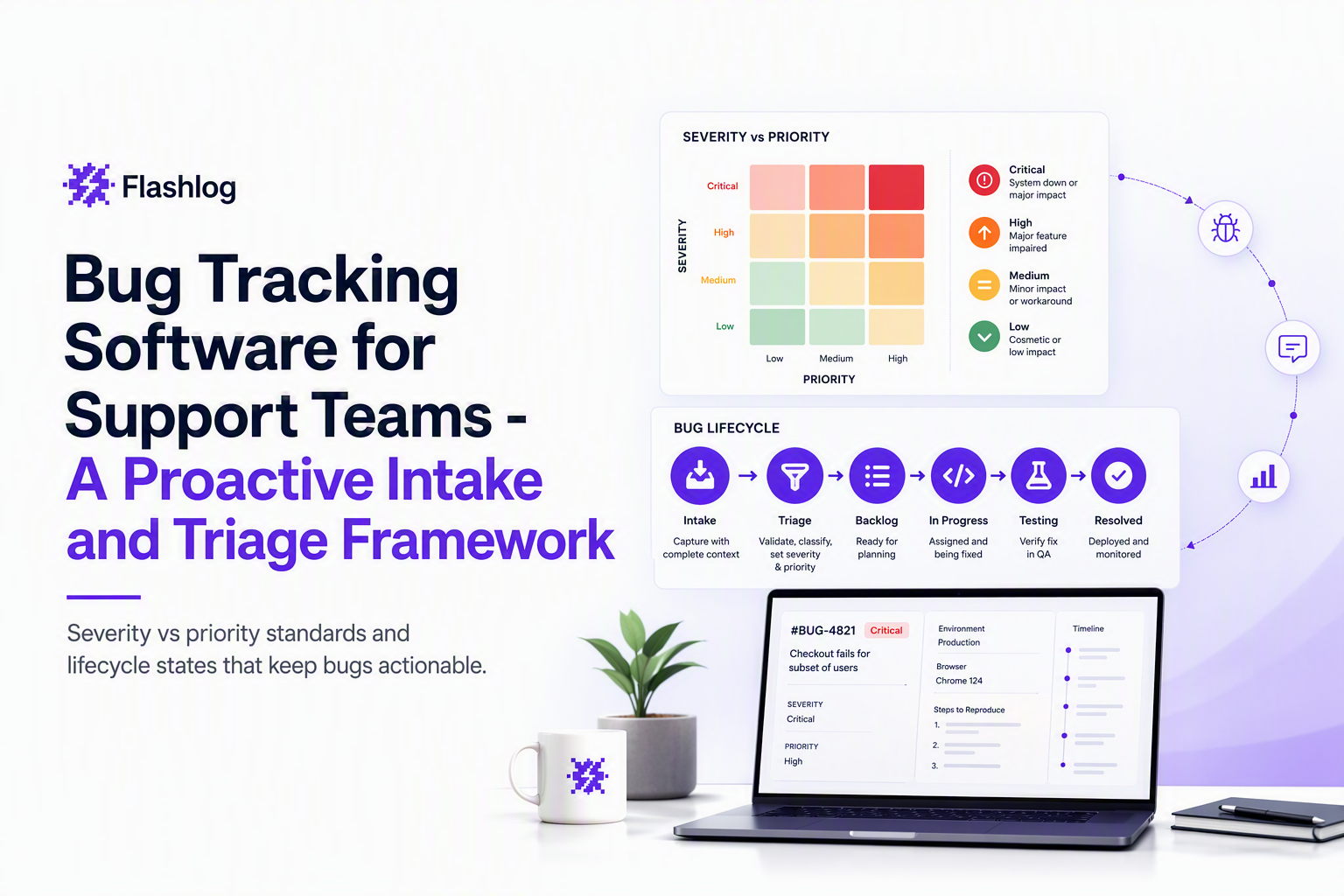
Severity describes user harm; priority describes when the team will act. Use a visible matrix so decisions are predictable:
| Severity \ Priority | P1 (Immediate) | P2 (Next) | P3 (Later) |
|---|---|---|---|
| S1 Critical Data loss, payments blocked, security risk |
Any S1 with active customers impacted | S1 with workaround, low volume | Rare edge with clear mitigation |
| S2 Major Key feature broken, significant degradation |
High-volume accounts, no workaround | Medium volume or workaround exists | Low volume, cosmetic side effects |
| S3 Minor Cosmetic, confusing UX, small defect |
Only if it blocks a top funnel path | If it clusters with other defects | Default |
What surprised our team was how much conflict disappears when support is allowed to set severity based on customer harm, while engineering sets priority based on delivery risk and capacity. The tracker should store both, not force one field to do two jobs.
A lifecycle that avoids “stuck in progress”
A simple lifecycle any bug tracking software can support is below, with a clear “who acts next” at every stage:
- Intake (Support): new signals land here.
- Triage (Support): confirm, dedupe, request info, or close.
- Ready for engineering (Support): meets field checklist, has artifacts.
- Investigating (Engineering): diagnosis in progress.
- Fix in progress (Engineering): assigned to a change.
- Released (Engineering): version, rollout notes captured.
- Customer follow-up (Support): notify reporters, close loop.
How to choose bug tracking software for support teams
Bug tracking software is the right fit for support when it minimizes intake friction while still producing structured, reportable issues that engineering trusts.
A support scorecard you can use to shortlist tools
Score each category from 1 (weak) to 5 (strong), then set a “must-pass” threshold for the top three categories that matter to your org.
- Intake UX and setup friction: Can support create consistent issues quickly? Are forms/templates enforceable?
- Field model and workflow control: Custom fields, required fields, status rules, and clear ownership.
- Integrations: Email, chat, CRM, and repo connections. If you already have a software bug tracking system, check whether support can work without a separate license layer.
- Automation: Deduping support tickets, rules to route by product area, and auto-linking to known issues.
- Reporting: Open issue count by priority, time-to-triage, time-to-first-engineering-touch, and reopen rate.
- Notifications and noise control: Can you alert on thresholds and routes (chat plus email) without spamming every event?
Two decision rules that prevent expensive tool mistakes
- If engineering refuses to leave the repo, pick a repo-native tracker and invest in intake templates and a triage queue so support can operate without becoming a labeling clerk.
- If support needs strong cross-product reporting, prioritize the field model and reporting first, then add repo links second. You can always integrate code later; you cannot retroactively fix messy fields.
One pragmatic “pilot” benchmark
Run a two-week pilot where support uses the tool and process on live tickets, then review three measurable outputs: (1) % of tickets deduped, (2) median time from intake to “Ready for engineering,” and (3) % of engineering tickets that bounce back for missing info. After running audits like this, the pattern was clear: the best tool is the one that reduces bounce-backs, even if it is not the most customizable.
A segmented bug tracking tools list by category
Bug tracking software categories map to different support realities, so the fastest shortlist comes from matching your intake sources and stakeholders to the right tool class.
Category matrix and best-fit scenarios
| Category | Best for | Watch-outs | Support workflow note |
|---|---|---|---|
| Repo-native (GitHub/GitLab) | Engineering-first teams shipping fast | Support needs templates, labels, forms | Keep a separate intake queue and only promote confirmed issues |
| Work management suites (Jira-like) | Cross-team visibility and reporting | Over-customization, admin overhead | Lock required fields and standardize statuses to avoid drift |
| Open-source trackers | Self-hosted needs and process discipline | UX can be rough for non-engineers | Use forms and training to keep quality consistent |
| Visual feedback and session capture | UI bugs, reproduction friction, web apps | Can become a parallel tracker if not integrated | Auto-attach artifacts but still enforce severity and lifecycle |
| Dedicated bug tooling | QA-heavy orgs with structured testing | May not fit support intake natively | Ensure it supports customer impact fields and routing |
If you want a broader shortlist and a decision matrix, compare categories using this guide to bug tracking tools so you do not evaluate everything as if it were the same product.
AI in bug tracking, what to buy vs what to integrate
AI helps support teams most when it automates intake capture, classification, and deduping before a ticket hits the engineering backlog, rather than trying to “solve” debugging inside the code editor.
Four AI capabilities that matter for support operations
- Proactive capture: detect failures even when users do not report them, so support can triage before tickets spike.
- Classification: tag by product area, platform, and probable severity based on context and patterns.
- Grouping and dedupe: collapse repeated failures into one issue with growing “pressure,” which keeps dashboards honest.
- Noise control: ignore rules for known junk and expected business errors so alerts represent real risk.
Buy vs integrate decision checklist
- Buy an AI intake layer if you lack consistent logging and support loses time recreating context; the goal is faster time-to-triage and fewer missed bugs.
- Integrate point AI features if your tracker already has strong workflows and you only need assistive labeling or suggestions.
A practical line to draw: if AI output cannot be expressed as a structured field update (labels, severity suggestion, grouped issue link) that your bug tracking software already understands, it will create a second truth that support cannot operationalize.
| Workflow stage | What to automate | What to keep human-owned | Tool requirement |
|---|---|---|---|
| Intake | Capture context, attach logs/artifacts | Customer impact summary | APIs or connectors into your tracker |
| Triage | Dedupe, grouping, suggested tags | Severity assignment | Rules, labels, linkable issues |
| Notification | Threshold-based alerts by priority | Escalation judgment | Configurable routes and templates |
| Engineering | Pre-filled reproduction context | Root cause and fix | Clean handoff into the engineering board |
FAQ
If you want to pilot a proactive intake layer alongside your existing bug tracking software, Flash Log can automatically capture and classify bugs even when users do not report them, then group repeat failures into engineer-ready issues so support can triage earlier and reduce missed production bugs.
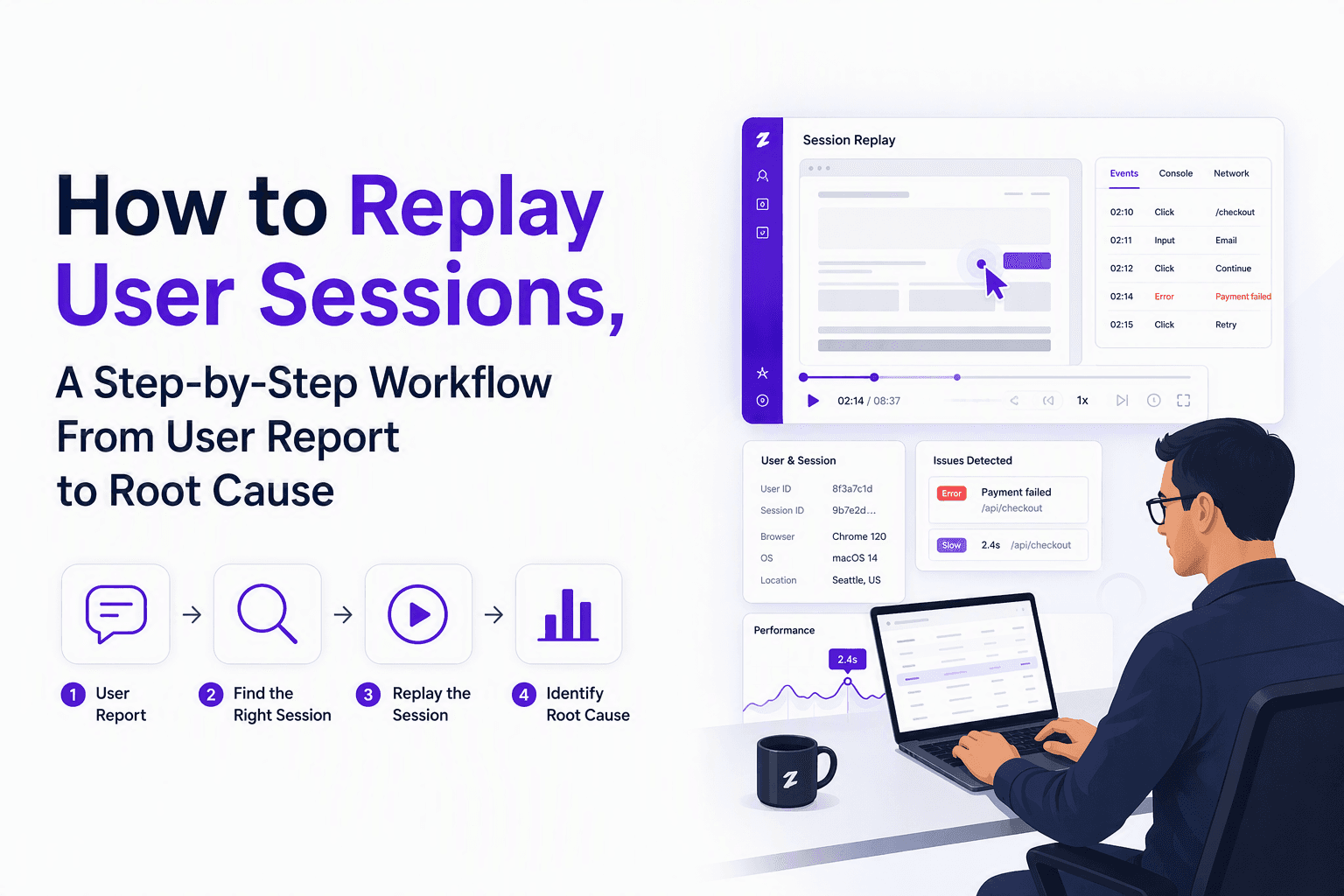
How to Replay User Sessions, A Step-by-Step Workflow From User Report to Root Cause
Learn how to replay user sessions with a practical workflow: find the right session, review signals, document findings, and share safely.

Software Defect Tracking Tools, 7 Options for Proactive Bug Detection
Compare software defect tracking tools for support-led workflows, proactive capture, automated triage, routing, and reporting. A shortlist with fit criteria.
Issue Tracking Software for Support Teams, A Decision Framework and Workflow Blueprint
Choose issue tracking software for support-led bug intake using a decision matrix, workflow blueprint, and proactive detection layer for faster triage.