
A Bug Tracker GitHub Workflow That Scales Without Turning Issues Into a Graveyard
If you want a bug tracker github setup that engineers actually trust, you need more than “open an Issue and add labels.” GitHub can work extremely well for bug tracking, but only if you design a workflow that prevents duplicate reports, missing context, and an ever-growing backlog of half-triaged issues.
- GitHub can be a solid bug tracker when you enforce a lightweight intake and triage SLA, plus a minimal label taxonomy tied to ownership.
- The biggest failure mode in a bug tracker github setup is the context gap: users do not report bugs, and reports that do arrive lack reproduction details.
- Measure workflow health with five metrics (time-to-triage, time-to-close, reopen rate, aging, and duplicate rate) and tune labels, templates, and automation accordingly.
When GitHub Works Well as a Bug Tracker and When It Breaks Down
Decision criteria you can apply in 10 minutes
GitHub Issues works best when your “bug surface area” and “bug volume” are predictable enough that a small set of conventions keeps the system searchable. Use the criteria below to decide whether your bug tracker github workflow needs only discipline, or needs stronger intake and automation.
- Team size
- Works well: 2 to 15 engineers sharing one or a few repos, with clear code ownership.
- Breakdown risk: 15+ engineers across multiple services where “who owns this?” is unclear.
- Product surface area
- Works well: one web app or API with a limited set of user journeys.
- Breakdown risk: web + mobile + realtime + multiple APIs, where bugs are cross-system and hard to reproduce.
- Bug volume signals
- Works well: fewer than ~20 new bug issues per week per repo, and duplicates are rare.
- Breakdown risk: 20 to 100+ weekly bug reports, frequent duplicates, and many issues missing environment details.
The two failure modes that create “Issue graveyards”
- No explicit triage SLA: issues pile up unowned, and engineers stop believing the tracker reflects reality.
- Context gap: even when an issue is real, it lacks reliable reproduction steps, release version, affected users, and failing endpoints. The “fix time” becomes “investigation time.”
A GitHub Bug Management Workflow That Stays Clean Under Real Volume
Workflow map from signal to closed issue
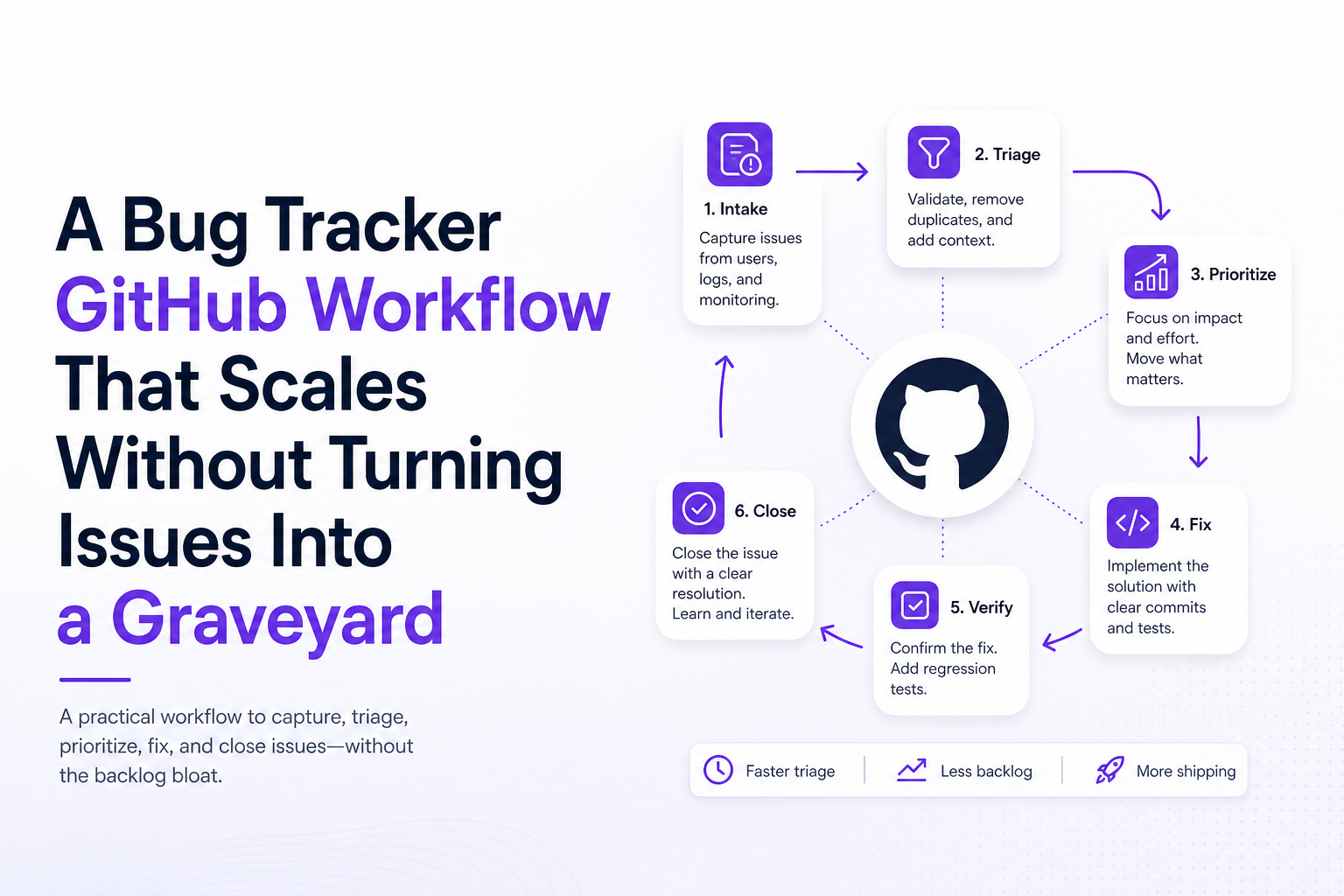
Here is a lightweight end-to-end workflow designed specifically for a bug tracker github setup. It keeps intake fast, triage consistent, and closure measurable without adding meetings.
- Intake: bugs enter GitHub through one of three channels: customer report, internal QA, or production signals.
- Triage (SLA-bound): confirm it is a bug, dedupe, assign severity, and route to an owner.
- Prioritization: decide when it gets fixed (now, next sprint, later) based on impact and cost.
- Fix and verify: link PR, add test notes, verify in prod or staging.
- Close with a reason: fixed, duplicate, cannot reproduce, expected behavior, or won’t fix.
Set two SLAs that prevent backlog rot
- Triage SLA: 1 business day for new bug issues to reach a terminal triage state: Owned, Duplicate, Need info, or Not a bug.
- Need-info SLA: 3 business days. If no response, close with “Need info” and a saved reply explaining how to reopen with required details.
Ownership rules that remove ambiguity
Pick one of these ownership models and document it in your repo CONTRIBUTING.md:
- Component owner: label by area (frontend, api, billing, realtime) and auto-assign to the owning team.
- On-call triager: one rotating engineer owns triage daily, assigns to final owners, and keeps the intake queue empty.
For teams that struggle with signal overload, pair this with a short weekly issue triage review that only looks at: (1) untriaged, (2) critical, (3) aging.
Issue Hygiene in Practice, Labels, Templates, Projects, and Automation That Matter
A minimal label taxonomy you can copy
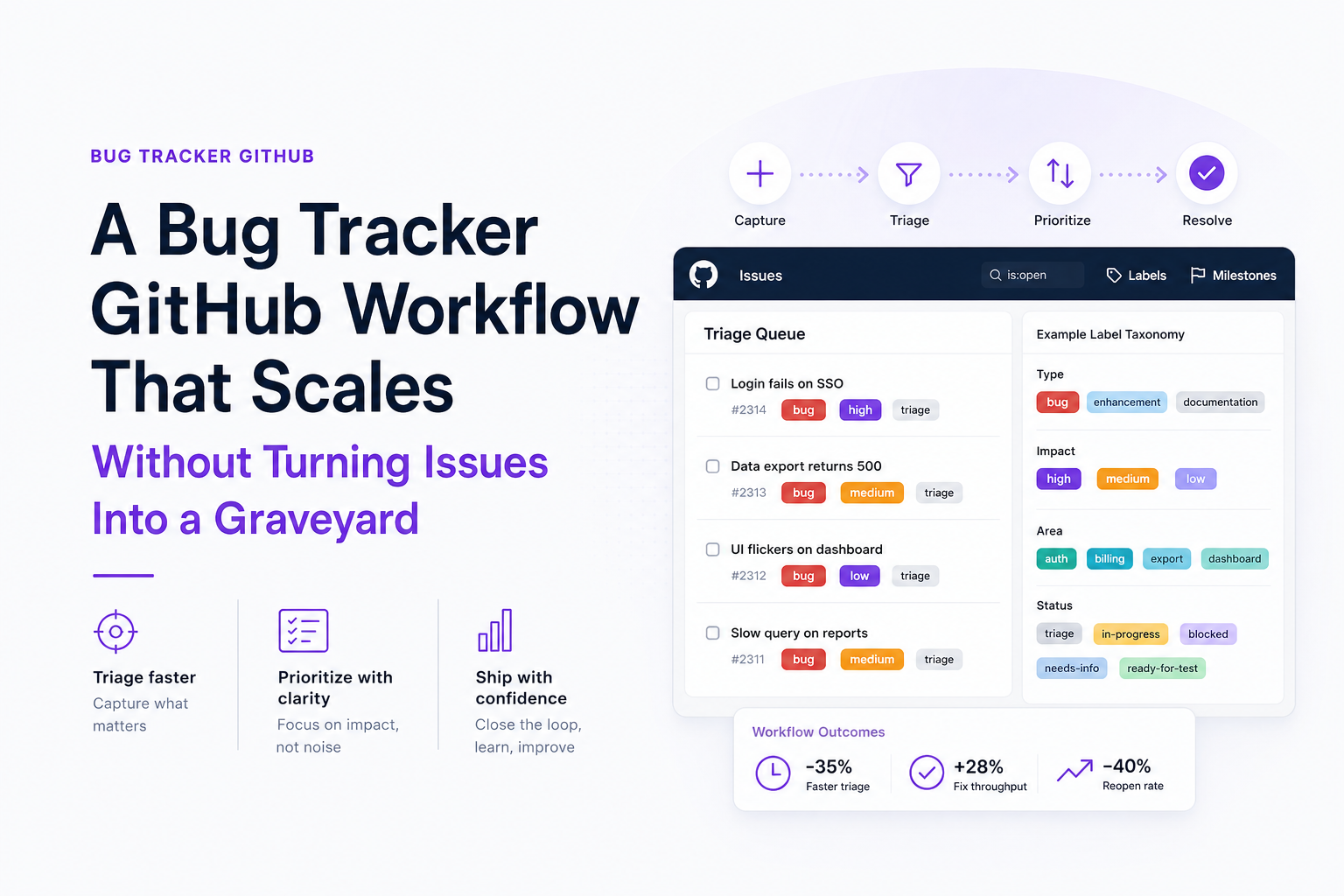
The goal is not to label everything. The goal is to label only what drives an action. This taxonomy is small enough to maintain but strong enough to run reports.
- Type:
type:bug,type:incident,type:task(avoid more than 3) - Status:
status:triage,status:need-info,status:ready,status:blocked - Severity:
sev:1(revenue or core flow broken),sev:2,sev:3 - Area:
area:frontend,area:api,area:realtime,area:auth - Resolution (applied on close):
res:fixed,res:duplicate,res:cannot-repro,res:expected
Issue Forms that enforce the minimum viable context
Use GitHub Issue Forms (YAML) to require fields that make debugging faster. For a bug tracker github workflow, the most valuable required fields are:
- What happened? (one paragraph)
- What did you expect?
- Steps to reproduce (numbered list)
- Environment: browser/OS/device, app version or release SHA
- Impact: how many users, which customer, which endpoint or page
Projects views that keep engineers focused
Create one GitHub Project for bugs only and add two views:
- Intake: filter
label:status:triage label:type:bug, grouped byarea. This is the daily worklist. - Fix queue: filter
label:status:ready label:type:bug, sorted by severity then age.
Two automations that pay off immediately
- Auto-label new issues: if created via bug form, apply
type:bugandstatus:triage. - Stale need-info: if
status:need-infoand no activity in 3 business days, comment with a saved reply and close withres:cannot-repro(or your preferred policy).
If you want a broader buyer-level view of tooling choices around GitHub, see this software bug tracking system guide and this shortlist of bug tracking tools.
The Context Gap, How to Capture Bugs Users Never Report and Still File Great GitHub Issues
Why GitHub-first teams miss the most expensive bugs
Customer-reported bugs are biased toward users who complain. The most expensive bugs are often silent: a checkout submit that fails, a socket message rejected, an API 500 that only happens for a segment, or a frontend exception that breaks a flow. In a bug tracker github setup, these failures do not reliably become issues, and when they do, they arrive without the “trail” engineers need.
The auto-capture to GitHub pattern
A scalable pattern looks like this:
- Capture production failures (network failures, runtime exceptions, realtime disconnects) at the moment they happen.
- Attach the trail: endpoint, status code, release version, browser/OS/device, and user actions leading into the failure.
- Deduplicate before filing: group repeated failures into one issue with an “affected users” count.
- Generate a ticket-ready summary: a short description, likely cause hypothesis, and concrete repro hints.
- Route into GitHub Issues with your label taxonomy and ownership rules already applied.
Where Flash Log fits without changing where engineers work
If you are committed to a bug tracker github workflow but need the missing “capture and context” layer, Flash Log is designed for that gap: it records real production failures (API, frontend, realtime), preserves the path into the bug, redacts sensitive fields, and outputs a structured, ticket-ready issue that can be routed into GitHub Issues. The practical benefit is fewer “cannot reproduce” closures and fewer duplicate issues that differ only by screenshots.
If you are evaluating tooling specifically for production capture, this overview of what to look for in a bug report tool can help you compare approaches.
How to Measure If Your GitHub Bug Tracker Workflow Is Improving
Five metrics and how to calculate them in GitHub
You can track all of the following using GitHub search + Projects fields, or by exporting Issues via the GitHub API. These metrics tell you whether your bug tracker github workflow is getting cleaner or just getting quieter.
- Time to triage (TTT): median time from issue created to first application of
status:ready,status:need-info, or closure with a resolution label. Target: < 1 business day. - Time to close (TTC): median time from creation to close for
res:fixed. Track by severity. Target depends on product, but a common benchmark is sev:1 within 1 to 3 days. - Reopen rate: % of closed bug issues that reopen within 14 days. Target: < 5% for
res:fixed. High reopen rate often means missing repro steps or incomplete verification. - Aging: count of open bugs older than 30/60/90 days, broken down by severity. Target: zero sev:1 older than 7 days.
- Duplicate rate: % of new bugs closed as
res:duplicate. Target varies, but if it is high, your intake is noisy or your dedupe is late.
One simple scorecard to review weekly
Put these in a weekly engineering note (or a Project dashboard):
- New bugs opened (by severity)
- Median time-to-triage
- Sev:1 open count and age
- Duplicates closed
- Top 3 areas by bug volume (area labels)
For industry context on measuring incident and reliability outcomes, many teams align parts of their operational reporting with SRE practices described by Google. See Google’s SRE books for broadly accepted measurement concepts you can adapt to bug workflows.
Implementation Plan, Roll Out in One Sprint Without Disrupting Engineers
Week-by-week rollout checklist
This plan assumes you are already using GitHub and want to upgrade it into a dependable bug tracker github workflow with minimal process overhead.
Week 1: Standardize intake and triage
- Create the bug Issue Form with required fields (environment, steps, impact).
- Create labels: Type, Status, Severity, Area, Resolution (keep it minimal).
- Set triage SLA (1 business day) and assign a rotating triager.
- Create saved replies for “need info,” “duplicate,” and “expected behavior.”
Week 2: Make work visible and enforce hygiene
- Create a GitHub Project for bugs with Intake and Fix Queue views.
- Add automation: new bug form issues get
type:bug+status:triage. - Add automation: stale
status:need-infocloses after 3 business days with a comment. - Define closure rules: every closed bug gets a
res:*label.
Week 3: Close the context gap (optional, high leverage)
- Decide what production failures should become GitHub issues (API 5xx, frontend exceptions, realtime disconnects).
- Implement capture-to-GitHub routing with dedupe and structured context.
- Start with one critical flow (checkout, sign-up, billing) and expand once noise is controlled.
Week 4: Review metrics and tune
- Review the five metrics weekly and pick one bottleneck to fix.
- If duplicates are high, improve dedupe and clarify “known issues.”
- If reopen rate is high, tighten verification steps and require better reproduction detail.
Change management tips that keep adoption high
- Make it easier than the old way: templates and automation should reduce typing, not add it.
- Keep labels boring: if someone needs a legend, you have too many.
- Protect engineer attention: route only confirmed bugs into the Fix Queue; everything else stays in Intake until it is real.
| Workflow step | GitHub feature | Rule that keeps Issues clean | What to measure |
|---|---|---|---|
| Intake | Issue Forms | Require environment + steps + impact | % issues missing required context (should approach 0) |
| Triage | Labels + saved replies | 1-day triage SLA, close need-info after 3 days | Median time-to-triage |
| Prioritization | Projects views | Fix Queue shows only status:ready bugs | Aging by severity |
| Fix | PR links, closing keywords | Every fix links to PR and includes verification note | Time-to-close, reopen rate |
| Closure | Resolution labels | Every close gets res:fixed/duplicate/cannot-repro/expected | Duplicate rate, cannot-repro rate |
FAQ
If you want to keep GitHub as the system of record but close the production context gap, Flash Log can capture real user-impacting failures, package the trail into ticket-ready context, and route one clean issue into GitHub so your bug tracker github workflow stays actionable instead of noisy.
Alert Storm Explained, Causes, Risks, and How To Stop Alert Noise Fast
Learn what an alert storm is, why it happens, and a first-week framework to cut alert noise fast without missing real incidents.

Software Bug Tracking System for Support Teams, A Practical Workflow for Catching Bugs Before Users Report Them
A software bug tracking system workflow for support teams: ticket fields, triage rules, AI capture signals, routing, and metrics to cut backlog.

How to Replay User Sessions, A Step-by-Step Workflow From User Report to Root Cause
Learn how to replay user sessions with a practical workflow: find the right session, review signals, document findings, and share safely.