
Crash Reporting for Support Teams, A Proactive Triage Framework That Reduces Tickets
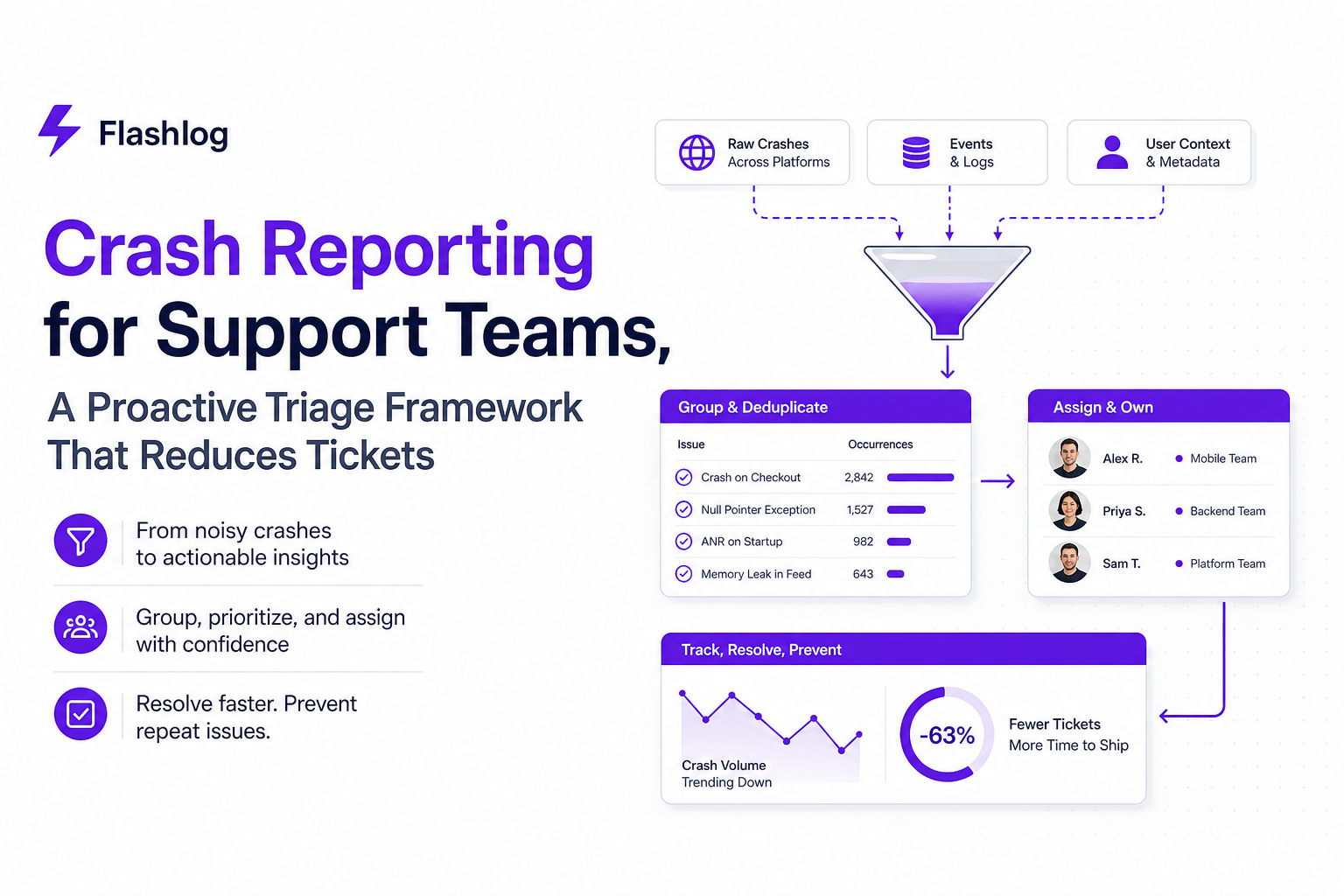
Crash reporting should reduce support load, but in many teams it does the opposite: it creates noisy alerts, unclear ownership, and long back-and-forth for missing context. This guide shows how to turn crash reporting into a proactive bug detection workflow that support can run and engineering can trust.
- Replace “every crash is urgent” with severity rules based on user impact, recurrence, and release timing, then tie each level to an SLA.
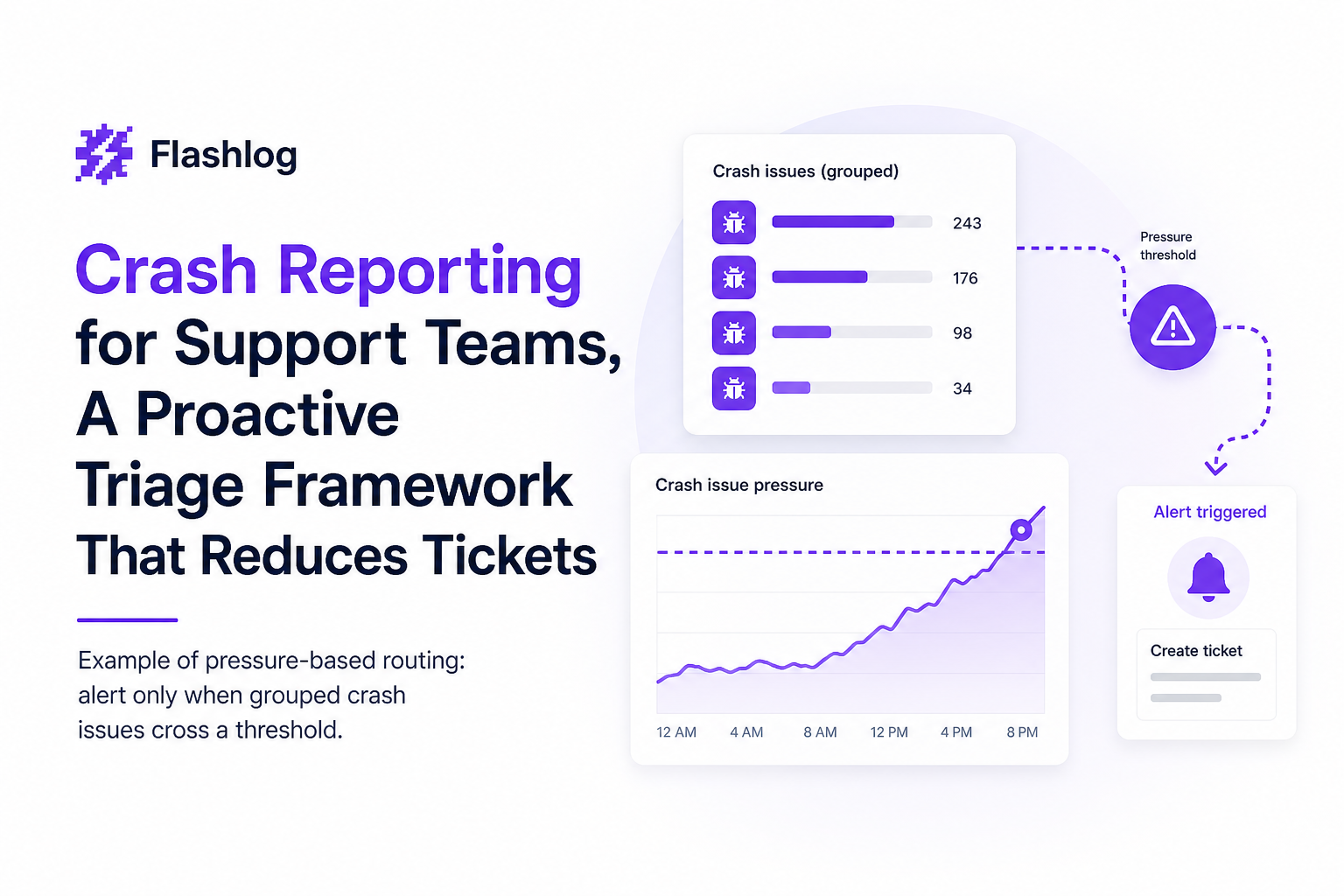
- Dedupe and route crashes by “issue pressure” (grouped repeats) so engineers see one actionable issue, not alert spam.
- Prove ROI with four metrics: time-to-triage, time-to-fix, ticket deflection, and recurrence rate per release.
Why crash reporting fails support teams in practice
Support teams usually inherit crash reporting outputs that were designed for engineers: stack traces, event streams, and raw counts. The result is predictable: support cannot answer “who is affected, how often, and what changed,” and engineering cannot answer “which of these is real and worth interrupting work for.”
Breakdown 1: Missing context creates ticket ping-pong
Most crash reports arrive without the minimum “support context” needed to reproduce or even classify impact. In practice, support needs at least: app version, device/OS, user journey (what they were doing), feature flag state, and whether the crash is new after an update. Without that, the ticket becomes a questionnaire, and engineering waits on answers that support cannot reliably collect after the fact.
Breakdown 2: Low reproducibility turns triage into guesswork
Even with a stack trace, teams often cannot reproduce because the report lacks the triggering sequence, timing, and environment differences (network, permissions, background state). The fix is not “ask for more details” indefinitely. The fix is to standardize what “reproducible enough” means and what evidence substitutes for reproduction when you cannot get it.
Breakdown 3: Noisy alerts train everyone to ignore them
If crash reporting pushes an alert per event, channels become unusable. People mute notifications, and truly urgent spikes get buried. Operationally, the unit of work should not be “a crash event,” it should be “a grouped issue with rising pressure,” meaning repeated failures rolling into one trackable item with a clear owner and threshold to wake someone up.
Breakdown 4: Ownership is unclear, so nothing closes the loop
Support might file the ticket, engineering might fix something, but nobody verifies that the crash rate dropped and stayed down. When ownership is unclear, crashes reappear as “new” issues every release and support keeps answering the same questions.
A support-led crash reporting triage framework engineers will trust
The goal is a triage system where support can make consistent decisions, and engineers see that those decisions map to impact. The framework below uses explicit severity criteria, dedupe rules, and SLAs so the workflow is repeatable.
Step 1: Define severity using a 3-factor score
Use three factors and score each 0 to 2. Total score determines priority.
- User impact: 0 = edge case, 1 = blocks a feature, 2 = blocks core flow or data loss
- Recurrence (issue pressure): 0 = single report, 1 = repeats daily, 2 = repeats hourly or spikes after release
- Release sensitivity: 0 = old version only, 1 = current version, 2 = new in latest release or rollout cohort
Priority mapping: 0-1 = P3, 2-3 = P2, 4-6 = P1. This removes “vibes-based” escalation and makes crash reporting a measurable intake channel.
Step 2: Dedupe with rules support can apply without code access
Dedupe is where most crash reporting programs either succeed or fail. Support needs a consistent grouping key so they are not filing duplicates. Use this order:
- Primary key: exception type + top stack frame signature (function + file)
- Secondary key: app version + platform (iOS/Android/Web)
- Split conditions: different feature area, different entry screen, or different permission/network state
In our experience working with support-led incident queues, simply enforcing “one issue per signature per version” reduced duplicate engineering pings by roughly a third because support stopped reopening the same crash under new ticket IDs.
Step 3: Assign ownership with a routing matrix
Support should not guess which engineer is on point. Create a routing matrix keyed by feature area and platform. Keep it simple: one primary owner and one backup per area, plus a default “triage captain” for unclassified crashes.
- Mobile app: Mobile on-call (primary), Mobile lead (backup)
- Auth/Payments: Service owner (primary), Platform on-call (backup)
- Web: Frontend on-call (primary), Web lead (backup)
Step 4: Set SLAs that match severity and support expectations
Support SLAs should include both triage and fix expectations. A practical baseline:
- P1: triage within 30 minutes, mitigation plan within 4 hours, fix or rollback within 24-48 hours
- P2: triage within 1 business day, fix within 1 sprint
- P3: triage within 3 business days, fix when batching or during planned refactor
To prevent “SLA theater,” define what counts as triaged: linked grouped crash signature, severity score, suspected release, and either reproduction steps or a documented substitute (video/session replay, logs, or a minimal test case).
Build a proactive bug detection loop from crashes to fixes
Reactive crash reporting waits for users to complain. Proactive detection treats crashes as leading indicators and routes them before tickets pile up. The loop below is designed so support can run it daily, and engineering only gets interrupted when pressure is real.
Loop map: capture, classify, group, route, verify
- Capture: collect crash event plus context (version, OS, device, last actions)
- Classify: expected vs unexpected, severity score, feature area
- Group: dedupe into issues so repeats become “pressure” not noise
- Route: notify the right channel based on priority thresholds
- Verify: confirm crash rate drops after fix and does not recur next release
Operational rules that make the loop work
- Noise gate: do not alert on raw events. Alert only on grouped issues after classification.
- Thresholds by priority: for example, notify when P1 issue count >= 5, P2 >= 12. Tune to your traffic and tolerance.
- Channel-aware routing: P1 goes to realtime chat and email backup; P2 to a triage channel; P3 to a daily digest.
What surprised our team was how much faster engineers responded once alerts carried the running issue count and priority, instead of a single crash event. The message changed from “FYI something crashed” to “this is accumulating and will create tickets.”
Support handoff package for each grouped crash issue
To cut follow-up questions, require this checklist before escalating:
- Grouped signature (exception + top frame) and affected versions
- Severity score and why (impact, recurrence, release sensitivity)
- Top 3 environments (OS/device) by frequency
- Any user journey evidence: screen path, last action, or web session replay for web flows
- Workaround guidance support can send immediately (if known)
What to measure to prove crash reporting ROI
If you cannot show impact, crash reporting becomes “extra process” and gets deprioritized. Use a small set of metrics that map to support cost and engineering throughput, and review them weekly for the first month.
Metric 1: Time-to-triage (TTT)
Definition: time from first occurrence of a grouped crash issue to “triaged” status (severity score + owner + evidence). Why it matters: lower TTT means fewer duplicate tickets and less user churn during spikes.
Target: P1 under 60 minutes during business hours; P2 under 1 day.
Metric 2: Time-to-fix (TTF) by severity
Definition: time from triaged to fix shipped (or rollback/mitigation). Track medians, not just averages. Target: P1 under 2 days; P2 under 1 sprint.
Metric 3: Ticket deflection rate
Definition: number of support tickets avoided because a crash issue was detected and mitigated before users reported it. How to measure: compare ticket volume for a feature area before and after proactive alerts, controlling for traffic changes. A practical proxy is “tickets containing the crash signature keywords” before vs after.
Metric 4: Recurrence rate per release
Definition: percentage of fixed crash issues that reappear within the next two releases. This is the “quality of fix” metric. If recurrence is high, you likely need better reproduction evidence, stronger regression tests, or tighter grouping rules.
Implementation checklist for the next 7 days
This rollout plan assumes you already have some crash reporting in place. The goal is to add the operational layer: severity scoring, grouping, routing, and measurement.
Day 1: Audit current crash reporting output
- List top 20 crash signatures by frequency and by user impact
- Identify which ones are duplicates under different ticket IDs
- Check which fields are missing most often (version, OS, last action)
Day 2: Define severity score and SLAs
- Adopt the 3-factor score (impact, recurrence, release sensitivity)
- Write SLA definitions in one page and share with support and engineering
- Define what “triaged” means so the metric is consistent
Day 3: Set grouping and split rules
- Agree on the grouping key (exception + top frame + version + platform)
- Define split conditions (feature area, entry point, permission/network state)
- Create a single “source of truth” issue list so support does not file duplicates
Day 4: Build routing matrix and ownership
- Map feature areas to owners and backups
- Create a triage channel and an escalation channel
- Document who can change severity and who can close issues
Day 5: Configure thresholds and alert templates
- Pick initial thresholds (example: P1 >= 5, P2 >= 12) and adjust later
- Ensure alerts include priority + total issue count + affected version
- Test delivery to Slack/Telegram/Discord/email before enabling
Day 6: Run a live triage drill
- Pick 5 real crash issues and process them end-to-end
- Time the handoff and record where questions repeat
- Update the support handoff checklist to remove ambiguity
Day 7: Start weekly reporting and a feedback loop
- Publish TTT, TTF, ticket deflection proxy, and recurrence rate
- Review top noisy signatures and add ignore rules or better grouping
- Agree on one improvement to implement next week
After running a few weekly reviews, the pattern was clear: most “crash reporting noise” came from inconsistent grouping and unclear split rules, not from the crash volume itself.
Where AI-based auto-capture fits and when to add it
Manual crash reporting breaks when support cannot reliably collect context, or when engineers need more than a stack trace to act quickly. AI-based capture and classification helps most in three situations: (1) users do not report crashes at all, (2) crashes happen in complex flows where steps are hard to describe, and (3) you need to separate expected business errors from real defects before alerting.
Add AI capture when these signals show up
- High “needs more info” rate: more than 30% of escalations bounce back for missing context
- Low reproducibility: engineers cannot reproduce the top 10 crashes within a day
- Alert fatigue: important spikes are missed because channels are noisy
What “good” looks like with AI in the loop
The AI layer should sit before alerting: capture the bug even when the user never files a ticket, classify expected noise out, group repeated failures into issues, then trigger alerts from issue pressure. Tools like Flash Log are built around that sequence: it captures and classifies bugs automatically, groups repeat failures into issue pressure, and supports threshold-based alerting to Slack, Telegram, Discord, or email with templated messages that include live placeholders such as priority and running issue count.
| Workflow element | Without operational triage | With support-led triage + pressure-based alerts |
|---|---|---|
| Unit of work | Individual crash events | Grouped crash issues with recurrence |
| Support effort | Repeated data collection per ticket | Standard handoff package per grouped issue |
| Engineering interruptions | Frequent, low-signal notifications | Threshold-based escalation when pressure is meaningful |
| Measurement | Crash counts only | TTT, TTF, ticket deflection, recurrence rate |
FAQ
If you want to add auto-capture and pressure-based alerting without rebuilding your whole process, Flash Log can sit behind your crash reporting workflow to capture bugs even when users never report them, classify and group them into issues, and trigger cleaner threshold alerts to the channels your team already uses.

Session Replay Tracking Explained, What It Shows and Why It Matters
Learn session replay tracking: what it captures, how playback works, and a starter checklist for debugging and UX insights without guesswork.
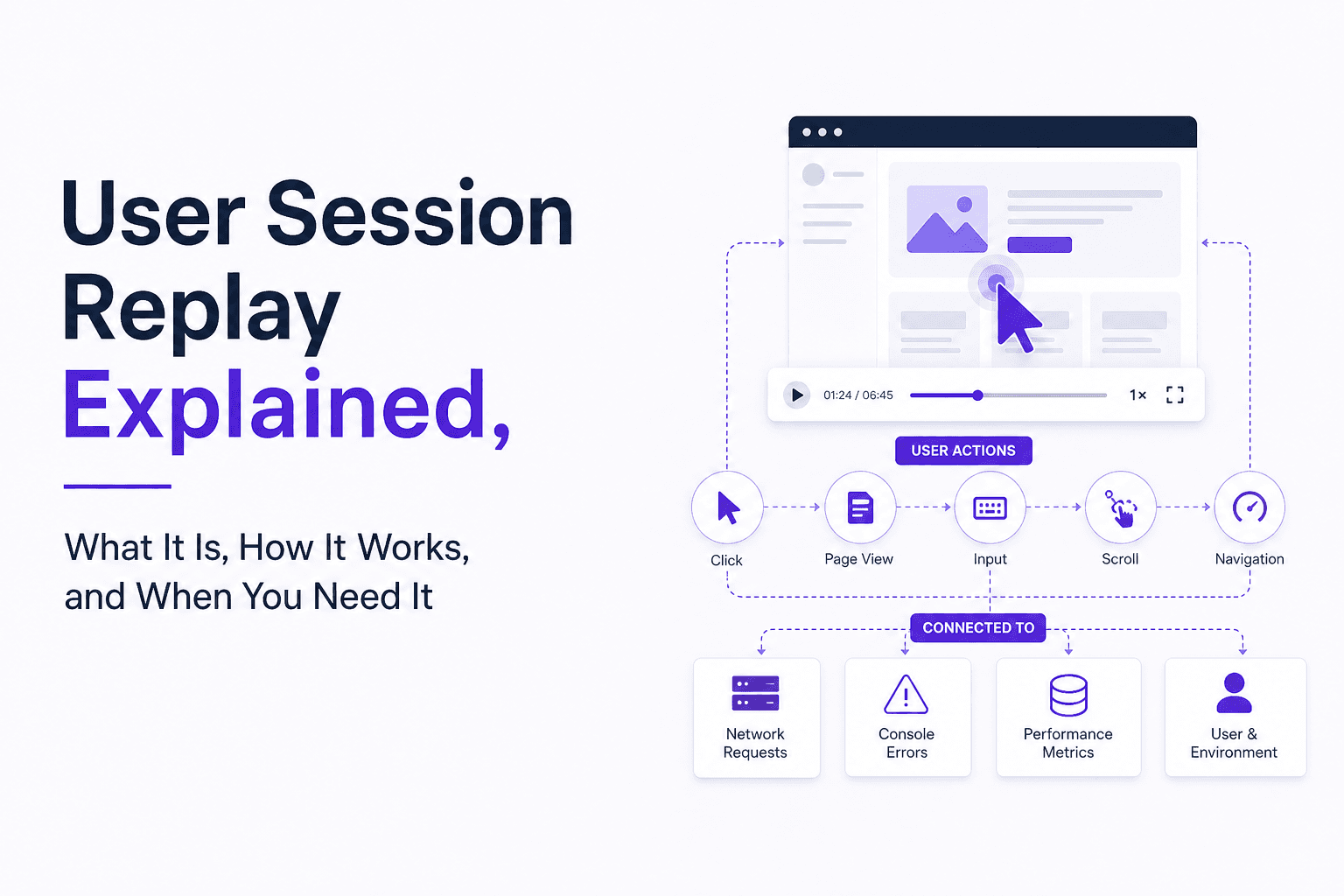
User Session Replay Explained, What It Is, How It Works, and When You Need It
Learn what user session replay is, how it works, what problems it solves, and a checklist to decide if you need user session replay.

Alert Noise Explained, How To Find The Source And Silence It On iPhone And Android
Alert noise is nonstop pings, alarms, and system alerts. Use this step-by-step flow to find the source and quiet iPhone or Android safely.