
IT Incident Management Process and Tool Checklist for Teams Evaluating PagerDuty Alternatives
IT incident management is the operational process for restoring normal service fast, with clear ownership, time targets, and communication that protects business impact while you evaluate PagerDuty alternatives.
- Operationalize a stage-by-stage incident workflow (detect, triage, contain, resolve, learn) and map each stage to specific tool capabilities you can score.
- Run a separate major-incident track with explicit triggers, IC/Comms/Scribe roles, and a predictable stakeholder update cadence.
- Reduce “unknown unknown” incidents by closing the gap between bug creation and alerting, especially for failures users never report.
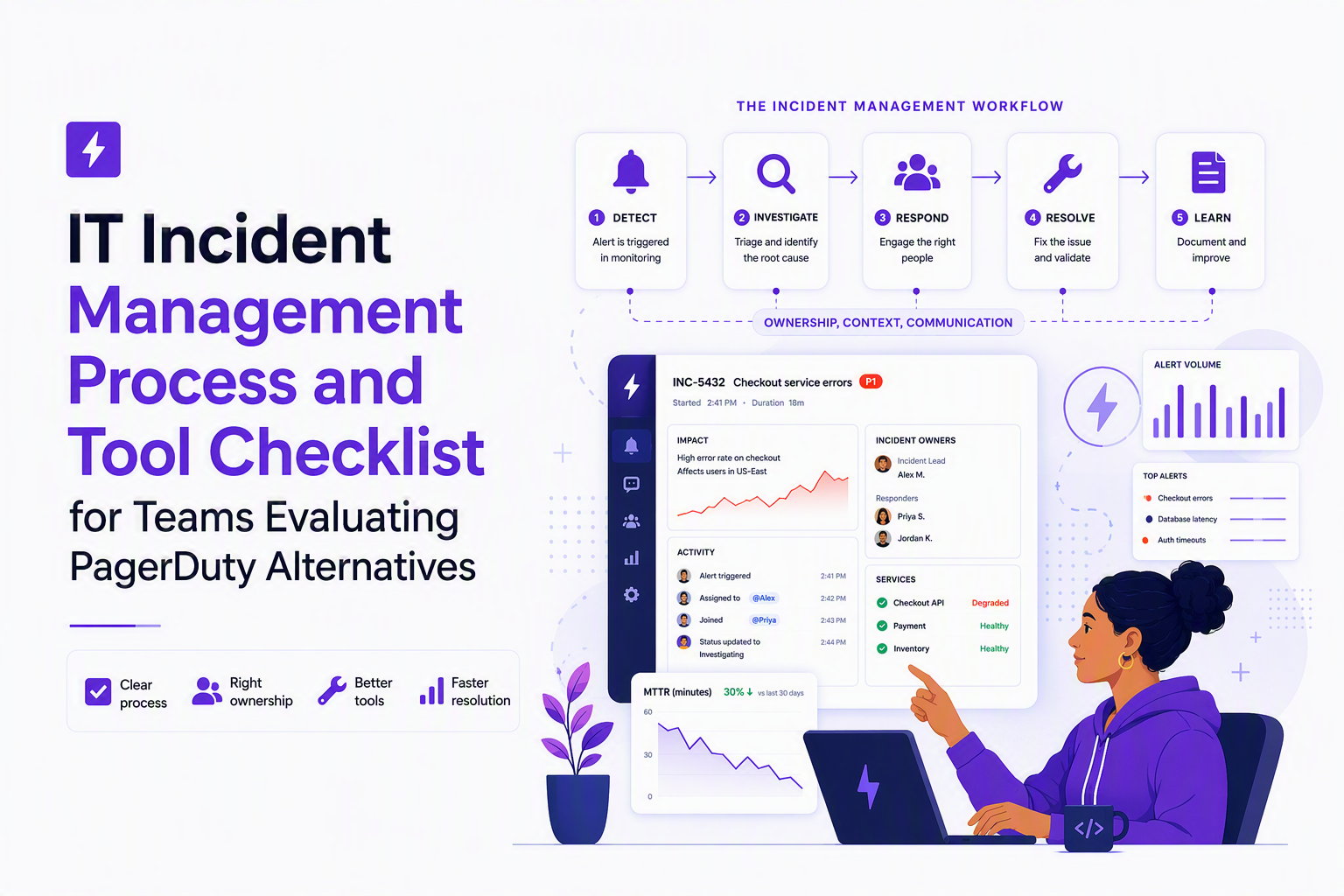
IT incident management in practice, scope, outcomes, and boundaries
IT incident management succeeds when it reliably restores service within agreed time targets and leaves an auditable trail for learning and compliance. To make that evaluable (and tool-agnostic), define scope boundaries up front and attach each boundary to an operational outcome.
Use a three-way boundary: incident vs problem vs request
- Incident: an unplanned interruption or reduction in quality of a service that needs rapid restoration (example: checkout errors spike and orders fail).
- Problem: the underlying cause requiring root-cause elimination (example: a regression in payment validation logic).
- Request: a planned service action requiring fulfillment (example: add a user to a group, rotate an API key).
In our experience, the fastest way to reduce confusion is to enforce one rule in tooling and process: incidents are time-boxed to restoration, and anything not directly contributing to restoration gets parked as a problem record with its own owner and SLA.
Define measurable outcomes you can score in an evaluation
- Service targets: attach incidents to SLO/SLA impact windows (for example, an availability SLO breach window) so “severity” is business-linked, not opinion-linked.
- Operational targets: track MTTD (detect), MTTA (acknowledge), and MTTR (restore) consistently across teams. If you already use an SRE-style monitoring model, tie “incident start” to the first actionable alert, not the first log line.
- Communication targets: define who gets updates, how often, and through which channel, especially for executives and customer support.
Set the scope of “IT” explicitly for modern product orgs
For product-led companies, “IT incident management” often spans cloud infrastructure, SaaS identity, internal tools, and customer-facing production. Write that into your scope document, and decide which incidents are handled in DevOps/SRE workflows vs internal IT workflows, because tool requirements differ (for example, CMDB depth vs on-call rotations).
The 5 stages and the 5 C’s, a clear map you can operationalize
A durable IT incident management process becomes easier to run and easier to buy tooling for when you map two simple frameworks to one workflow: the 5 stages of execution and the 5 C’s of coordination.
The 5 execution stages (what the team does)
- Detect: identify a real, actionable deviation (signal over noise).
- Triage: classify, prioritize, assign initial owner, and decide if this is major-incident track.
- Contain: stop the bleeding with safe mitigations (feature flag off, rollback, rate-limit).
- Resolve: fix forward or permanently remediate and validate recovery.
- Learn: post-incident review, action items, and prevention work moved to problem management.
The 5 C’s (what the process must ensure)
- Command: one decision-maker to prevent thrash.
- Communication: internal and external updates with predictable cadence.
- Coordination: right people pulled in fast, with clear handoffs.
- Context: shared facts, timeline, impacted services, current mitigation.
- Continuous improvement: action items tracked to completion.
Map both frameworks into an ITIL/DevOps-ready workflow table
| Stage | Primary goal | 5 C’s emphasis | Minimum artifacts | Decision gates |
|---|---|---|---|---|
| Detect | Turn telemetry into actionable signals | Context | Alert payload, affected service, first-seen time | Is the alert actionable and in-scope? |
| Triage | Assign ownership and severity quickly | Command, Coordination | Incident record, severity, owner, comms channel | Major incident trigger met? |
| Contain | Reduce impact before full fix | Command, Communication | Mitigation plan, risk notes, rollback plan | Mitigation approved and reversible? |
| Resolve | Restore service and verify recovery | Coordination, Context | Fix details, verification steps, customer impact assessment | Recovery confirmed and monitored? |
| Learn | Prevent recurrence and improve response | Continuous improvement | Timeline, root cause hypothesis, action items, owners | Actions tracked with due dates? |
For teams modernizing on-call behaviors alongside tooling, pairing this with an alert triage standard is usually the difference between “we bought a tool” and “we changed outcomes.”
Major incident management, triggers, roles, comms cadence, and a sample timeline
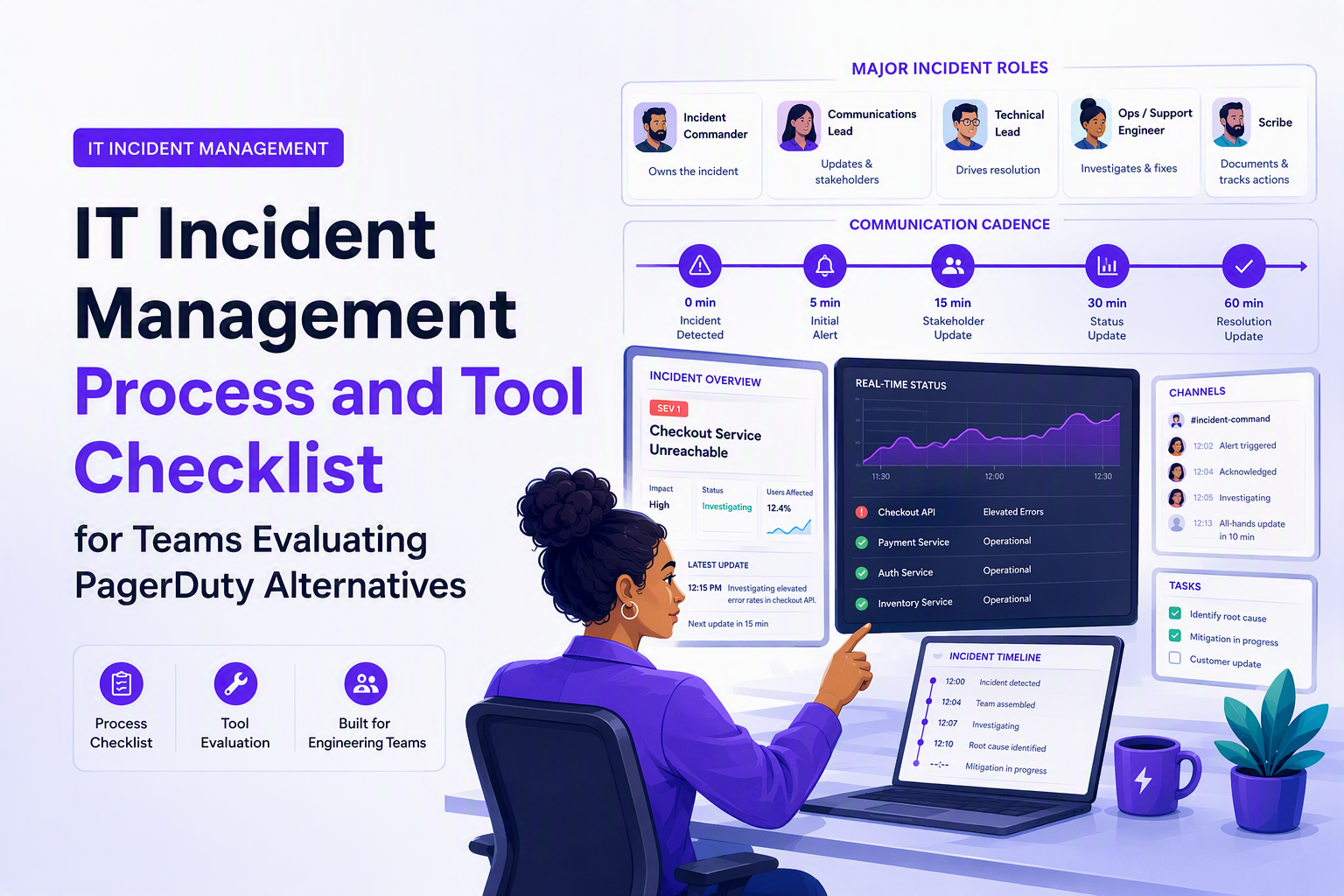
Major incident management works when you treat it as a separate operating mode with explicit triggers, dedicated roles, and a predictable communication rhythm. Trying to “scale up” normal incident handling mid-crisis tends to produce role collisions and missed updates.
Define triggers that are objective and testable
- Customer impact trigger: revenue-critical user journeys degraded (checkout, login, payments) or high-ticket customers blocked.
- Security/Compliance trigger: confirmed or strongly suspected breach, data exposure, or audit-relevant outage.
- SLO trigger: an error-budget burn rate threshold that indicates the SLO will breach if not mitigated (use your existing SLO math rather than inventing a new one).
- Duration trigger: any Severity 2 incident not mitigated within a defined time window (example: 30 to 60 minutes) escalates to major incident for governance and comms consistency.
Use three roles that prevent chaos
- Incident Commander (IC): owns decisions, scope, and prioritization.
- Communications Lead: owns internal updates, status page posts, and support enablement.
- Scribe: owns timestamped timeline, decisions, and action items for post-incident review.
What surprised our team was how often MTTR improved without any new technical tooling once we enforced that the IC does not troubleshoot; the IC coordinates and makes calls, while responders troubleshoot.
Set a comms cadence before you need it
- Internal engineering channel: every 10 to 15 minutes with current hypothesis, mitigation status, and next action.
- Support and CS: every 20 to 30 minutes with customer-facing language and workaround guidance.
- Exec stakeholders: every 30 minutes with impact summary, ETA confidence level (high, medium, low), and risk.
Sample major-incident timeline (first 60 minutes)
- Minute 0 to 5: trigger met, IC assigned, major-incident channel opened, incident record created.
- Minute 5 to 10: severity confirmed, responders paged, current impact and blast radius stated.
- Minute 10 to 20: first mitigation attempt chosen (rollback, feature flag, traffic shift) with explicit risk.
- Minute 20 to 30: comms lead posts first stakeholder update; support receives customer script.
- Minute 30 to 60: iterative mitigation and verification loop; timeline kept; decision points captured for PIR.
Incident management software requirements mapped to each stage
Incident management software should be scored by whether it supports each workflow stage with the minimum controls you need, rather than by brand or feature count. The checklist below is designed to hold up when comparing PagerDuty alternatives because it maps requirements to execution outcomes.
Stage-by-stage capability checklist
- Detect
- Alert ingestion from monitoring and error sources with deduplication and grouping (reduce repeated noise).
- Routing rules that can express business priority (service, environment, severity, owner team).
- Clear, testable notification delivery to Slack/email/phone or ChatOps destinations.
- Triage
- Fast incident creation with templates and required fields (service, impact, severity, owner).
- Escalation policies and on-call schedules with auditability.
- Linking between alert, incident, and ticket records to avoid split-brain work.
- Contain
- War-room coordination: ChatOps hooks, pinned context, and handoff clarity.
- Ability to run predefined playbooks (runbook links, checklists) without hunting in docs.
- Resolve
- Status tracking, ownership changes, and resolution codes that are reportable.
- Integration paths into deployment systems and issue trackers for fix-forward workflows.
- Learn
- Post-incident review workflow: timeline export, action items, and reminders.
- Metrics and reporting for MTTD/MTTA/MTTR by service and team.
Integration requirements to include in your scorecard
- Monitoring and observability: metrics, traces, logs. If your triage depends on connecting evidence fast, prioritize tooling that helps with log correlation and consistent context links.
- ChatOps: Slack or equivalent, with reliable delivery, permissions, and message templating.
- Ticketing: Jira/ServiceNow equivalents, including bi-directional linking so “restore” and “fix permanently” do not drift apart.
- CMDB or service catalog: even a lightweight service directory helps route incidents to the right team quickly.
A buyer’s scoring model you can use tomorrow
Use a simple 0 to 3 scoring per stage (0 missing, 1 manual workaround, 2 adequate, 3 strong) and weight stages based on your current bottleneck. After running a few evaluations, the pattern is clear: teams that struggle with noisy paging should weight Detect and Triage higher, while teams that struggle with repeated recurrence should weight Learn and problem linkage higher.
To make the evaluation consistent, align the tool requirements with your broader incident mgmt criteria and your documented incident management roles and metrics.
| Workflow stage | What to test in a trial | Failure mode to watch | Evidence to capture |
|---|---|---|---|
| Detect | Can you dedupe/group and route by service, env, severity? | Alert flood or missed critical signals | Sample alert set with grouping results |
| Triage | How fast can an on-caller create/ack/assign with context? | Slow ownership, unclear severity criteria | Screen recording of first 10 minutes |
| Contain | Does ChatOps keep one source of truth during mitigation? | Parallel threads, conflicting instructions | War-room transcript with pinned context |
| Resolve | Can you link deploys/tickets and close with audit trail? | “Resolved” with no verification or owner | Incident record + linked change/ticket |
| Learn | Can you export timeline and track action items to done? | Repeat incidents, no follow-through | PIR doc + action item dashboard |
FAQ
If your it incident management evaluation keeps running into blind spots like failures users never report, Flash Log is worth a look: it uses AI to automatically capture and classify bugs (even without user reports) so teams can spot emerging issue pressure earlier and route triage faster. Review your current workflow for “unknown unknown” gaps, then book a demo of Flash Log to see how proactive AI capture can reduce incident load while keeping alerts readable and actionable.

Outlier Detection in Practice, A Workflow for Methods, Formulas, and Thresholds
Learn practical outlier detection: choose methods, apply formulas, set thresholds by cost, and ship reliable alerts with copy-paste Python patterns.
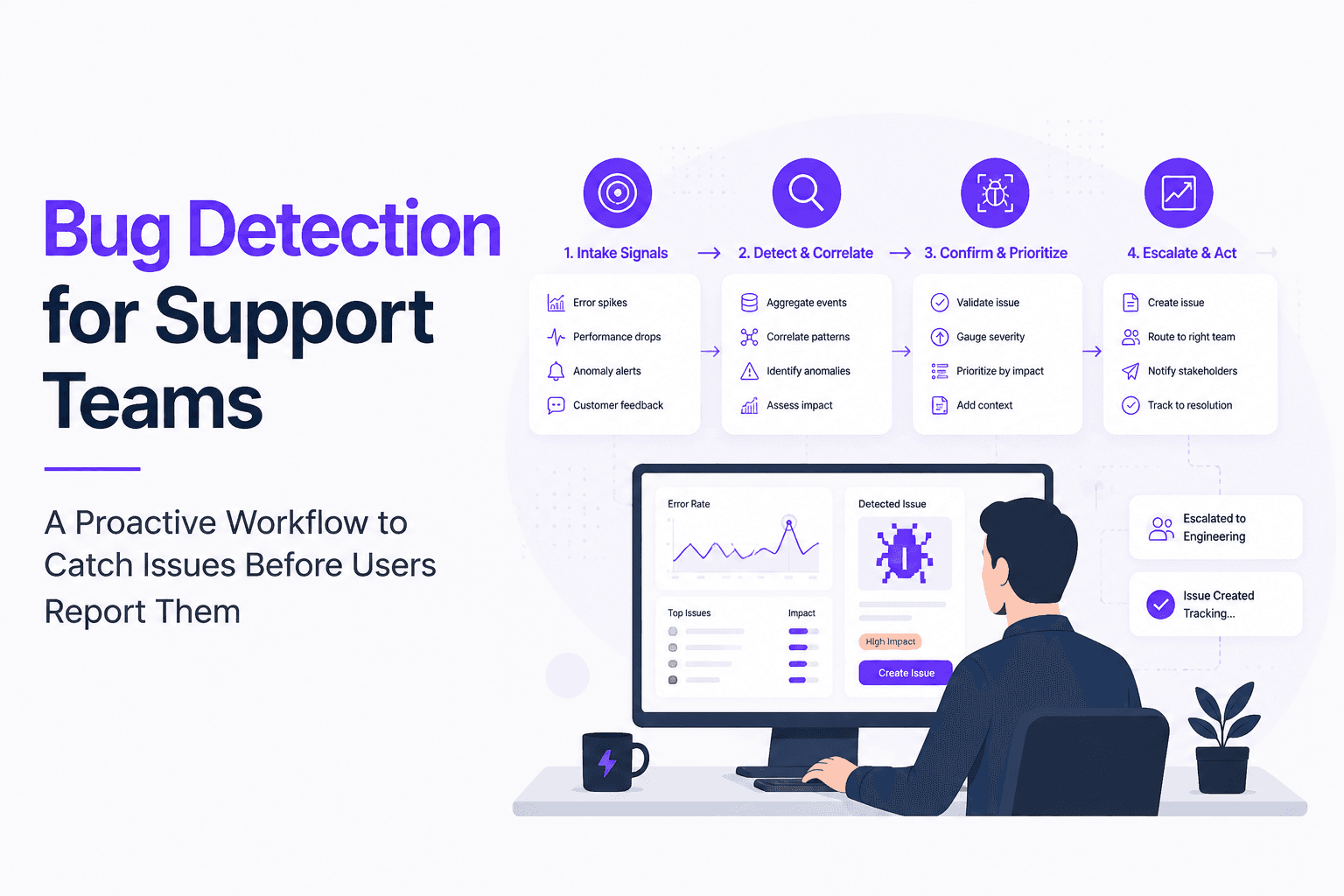
Bug Detection for Support Teams, A Proactive Workflow to Catch Issues Before Users Report Them
Build proactive bug detection for Support with clear signals, triage rules, evidence standards, and a weekly cadence that engineering trusts.
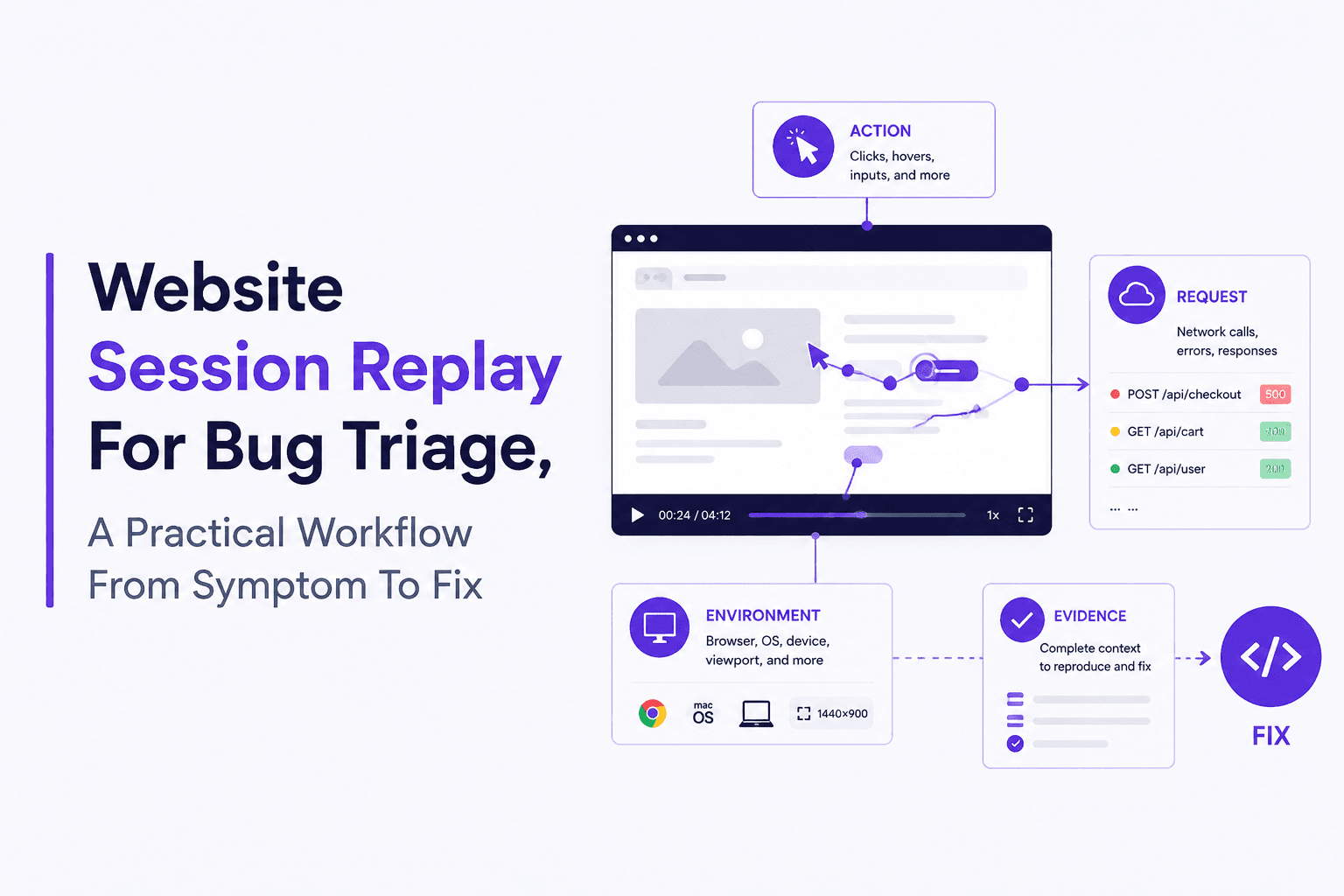
Website Session Replay Explained With a Real Example and a Setup Checklist
Learn website session replay basics, a real bug-to-fix walkthrough, and a privacy-safe setup checklist for collecting and using replay data.